
 18 june 2026, 12:38
Ask any growth lead what keeps them up at night and the answer is usually one word: retention. Across consumer apps, average day-30 retention sits around 5.7%, and in some categories like gaming and social up to 90% of installs go quiet within a month. Downloads are cheap; lasting relationships are not.
That’s where email marketing for mobile apps earns its place. Well-timed, personalized emails bridge the gap between the first tap on the “Get” button and months of engaged use, purchases, and word-of-mouth advocacy. This guide walks through the strategies, examples, and best practices that turn the inbox into your mobile growth engine — from onboarding flows and segmentation to deep linking and the metrics that prove ROI.
What is email marketing for mobile apps, and why it matters
Email marketing for mobile apps is the practice of using triggered, segmented email to onboard, retain, re-engage, and monetize app users. Unlike paid acquisition, it’s an owned channel — no bidding wars, no algorithmic surprises, no 24-hour Story limit.
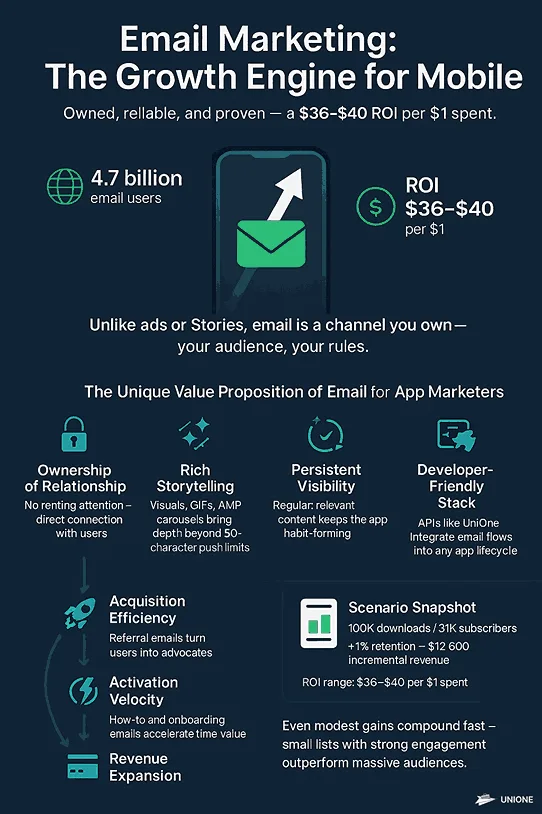
The “email is dead” headline reappears every few years, yet the channel keeps growing — the global email audience is on track to reach 4.7 billion users in 2026. For app teams, that reach plus full control over timing and content makes email the most dependable lever in an otherwise volatile acquisition stack. Paid channels swing with auction prices; the inbox is a relationship you can nurture on your own schedule.
Two things make it indispensable. First, ownership: you’re not renting attention from an ad network, you’re nurturing a direct line you control indefinitely. Second, depth: a push notification gives you roughly 50 characters, while an email can carry visuals, walkthroughs, and dynamic blocks — ideal for teaching complex flows like crypto wallets or finance super-apps. Inbox placement also outlasts social reach: a starred email can resurface months later when a user searches “receipt” or “coupon”, rekindling engagement without extra spend.
UniOne’s email marketing platform and email API exist for this very reason — app teams need a reliable, developer-friendly pipe to their users’ inboxes
Key benefits for app growth:
- Acquisition efficiency — referral emails turn happy users into brand advocates.
- Activation velocity — timely how-to messages shorten the learning curve and get users to their first “aha” moment faster.
- Retention durability — consistent, value-oriented content keeps the app habit-forming instead of forgettable.
- Revenue expansion — personalized promotions read as helpful recommendations rather than generic sales pitches.
Combined, these make email not just a support tactic but a core growth driver.
The ROI of app email marketing: a quick example
Industry studies put email’s ROI between $36 and $40 per $1 spent. The figure resonates because it’s reproducible — run it against your own funnel. Say a health-tracking app gets 100k downloads a month, 60k open accounts, 30k marketing email subscribers, and a $4.20 average LTV. If a four-touch onboarding program lifts day-30 retention by just one point, that incremental cohort is worth roughly $12,600 in added revenue (1% × 100k × $4.20 × 30 days).
You don’t need a huge list, either: smaller apps with hyper-engaged audiences often see triple-digit ROI because they monetize through high-margin digital goods. That’s why the $36–40 figure resonates with boards and investors alike — the math is conservative and reproducible. Model your own version before each planning cycle so leadership treats email as a growth line, not a cost center.
Essential types of email campaigns for mobile apps (with examples)
It’s tempting to run ten flows at once, but mastery comes from nailing the big four. Think of them as a lifecycle: each picks up where the last leaves off, moving a user from first launch to long-term advocacy without ever feeling money-milked.
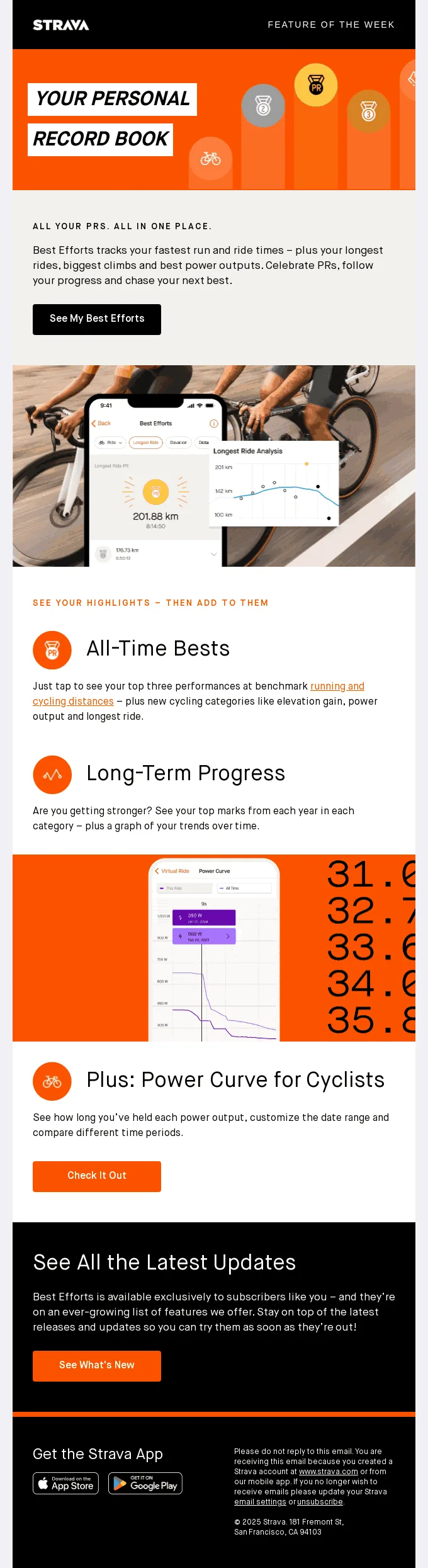
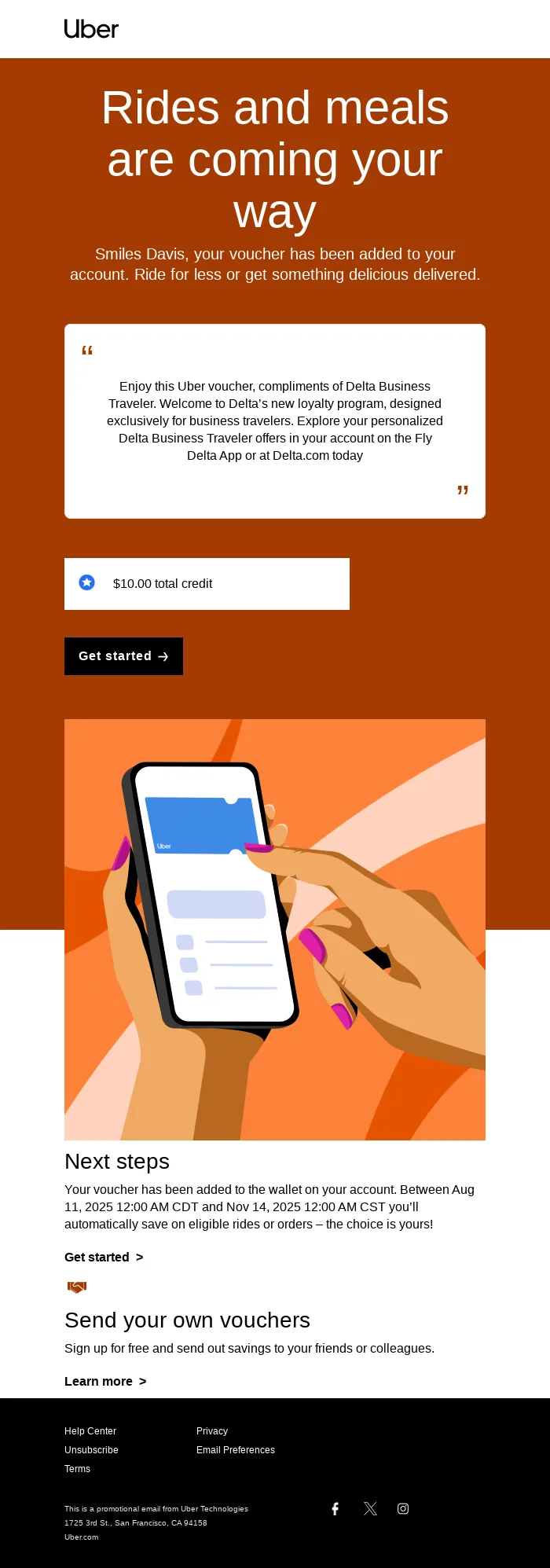
Onboarding sequences act like a GPS, showing users the fastest route to value. A typical flow looks like:
- Day 0 — welcome, core promise, account verification, and a deep link.
- Day 2 — an intro video plus one CTA (“Add your first habit”).
- Day 4 — social proof: user reviews or press mentions.
- Day 7 — a “Did you know?” feature-discovery highlight.
Source: Really Good Emails
Personalization matters — benchmark reports consistently tie personalized onboarding mail to materially higher open rates.
Retention and engagement campaigns shift the goal to habit reinforcement. Congratulate milestones (“1,000 words learned!”), send weekly recaps, or surface usage-gap tips. A fintech app’s Friday “spending vs. last week” digest, for example, nudges users back to review their budget.
Promotional campaigns should feel additive, not intrusive. Segment by intent (discount the annual plan only to users with 20+ sessions), anchor on the outcome (“Save 20% on a healthier you”) rather than the price, and limit cadence — about two promos a quarter keeps FOMO high without training users to wait for sales.
Re-engagement and win-back leans on emotion. A gaming studio that tested “We miss you on the track” against “Exclusive chest awaits” found the human-language line won about 15% more opens — proof that voice beats purely transactional hooks.
Source: Really Good Emails
How to build and segment your mobile app email list
Growing your list ethically is just the beginning; slicing it intelligently multiplies the outcome.
Three entry channels to start:
- App sign-up — a default opt-in box with GDPR-compliant language.
- In-product modal — triggered after a success state (e.g., a completed first workout).
- Referral flow — when a user shares the app, capture the invited friend’s email to send a one-time bonus claim message.
Segmentation, from basic to advanced:
- RFM (recency, frequency, monetary) — prioritize high-value and lapsed buyers.
- Feature affinity — group users by the modules they actually use (chat, store, coach).
- Sentiment tagging — feed CSAT/NPS scores into UniOne custom fields so detractors receive empathy-driven outreach.
Apps with enough data graduate to predictive churn-probability scoring, auto-building at-risk segments above a chosen threshold — where mobile app email marketing starts to overlap with data science.
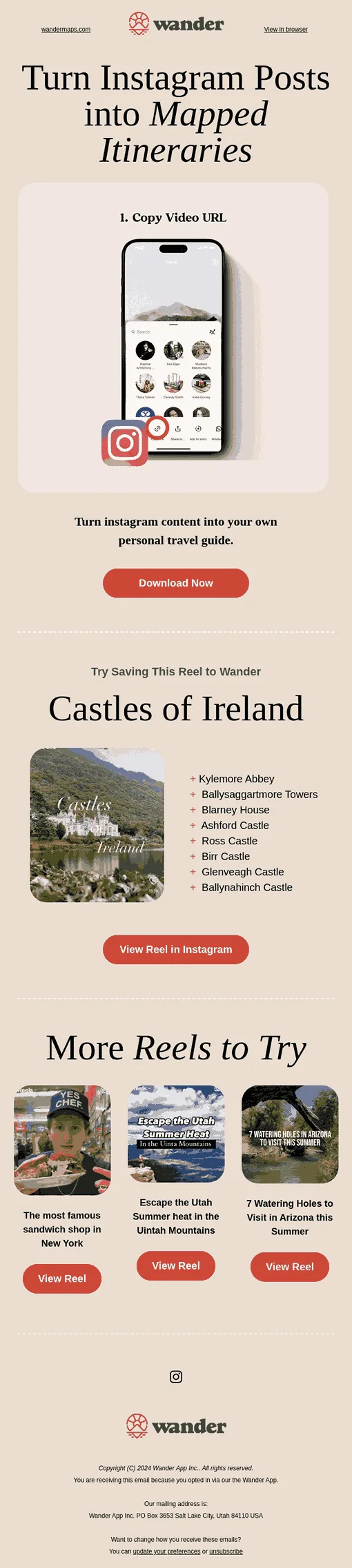
Source: Really Good Emails
A step-by-step process for mobile app email campaigns
A repeatable framework keeps design, engineering, and leadership aligned.
Define goals and KPIs. Tie the campaign to a product goal (“improve tutorial completion from 48% to 55% in Q4”) and pick two or three supporting email metrics (open rate, CTOR, conversion to event) that roll up to it.
Identify the target segment. Precision beats volume. Use boolean rules such as tutorial_complete = false AND days_since_install ≥ 3 AND locale = en-US, and add predictive scoring once you have the data.
Craft compelling content. Use the Problem-Agitate-Solution model in your brand voice, and make the CTA mirror the in-app wording for cognitive consistency.
Design for mobile. One column, 14–16pt body text, and a CTA placed around 40% of screen height so it’s within thumb reach. Dark-mode-safe colors and image alt text round it out.
Test and optimize. Graduate from A/B testing to multi-armed bandit algorithms for subject lines once your list passes ~50k; rotate three variants and let the algorithm allocate traffic.
Launch and monitor. Treat launch as halftime. Alert if the bounce rate exceeds 2% on the first 1,000 sends, and feed click data back into your analytics warehouse so PMs can see downstream impact.
Iterate and scale. Clone winning sequences to adjacent segments and locales, and document a playbook of subject-line formulas, templates, and measured lifts.
Pros and cons of email marketing for mobile apps
No channel is perfect — weigh email against your push and in-app stack before you lean on it.
Pros
- Owned and durable — no ad auctions or algorithm changes; the relationship is yours to keep.
- Content-rich — visuals, walkthroughs, and dynamic blocks that a push notification simply can’t carry.
- Strong ROI — widely cited at $36–40 per $1 when executed well.
- Persistent — emails resurface in search long after a push is swiped away.
- Measurable revenue — clean attribution to upgrades, renewals, and purchases.
Cons
- Not real-time — push still wins for urgent, time-boxed nudges.
- Deliverability is ongoing work — authentication, list hygiene, and sender reputation need constant care.
- Needs data plumbing — meaningful personalization depends on syncing app events to your ESP.
- Opens are fuzzy — Apple Mail Privacy Protection makes open rate unreliable as a sole metric.
The takeaway: email and push are complementary. Use push for the moment; use email for the story, the depth, and long-term lifetime value.
Top email marketing platforms for mobile apps
The right tool shapes deliverability, automation depth, and scalability. A quick comparison of strong options for app teams:
| Platform | Strengths | Notable weaknesses | Best for |
|---|---|---|---|
| UniOne | Developer-friendly API, transactional + marketing in one, granular analytics | No native SMS | Product-led teams scaling from MVP to millions |
| Customer.io | Real-time behavioral triggers, visual workflow builder | Steeper learning curve for non-technical users | SaaS and subscription apps |
| Braze | Rich segmentation and in-app messaging, Canvas journey orchestration | Premium pricing tiers | Enterprise consumer brands |
| Iterable | Cross-channel (email, push, in-app) plus AI send-time optimization | Requires custom event setup | Marketplaces and on-demand services |
Pricing, support, and convenience all differ. Always run a trial and confirm the API works with your tech stack before you commit.
Optimizing emails for mobile devices and app store conversions
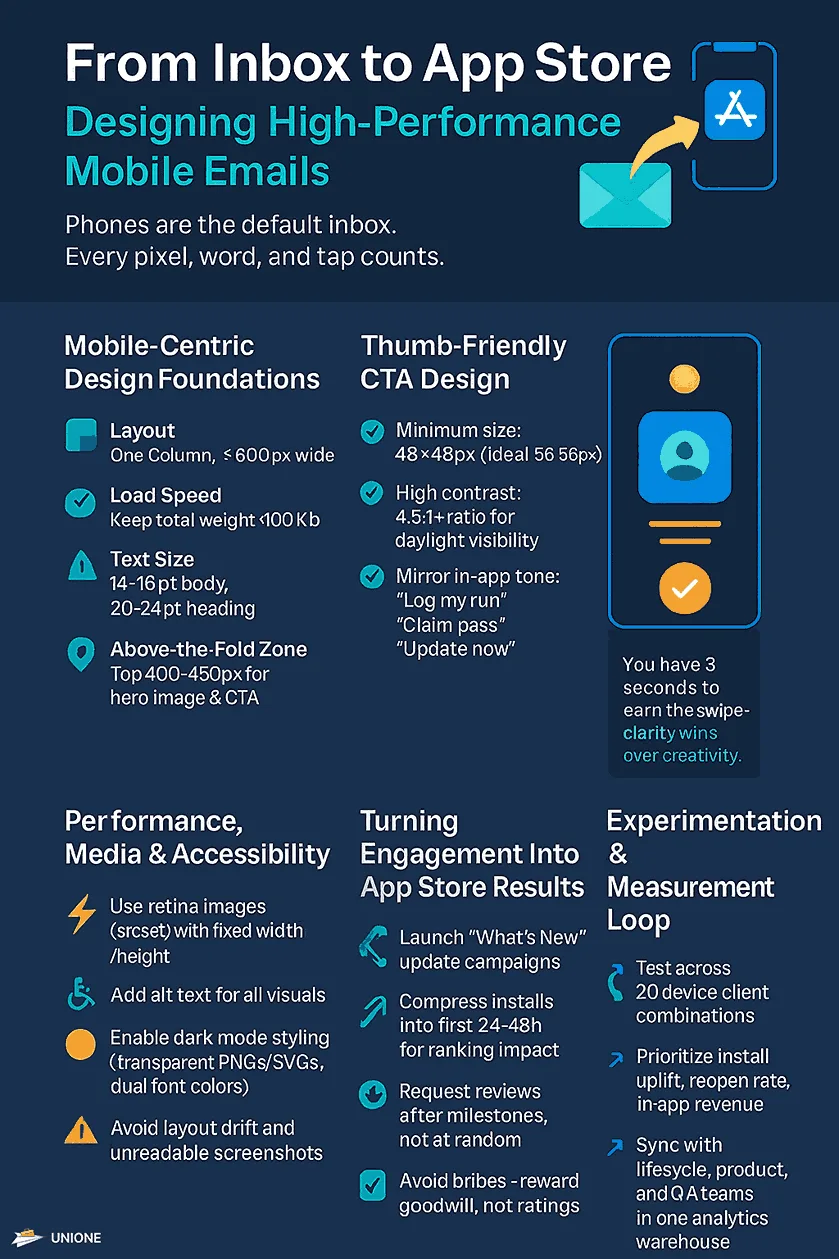
More than seven in ten emails are opened on a handheld screen, so every design or technical shortcut is magnified in that narrow, fast-scroll environment. A mobile reader gives you roughly three seconds to communicate value before they swipe past, which means “shrink-to-fit” desktop templates aren’t enough — the layout, copy, and app hand-off all have to feel native to the phone.
- Mobile-first layout — a single fluid column no wider than 600px, total HTML weight under ~100KB, 14–16pt body and 20–24pt headings, with the hero, hook, and primary CTA in the top ~400px.
- Thumb-friendly CTAs — 48×48px is the minimum target (56×56 is safer on the move), contrast above 4.5:1, and action verbs that match in-app copy (“Log my run,” “Claim 7-day pass”).
- Performance and accessibility — serve retina images with srcset but set explicit width/height to avoid layout shift, always add descriptive alt text, and design dark-mode-safe with transparent PNGs/SVGs.
- Deep linking — implement Universal Links (iOS) and App Links (Android) so existing users bypass the browser; use deferred deep links (Branch, Firebase) for prospects who haven’t installed yet, and tag with UTM/MMP parameters so attribution platforms credit email for the assist.
- App store signals — a “What’s New” campaign with an “Update now” deep link concentrates install velocity, one of Apple’s ranking inputs, while well-timed review requests after a positive moment lift ratings within Apple’s guidelines.
Because opens are imprecise after Mail Privacy Protection, prioritize downstream signals: install uplift, reopen rate, in-app revenue, and review volume.
Key metrics to track
Look past vanity opens to a layered dashboard:
- Engagement — open rate, unique click-through rate (uCTR), and click-to-open rate (CTOR).
- Behavioral — sessions and feature use within 24 hours of a click.
- Revenue — email-attributed average order value and subscriber upgrade rate.
- List health — bounces, unsubscribes, and complaints (keep spam complaints under 0.1%).
Tie every metric back to your North Star with closed-loop attribution through email analytics — without it, you’re flying blind.
Best practices for timing and frequency
Good timing respects user routines while maximizing visibility. Start with timezone-localized sends (around 10 a.m. and 8 p.m.), then layer AI send-time optimization once you’ve collected enough open events for statistical stability.
On cadence: two to three sends in the first onboarding week keep momentum without overwhelming new users, then weekly or bi-weekly value emails keep the app top of mind. Offer a preference center so subscribers can downshift to a monthly digest, and watch for unsubscribe spikes — a sudden increase signals message-market mismatch or over-promotion. Pace promotional drives by season rather than stacking them, and give the list a two-week cooling-off period so value-based content can reset sentiment before the next push.
Integrating email with app analytics and user data
Personalization is only as good as the data behind it. Imagine congratulating a user on a 90-day streak when they actually broke it last week — trust evaporates instantly. The fix is to sync your app events to your ESP on a tight schedule (an ETL pipeline such as Fivetran into your warehouse, then out to email) so campaigns fire on live behavior rather than yesterday’s export. That integration unlocks three things:
- Cohort syncs — trigger campaigns on real-time behavior, not a stale snapshot.
- Revenue attribution — pull purchase receipts into email to calculate exact, defensible ROI.
- Personalization tokens — dynamically insert a user’s last activity date or goal progress.
Email integrations and webhooks make this connection straightforward, so when finance audits attribution each quarter you have numbers tied to email marketing for mobile apps, not directional guesses.
Reducing churn and increasing lifetime value through email
Churn drains budgets faster than any other line item, and email is uniquely suited to fight it. Unlike push, which is great for a momentary nudge, email can carry a progress summary, a community post, or a spotlight that renews a user’s original motivation.
- Identify at-risk users with multi-factor rules (“no session in 14 days + opened fewer than two emails last month + NPS ≤ 7”), then feed them into a churn-propensity model so your lifecycle team tackles the hottest list first.
- Run a value-reminder series — show cumulative achievements (“8 hours meditated”), surface features users haven’t tried, and include community stories. Music-learning app Yousician, for example, reports stronger reactivation when it showcases user-generated performance videos.
- Monetize without discounting — tiered bundles (a sheet-music pack plus a tuner add-on) lift revenue in A/B tests without eroding perceived price integrity.
Automate the whole loop with email automation so identification, engagement, and monetization run as one 12-month retention engine.
Common mistakes to avoid
- Mismatched tone between push and email confuses users — keep your voice consistent across channels.
- List bombing — uploading cold lists bought from data brokers triggers domain-wide penalties under Gmail’s sender rules and wrecks your reputation.
- Skipping the plain-text part — some clients strip HTML, so a plain-text alternative protects deliverability and saves thousands of opens.
How UniOne helps app teams
UniOne’s toolset was built with modern app teams in mind:
- Transactional email templates — responsive, pre-designed layouts for verifications, receipts, and onboarding steps.
- Email automation — code-based workflows triggered by in-app events for onboarding, nurture, and win-back.
- Email integrations — plug-and-play connectors and webhooks to sync Firebase, Segment, or a custom backend in minutes.
- Email analytics — granular dashboards showing delivery, engagement, and conversion by device and cohort.
Pair them with UniOne’s mobile app marketing tools and a deliverability-first SMTP and API backbone, and you can ship version 1.0 and scale to millions on the same stack. Developers can wire it up in minutes — see the step-by-step guides for Python and Go.
Conclusion
Done right, email marketing for mobile apps isn’t a relic — it’s the connective tissue of modern retention. It starts in onboarding, deepens through personal milestones, and matures into advocacy and revenue. Audit your lifecycle flows, pick the weakest KPI, and ship one narrowly scoped experiment; then measure, repeat, and compound the wins. Every point of retention you recapture adds to lifetime value — and funds the next turn of the acquisition flywheel.
FAQ
How soon should I send the first email after a user downloads my app?
Send a welcome message within the first 10–15 minutes, while intent is high. Keep it brief, personalize the greeting, and offer one clear next step.
What’s the ideal email frequency for mobile app users?
Most apps succeed with one onboarding series followed by weekly value emails. Monitor unsubscribe and open rates; if either shifts by about 25% week-over-week, reduce frequency.
How do I prevent my app emails from going to spam?
Authenticate your domain (SPF, DKIM, DMARC), warm up IPs gradually, keep your lists clean, and avoid spam-triggering words in subject lines.
What’s the difference between push notifications and email marketing for apps?
Push is intrusive and real-time — good for urgent prompts, but easily silenced. Email is more persistent and content-rich: it tells better stories, sells more effectively, and builds longer relationships.
Is email or push better for mobile app retention?
Neither alone — they’re complementary. Push drives urgent, time-sensitive action but is easily muted; email carries the depth, context, and storytelling that compound over weeks. The strongest retention programs orchestrate both from the same shared user data.
Which metric best proves email marketing ROI for an app?
Email-attributed revenue tied to a product KPI — paid conversion or subscription upgrades, for example — beats open rate, especially since Apple’s Mail Privacy Protection made opens unreliable. Pair it with install uplift, reopen rate, and in-app purchases within 24 hours of a click.