

 11 june 2026, 19:04
You might think the email header part is just the subject line, plus maybe the recipient’s and the sender’s addresses, since these are the things you can see above the message in all email clients. But in fact, the email header part also contains much more information related to the email transmission process.
So, what is an email header and what is it needed for? Find out what information email headers contain, what they are used for and why they matter for email security, authentication, troubleshooting, and deliverability. Learn how to view email headers in Gmail, Outlook, and Yahoo.
What is An Email Header?
Any email consists of two parts – the body section (the message itself as you see it) and the header section.
An email header section is a section of metadata attached to every email message. It contains technical details about the sender, recipient, routing path, authentication checks, content type, and the servers involved in delivery.
Email headers are not to be mistaken for the visible “header” part we usually see at the top of a document, with a company logo, business address, and the like. All of this is still part of the message body. While a few elements of the header section, like the subject line, To and From addresses, and date, are made visible to the user, most of them are not shown and serve purely technical purposes.
Email providers and mail servers use headers to authenticate messages, route emails between SMTP servers, filter spam, verify sender identity and troubleshoot delivery problems. Headers are also useful for identifying phishing attempts, spoofed emails or configuration issues that affect deliverability.
Types of Email Headers and Email Header Examples
Email headers fall into two categories: visible headers and technical headers, aka envelope. Understanding the difference between them makes it easier to analyze emails, troubleshoot delivery issues and identify suspicious messages.
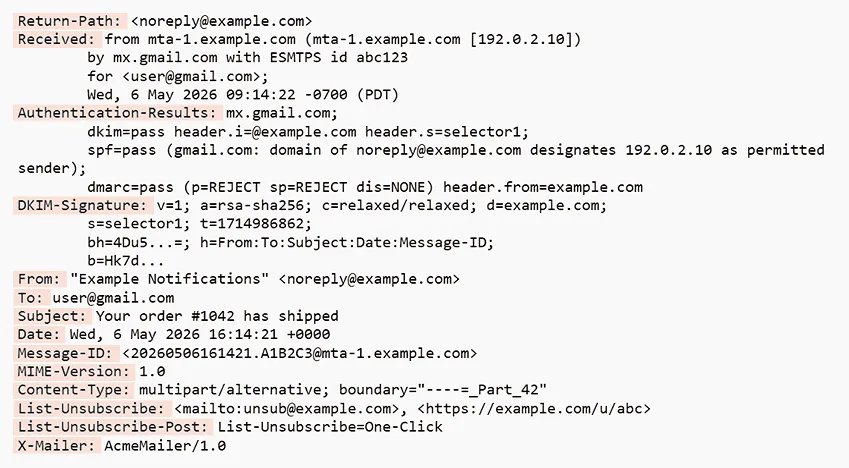
Each header, including both visible and technical ones, consists of two parts separated by a colon: header name and header value. In the image below, header names are marked red. Note the already familiar Subject, To and From.
Technical Email Headers
Technical email headers contain information related to the email transmission process and added by email clients and mail servers. They include information about the sending server, routing path, authentication checks, message format, encryption methods, spam filtering results and unique message identifiers.
These headers are used by email systems rather than end users to help email providers authenticate senders, route emails, prevent phishing and spoofing attacks, and troubleshoot delivery problems. Developers and email administrators analyze technical headers to diagnose deliverability issues or verify the SPF, DKIM, and DMARC checks.
Visual Email Headers
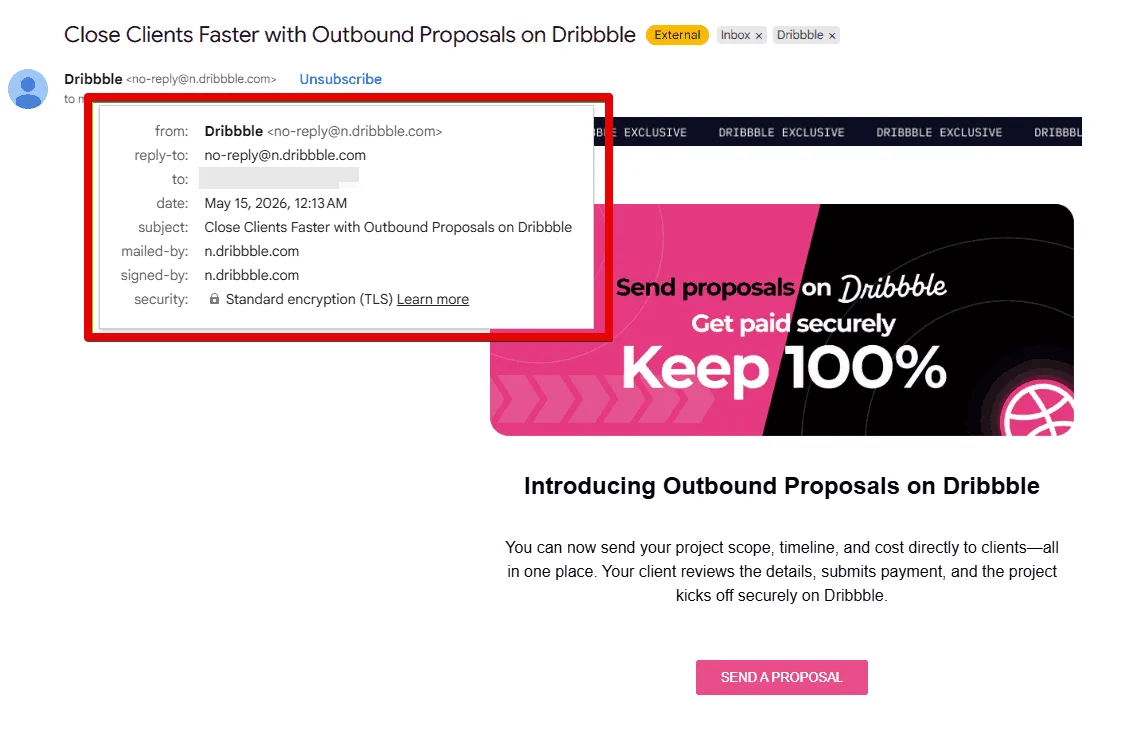
Visual email headers contain information users normally see at the top of the message in their inbox: sender, recipient, subject line, and sending date. These elements help recipients quickly identify who sent the message, what it is about and when it was delivered.
What Information Does an Email Header Include?
As soon as you learn how to read email headers, it will be easier for you to understand the meanings of important technical parameters.
Core Fields
Core header fields are the basic email headers that identify the sender, recipient, sending time and subject. These are the fields users see in their inboxes.
|
Data |
Description |
|
From |
Name and email address of the sender, the origin of the email. Sometimes referred to as “Envelope From” in technical documents. |
|
To |
Name and email address of the recipient. If there’s more than one recipient, the name and email address of each will appear in this section. |
|
Date |
The sent email’s date and timestamp. |
|
Subject |
The subject line used in the email message. |
Advanced Fields
Advanced header fields contain technical metadata used by mail servers and email providers during transmission, authentication and spam filtering. They are usually hidden from users but can be easily viewed in the original message source.
These fields are especially useful for developers, email administrators and deliverability specialists who need to troubleshoot sending problems, investigate phishing attempts or verify sender authenticity.
|
Data |
Description |
|
Received |
The address of the server where the message arrived and the addresses of other servers that could transmit this message. A separate Received header is added by each SMTP server the message gets through. |
|
Message-ID |
The unique message identifier, providing for easier message processing. |
|
MIME-Version |
The revision number of the Multi-purpose Internet Mail Extension specification used to create the letter. MIME allows you to send attachments in different formats, for example, text, audio, visual content, and more. |
|
Content-Type |
Tells if the message is in plain text or html format. A typical message will include different content types (text, images, html, etc.) – such messages are referred to as “multipart”. |
|
DKIM-Signature |
A signature confirming the authenticity of the message. It is used to verify that certain parts have not been altered in the course of transferring the message. |
|
Return-Path |
An address to send delivery failure notifications to. |
|
Precedence |
Gmail asks that email senders include Precedence: Bulk in any message that is sent to multiple subscribers. It’s optional, but it helps prevent autoresponder loops and allows providers to identify bulk email campaigns correctly. |
Why Email Headers Matter
Understanding email headers may not be easy, but it may be crucial for eliminating a wide range of delivery problems.
- They help email providers route messages correctly, verify sender identity, detect spam or phishing attempts and troubleshoot delivery problems.
- For businesses and marketers, header information is valuable for monitoring sender reputation and improving email deliverability.
- Developers and administrators use email headers to diagnose technical issues and confirm that authentication protocols are properly configured.
Headers Provide Security
Hackers may attempt to forge a message, say, from your bank to try to lure you into providing sensitive data.
Email headers contain data that help protect users from spam, spoofing, phishing and other malicious activity – originating and target addresses, subject line, date of sending, DKIM signature, SPF check results, and dozens of other things. They act as a safeguard for your privacy and security. However, to be of any use, one must be sure this information has not been forged or tampered with.
Digital signature (DKIM) allows the receiving server to verify the email’s integrity. For example, the signed “From” address makes sure that the sender is really the one whose address you see in that field.
Sender Policy Framework (SPF) verification checks whether the mail server the message came from is allowed to send emails on behalf of the sender’s domain.
For a detailed explanation of these authentication methods, see UniOne’s guide to email authentication.
Headers Show Routing Information
You cannot send an email directly from one personal computer to another, there are certain routes that the messages take. Email headers make it possible to trace the path an email follows before reaching the recipient’s inbox.
To reach the receiver, any email has to go through a Mail Transfer Agent (MTA). This program is a part of the email server software that receives information from the sender’s email client (also called the Mail User Agent, or MUA) and brings it to another MTA. That one, in turn, dispatches the message to yet another MTA, or to the receiver’s mailbox and, finally, it appears on their shiny computer screens after being retrieved by the recipient’s MUA.
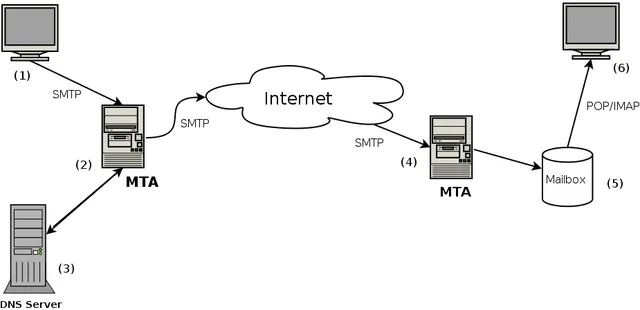
During delivery, every SMTP server that processes the message adds a new Received header to the header section. These records show which servers handled the email, their IP addresses, timestamps and sometimes authentication results. And the whole journey can be tracked by studying the email headers.
Routing information is useful for diagnosing delivery delays, server misconfigurations, spoofing attempts, and understanding how messages travel across the internet.
Deliverability
Mailbox providers analyze header data to determine whether a message is legitimate, suspicious or potentially spam.
Authentication results, routing history, sending server information and message formatting all influence how receiving servers evaluate incoming emails. Incorrect or missing SPF, DKIM, or DMARC DNS records may negatively affect sender reputation and inbox placement.
Before sending an email newsletter, make sure you have your software configured properly.
How to View Email Headers
As we mentioned earlier, full email headers are usually hidden by default in most email clients. But there are ways to access them through the message settings or advanced options menu.
In order to view email headers, you have to open the original version of the email. The header section is the topmost part of the original email, separated from the body by a single blank line.
Let’s find out how to view email headers in the three most popular email providers. Regardless of which client software you are using – Gmail or one of the Google apps, the steps to view the header section are very similar.
Viewing Email Headers in Gmail
To view email headers in Gmail:
- Open the email you want to inspect.
- Click the three vertical dots next to the Reply button in the upper-right corner of the message.
- Select “Show original”.
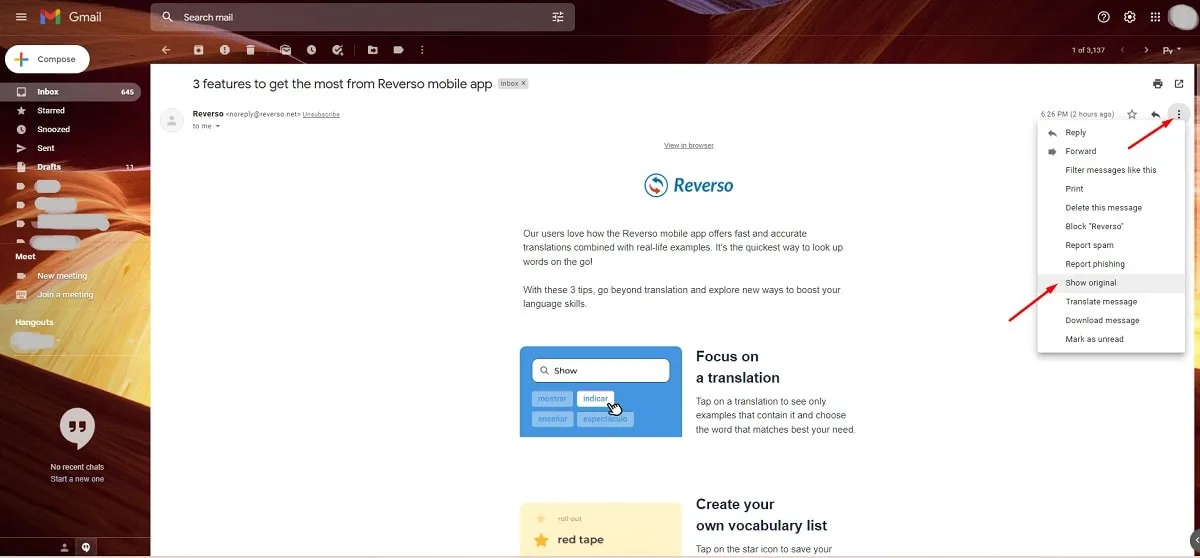
You will be redirected to a page containing the email as it is stored inside the mailbox, complete with all headers and encoded for transfer.
4. Scroll down a bit to see the entire email header section (remember that it is separated from the message body by a single blank line). The email header example in the following picture shows only a tiny part of the code.
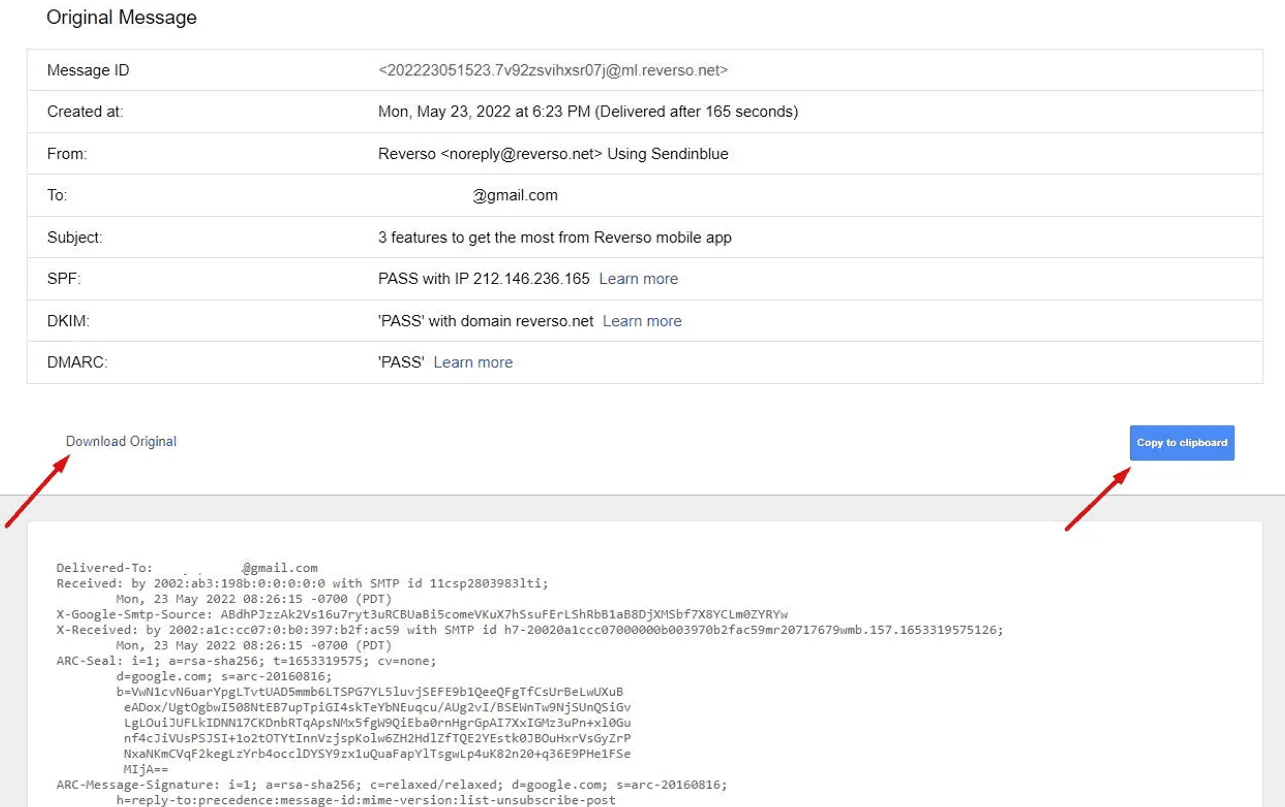
Also, on this page you can download the email in .eml format by clicking “Download original” or copy it to the clipboard.
Viewing Email Headers in Outlook
Due to frequent updates of Microsoft Outlook, different versions may offer varying approaches to viewing the email header.
In most modern Outlook versions, you can access email headers using the following steps:
- Open the email message you want to inspect.
- Click the three horizontal dots in the upper-right corner.
- Select View → View message source.
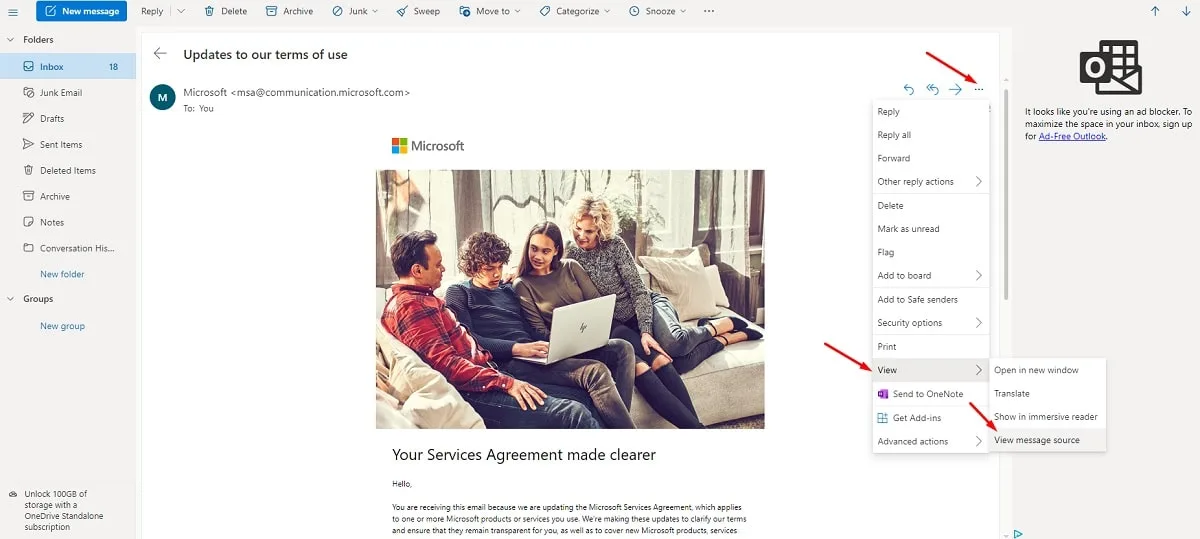
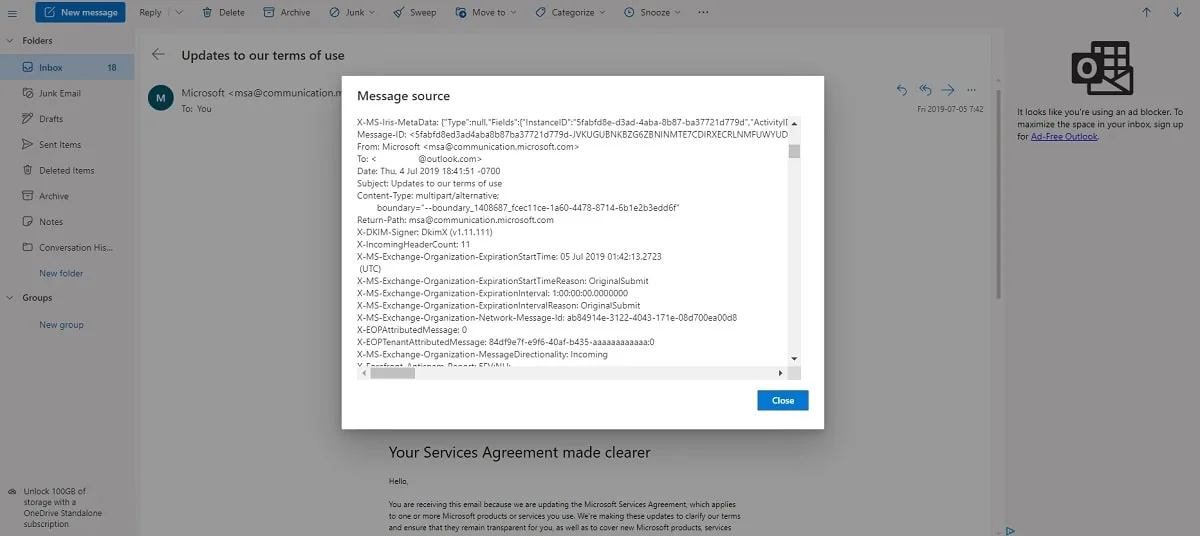
- Scroll down to see the necessary lines containing the full header information, including routing data, authentication results, and server details.
Viewing Email Headers in Yahoo
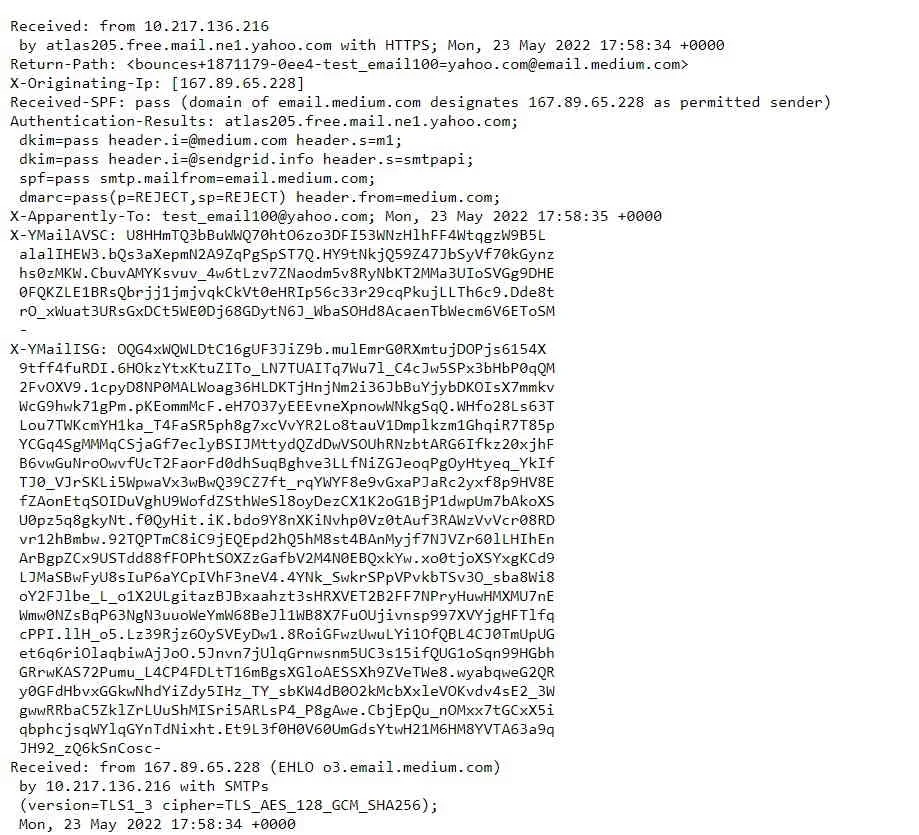
This one is only slightly different from the previous two. To view email headers in Yahoo Mail:
- Open the email you want to inspect.
- Click the three horizontal dots above the message next to the Spam icon.
- Select “View raw message”.
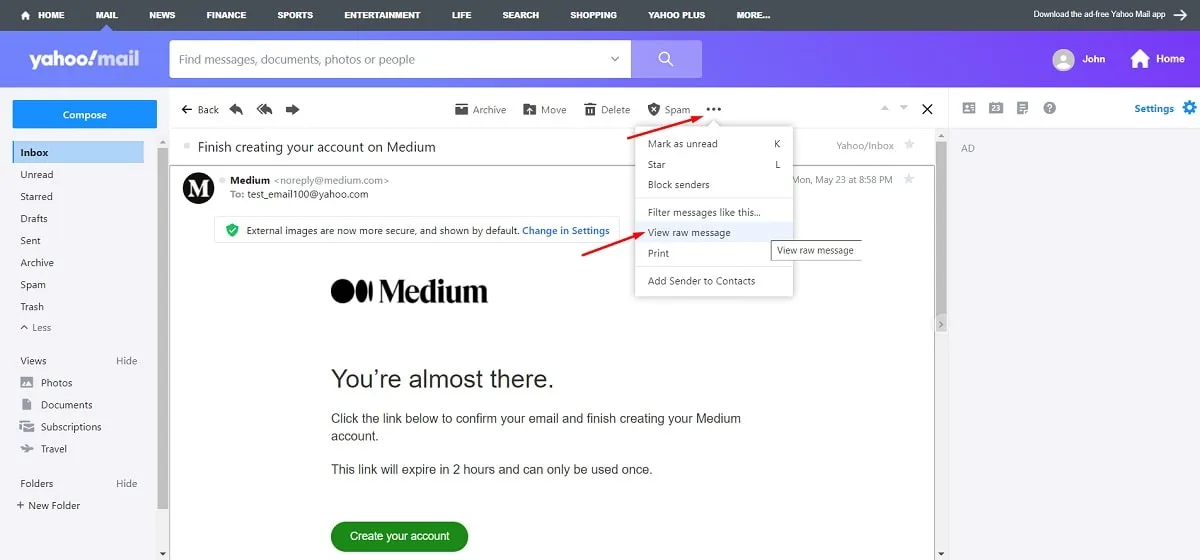
- The original version of the email with all headers will open in a new tab. Switch to it, right-click, select “Save as” and save the page as an .eml file.
How to Analyze an Email Header
Analyzing an email header helps determine where a message came from, how it was routed, whether it passed authentication checks and if there are any signs of spoofing or delivery issues.
When reviewing a header, pay special attention to fields such as From, Return-Path, Received, Message-ID, and Authentication-Results. These fields can help verify sender identity, trace the message route and check whether SPF, DKIM and DMARC validation succeeded.
The Received fields are especially important because they show the sequence of servers that processed the message. These entries are usually read from bottom to top to trace the email’s path from the original sender to the recipient.
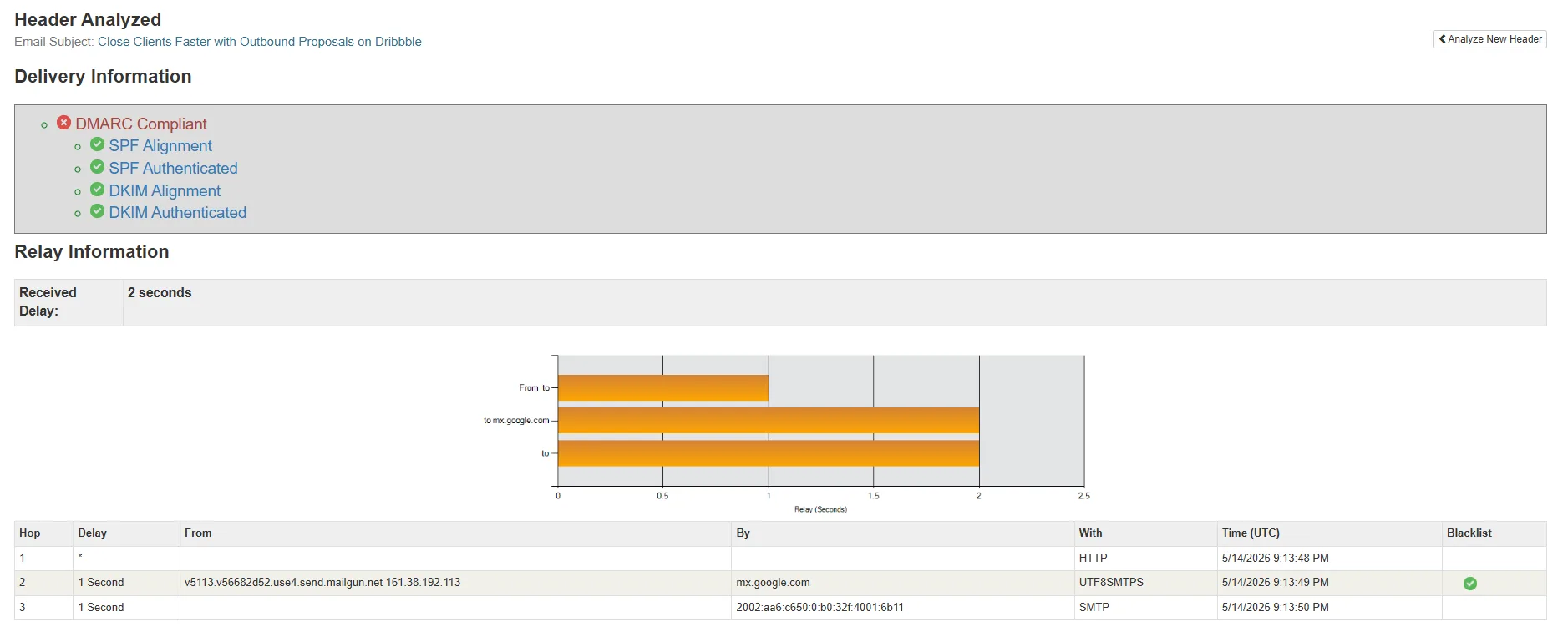
You can also use specialized email header analyzer tools to simplify the process, like MxToolbox Header Analyzer or Google Messageheader Tool. They automatically parse raw headers and highlight important information related to authentication, spam filtering, routing and sender reputation.
Here’s how the results might look like:
Common Email Header Issues
Email headers can reveal problems affecting message delivery, authentication and security. Some of the most common email header issues include:
- Failed SPF, DKIM, or DMARC authentication checks.
- Missing or incorrect Return-Path configuration.
- Suspicious or spoofed sender addresses.
- Delivery delays caused by routing problems.
- Messages marked as spam due to poor sender reputation.
- Incorrect MIME or Content-Type formatting.
- Missing or malformed header fields.
Email Header Best Practices
Properly configured email headers help improve deliverability, strengthen sender reputation and reduce the risk of messages being marked as spam or rejected by recipient servers.
Some recommended email header best practices:
- Configure SPF, DKIM, and DMARC correctly for your sending domain.
- Use a valid and monitored Return-Path address.
- Keep From and Reply-To addresses consistent and trustworthy.
- Avoid malformed or unnecessary custom headers.
- Use proper MIME formatting for HTML emails and attachments.
- Include Precedence: Bulk for mass email campaigns when appropriate.
- Regularly check and analyze headers to identify authentication or routing issues.
Monitoring header data also helps to identify deliverability issues early and improve inbox placement rates over time. For more strategies and recommendations, read our guide on how to improve email deliverability.
What Are the Different Aspects of an Email Header?
As soon as you learn how to read email headers, it will be easier for you to understand the meanings of important technical parameters. Some of them are listed below.
These fields are contained in the email header section:
Received — this line displays the address of the device where the message arrived and the addresses of other devices that could transmit this message.
MIME-version provides the revision number of the Multi-purpose Internet Mail Extension specification used to create the letter. MIME allows you to send attachments in different formats, for example, text, audio, visual content, and more.
Message ID is the message identifier which is unique for the server, providing for easier message processing.
DKIM is a signature confirming the authenticity of the sender. It is used to verify that certain important headers have not been altered in the course of transferring the message.
Understanding email headers may take time, but it may be crucial for eliminating a wide range of delivery problems.
Conclusion
Subscribers may not look into all the technical details the headers contain, but email services carefully analyze the data to protect their users from spam, phishing, and other malicious acts. They may show the technical details in different ways, but you can always find the code you need to check and fix any issues.
Related services
UniOne provides email infrastructure solutions for businesses, developers, and marketing teams that need reliable email delivery and high deliverability rates:
- SMTP Service – scalable SMTP relay for transactional and bulk email sending.
- Email API for Developers – flexible API for integrating email functionality into applications and services.
- Transactional Email Services – infrastructure for sending password resets, notifications, confirmations, and other automated emails.
FAQ
Why are email headers important?
Email headers contain technical information used for message routing, authentication, spam filtering and delivery diagnostics. They help email providers verify sender identity, detect suspicious activity and process messages correctly.
How do email headers affect deliverability?
Mailbox providers analyze header information to evaluate whether a message is legit or potentially spam. Authentication results, routing history, sender reputation and formatting details contained all influence inbox placement and deliverability.
Can email headers be spoofed or forged?
Header fields, such as the From address, can be spoofed or forged by attackers. However, getting the email digitally signed with DKIM can guarantee message integrity.
Can email headers reveal the real sender?
In many cases, yes. Header fields such as From, Received, Return-Path and authentication results help identify the originating server and trace the route the message took before final delivery. However, some details may still be hidden or altered depending on the sender’s infrastructure and privacy settings.
What tools can analyze email headers automatically?
There are many online email header analyzer tools like MxToolbox Header Analyzer or Google Message Header Tool that can parse raw headers and highlight important information automatically. They help identify authentication results, routing paths, spam indicators, IP addresses and delivery issues.
![10 Intuitive Email Builders To Try [Our 2026 Top]](https://unione.io/generated/wp-media/3c070570dad3c285.webp)