
 23 june 2026, 16:04
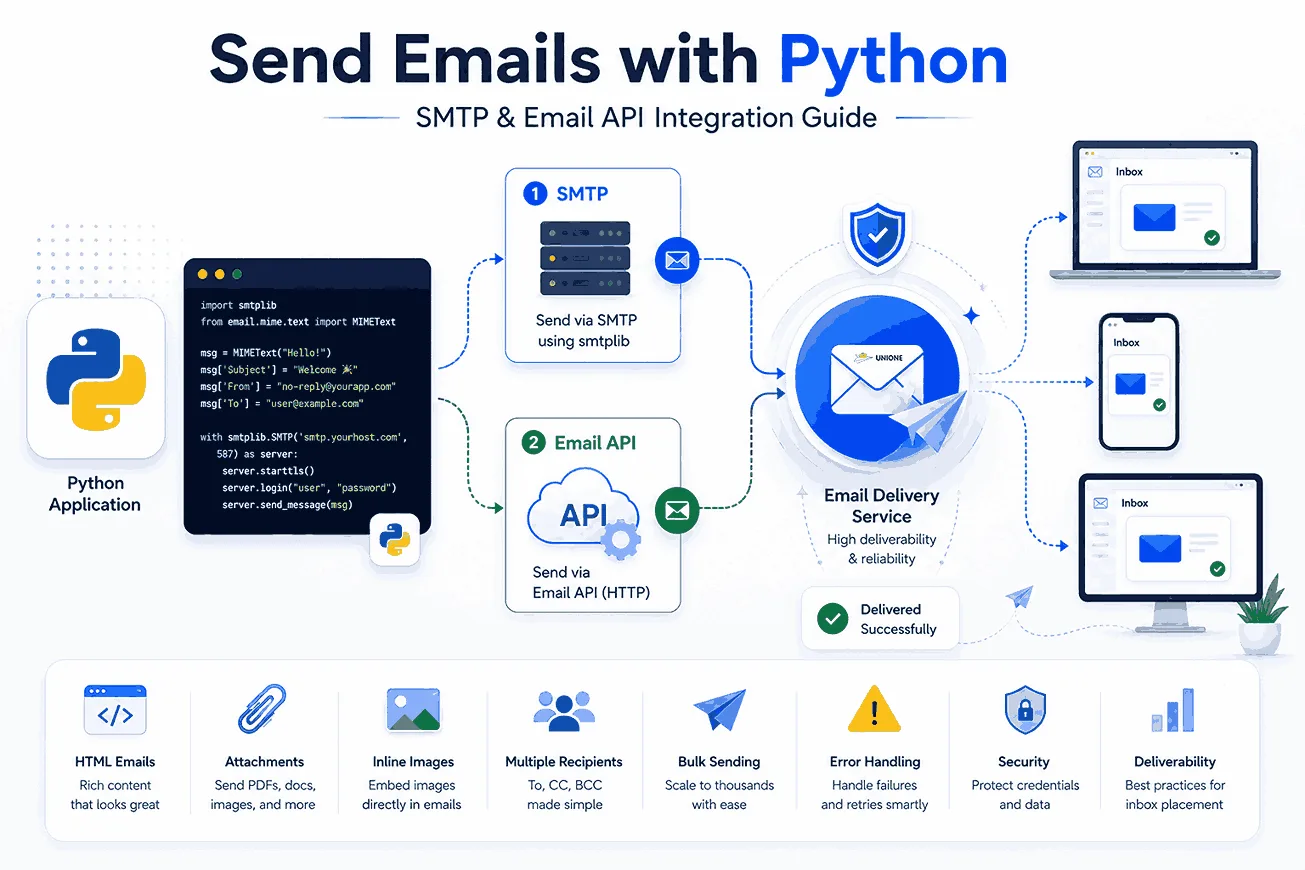
Email notifications are essential for almost every business with an online presence – with more than 4 billion active email users worldwide, the inbox remains one of the most dependable ways to reach people. You can confirm sign-ups, verify password changes, send receipts, flag login attempts, or push a promotion, all automatically. And you don’t need a separate marketing tool for all of that: a few lines in Python can send mail straight from your application.
This step-by-step guide shows how to send emails using Python two ways – with the built-in smtplib module over SMTP, and with an HTTP email API – and then goes further into the parts most tutorials skip: HTML, attachments, inline images, multiple recipients, bulk sending, error handling, security, and deliverability. Every example is real, runnable code.
Here’s what you’ll learn:
- Your options for sending email with Python (SMTP vs. API);
- How to send a plain-text email with smtplib, step by step;
- How to send HTML emails, attachments, and inline images;
- How to send to multiple recipients and at bulk scale;
- How to send through an email API for speed and deliverability;
- Error handling, credential security, and inbox-placement best practices.
What are your options for sending emails with Python?
The Simple Mail Transfer Protocol (SMTP) powers the flow of email between servers worldwide. Python supports it through the built-in smtplib module, part of the standard library – it implements the RFC 821 (SMTP) and RFC 1869 (ESMTP) specifications and needs no extra installation. With smtplib you can automate plain-text, HTML, and bulk emails, and attach files like images or PDFs.
That gives you two practical paths:
- Your own SMTP server. From a code standpoint there’s little difference, but running your own server means you’re responsible for maintaining, securing, and warming up the IP – which can be a real distraction from your core product.
- An external email service provider (ESP) such as UniOne. The ESP handles infrastructure, authentication, and deliverability, and gives you two ways in: an SMTP API (used with the same smtplib module – you just point it at the provider’s host and port) and a dedicated HTTP API (which uses requests module instead of smtplib and unlocks templates, analytics, and faster bulk sending).
There’s also a distinction within the API path. An SMTP API is simply an ESP’s SMTP server (often with some extra features beyond the standard SMTP). You use it through smtplib like any other SMTP server, which makes it a drop-in upgrade from running your own. A dedicated HTTP API is a different interface: you send JSON data over HTTPS with requests, which is faster at high volume and unlocks server-side templates, detailed analytics, and per-recipient personalization that plain SMTP can’t offer. The trade-off is a little more code.
Start with smtplib to understand the fundamentals, then move to the API when you need scale and deliverability. We’ll cover both.
Before you start: prerequisites and setup
You’ll need:
- Python 3.6+ (the examples use modern email.message.EmailMessage; Python 3.8+ is recommended);
- smtplib and email – both built in, no installation required;
- The
requestslibrary for the API method: pip install requests; - An ESP account and API key. Create a free UniOne account and grab your user_id or project_id and API key from the dashboard.
Keep your credentials out of your code
Before deploying any real code, remember one rule that the rest of this guide depends on: never hardcode SMTP passwords or API keys. Anything committed to source control can leak. Store secrets in environment variables and read them at runtime:
# set these in your shell or a .env file (never commit them)
export UNIONE_USER_ID="your_user_id"
export UNIONE_API_KEY="your_api_key"
import os
login = os.environ["UNIONE_USER_ID"] # your user_id or project_id
password = os.environ["UNIONE_API_KEY"] # your API key or project_api_keyFor local development, a .env file loaded with python-dotenv keeps things tidy:
pip install python-dotenvfrom dotenv import load_dotenv
load_dotenv() # reads variables from a local .env fileEvery example below assumes login and password come from the environment this way.
Method 1: Send an email with Python’s smtplib (SMTP)
Step 1: Test locally with a debugging SMTP server
Before sending real mail, it helps to test against a local server that just prints messages to your console instead of delivering them across the net. Historically Python shipped a smtpd module for this, but it was deprecated since Python 3.6 and removed entirely in Python 3.12. The modern replacement is aiosmtpd:
pip install aiosmtpd
python -m aiosmtpd -n -l localhost:8025
That starts a local debugging server listening on port 8025. Now send a message to it:
import smtplib
from email.message import EmailMessage

msg = EmailMessage()
msg["From"] = "[email protected]"
msg["To"] = "[email protected]"
msg["Subject"] = "Test message #1"
msg.set_content("This is a test message for the UniOne Python tutorial.")

try:
    with smtplib.SMTP("localhost", 8025) as server:
        server.set_debuglevel(1)   # print the SMTP conversation
        server.send_message(msg)
    print("Successfully sent the test email")
except smtplib.SMTPException as error:
    print(f"Something went wrong: {error}")
A few things to note:
- We build the message with EmailMessage instead of hand-writing raw RFC headers – it sets headers and body correctly and avoids formatting bugs.
- smtplib.SMTP(“localhost”, 8025) opens the connection; localhost is your server’s name and port 8025 is where it listens.
- set_debuglevel(1) prints the SMTP exchange so you can see what happens.
- send_message(msg) does the actual sending, and we catch smtplib.SMTPException – the base class for smtplib errors – so a connection or send failure doesn’t crash the script.
Step 2: Connect to an external SMTP server (UniOne)
The local server only prints messages; to deliver real email you connect to an external SMTP server. Two things change: you encrypt the connection and you authenticate.
Unencrypted SMTP traffic can be intercepted, so always use TLS. You have two standard options:
- SMTP over SSL on port 465, using smtplib.SMTP_SSL().
- STARTTLS on port 587, using smtplib.SMTP() followed by server.starttls().
To connect to UniOne’s SMTP server, use these parameters:
- host – smtp.us1.unione.io or smtp.eu1.unione.io, depending on whether your account is registered at us1 or eu1.
- port – 25, 465, or 587. All UniOne connections are encrypted by default.
- username – your account’s user_id or project_id (from the UniOne dashboard).
- password – your account’s API key or project_api_key.
- encoding – UTF-8.
Here’s a complete, secure plain-text send over SSL (port 465):
import os
import smtplib
from email.message import EmailMessage

smtp_server = "smtp.us1.unione.io"        # or smtp.eu1.unione.io
port = 465                                 # SSL; use 587 for STARTTLS
login = os.environ["UNIONE_USER_ID"]       # your user_id or project_id
password = os.environ["UNIONE_API_KEY"]    # your API key or project_api_key

msg = EmailMessage()
msg["From"] = "[email protected]"
msg["To"] = "[email protected]"
msg["Subject"] = "Test message #2"
msg.set_content("This is a test message sent from UniOne with Python over a secure connection.")

try:
    with smtplib.SMTP_SSL(smtp_server, port) as server:
        server.login(login, password)
        server.send_message(msg)
    print("Successfully sent the email")
except smtplib.SMTPException as error:
    print(f"Something went wrong: {error}")
Prefer STARTTLS on port 587? Swap the connection block:
with smtplib.SMTP(smtp_server, 587) as server:
    server.starttls()              # upgrade the connection to TLS
    server.login(login, password)
    server.send_message(msg)
Both deliver the same message securely – pick whichever way your environment allows. (See UniOne’s notes on the SMTP service for more.)
How to send email from a Gmail account in Python
UniOne is built for application and bulk email, but for quick personal scripts you may want to send through an existing Gmail account. The mechanics are identical for any SMTP server – only the host and credentials change.
Two caveats matter, though. Gmail requires using a separate App Password instead of your primary mailbox password: you must enable 2-Step Verification, then generate an app-specific password, because your normal password won’t authenticate over SMTP. Also, free Gmail accounts cap sending at roughly 500 messages per day, which is fine for testing or low-volume personal use but not for bulk campaigns.
import os
import smtplib
from email.message import EmailMessage

msg = EmailMessage()
msg["From"] = "[email protected]"
msg["To"] = "[email protected]"
msg["Subject"] = "Sent from Python via Gmail"
msg.set_content("This message was sent through Gmail's SMTP server.")

# Use an App Password (2-Step Verification must be on) – not your normal password
with smtplib.SMTP("smtp.gmail.com", 587) as server:
    server.starttls()
    server.login("[email protected]", os.environ["GMAIL_APP_PASSWORD"])
    server.send_message(msg)
print("Sent via Gmail")
For anything beyond that – transactional mail, newsletters, or bulk sends – a dedicated provider gives you far higher limits and better deliverability than a consumer mailbox.
How to send HTML emails with Python
Plain text is fine for a quick alert, but most product emails are HTML. The trick is to send both plain-text and HTML versions so every email client can render something. With EmailMessage, set the plain-text body first, then add the HTML as an alternative:
import os
import smtplib
from email.message import EmailMessage

smtp_server = "smtp.us1.unione.io"
port = 465
login = os.environ["UNIONE_USER_ID"]
password = os.environ["UNIONE_API_KEY"]

msg = EmailMessage()
msg["Subject"] = "Multipart email test"
msg["From"] = "[email protected]"
msg["To"] = "[email protected]"

# 1) plain-text fallback
msg.set_content("Hi, check out our new post on sending emails with Python.")

# 2) HTML version (preferred by most clients)
msg.add_alternative("""\
<html>
  <body>
    <p>Hi,<br>
       Check out our new post on the UniOne blog about
       <strong>sending emails with Python</strong>.</p>
  </body>
</html>
""", subtype="html")

with smtplib.SMTP_SSL(smtp_server, port) as server:
    server.login(login, password)
    server.send_message(msg)
print("Message sent")
The line add_alternative(…, subtype=”html”) attaches the HTML so an email client can pick HTML or fall back to text. For ready-made, responsive designs you don’t have to hand-code: UniOne also offers transactional email templates.
How to send emails with attachments
Python can attach text files, PDFs, images, audio, or video. With EmailMessage, add_attachment() handles the MIME wrapping for you – just give it the bytes, the MIME type, and a filename.
Keep in mind that the maximum total size for a UniOne email, including text and all attachments, is 10 MB.
import os
import smtplib
from email.message import EmailMessage

smtp_server = "smtp.us1.unione.io"
port = 465
login = os.environ["UNIONE_USER_ID"]
password = os.environ["UNIONE_API_KEY"]

msg = EmailMessage()
msg["Subject"] = "How to send emails using Python"
msg["From"] = "[email protected]"
msg["To"] = "[email protected]"
msg.set_content("This is a tutorial on sending attachments via Python.")

# attach a PDF in binary mode
filename = "PythonTutorial.pdf"
with open(filename, "rb") as f:
    msg.add_attachment(
        f.read(),
        maintype="application",
        subtype="pdf",
        filename=filename,
    )

with smtplib.SMTP_SSL(smtp_server, port) as server:
    server.login(login, password)
    server.send_message(msg)
print("Sent")
To attach an image or another file type, change maintype/subtype accordingly (for example, maintype=”image”, subtype=”png”).
How to embed images in Python emails
Attachments sit at the bottom of an email; sometimes you want an image to appear inline in the HTML body. The reliable way is a CID (Content-ID) attachment – you reference the image by ID in the HTML and attach it with a matching Content-ID. This needs a multipart/related message type, so we’ll use the email.mime classes here:
import os
import smtplib
from email.mime.multipart import MIMEMultipart
from email.mime.text import MIMEText
from email.mime.image import MIMEImage

smtp_server = "smtp.us1.unione.io"
port = 465
login = os.environ["UNIONE_USER_ID"]
password = os.environ["UNIONE_API_KEY"]

msg = MIMEMultipart("related")
msg["Subject"] = "CID image test"
msg["From"] = "[email protected]"
msg["To"] = "[email protected]"

# reference the image by its Content-ID in the HTML
html = '<html><body><img src="cid:unione_image"></body></html>'
msg.attach(MIMEText(html, "html"))

# attach the image with the SAME Content-ID
with open("UniOneImage.jpg", "rb") as f:
    image = MIMEImage(f.read())
    image.add_header("Content-ID", "<unione_image>")
    msg.attach(image)

with smtplib.SMTP_SSL(smtp_server, port) as server:
    server.login(login, password)
    server.send_message(msg)
print("Sent OK")
The cid:unione_image in the HTML must match the Content-ID header (<unione_image>) on the attached image. The client fetches the embedded image and displays it in place.
How to send emails to multiple recipients
To reach several people, loop over a list and build a personalized message for each one so everyone gets his own unique copy. Storing recipients in a CSV file scales better than typing addresses by hand:
import os
import csv
import smtplib
from email.message import EmailMessage

smtp_server = "smtp.us1.unione.io"
port = 465
login = os.environ["UNIONE_USER_ID"]
password = os.environ["UNIONE_API_KEY"]
sender = "[email protected]"

with smtplib.SMTP_SSL(smtp_server, port) as server:
    server.login(login, password)
    with open("contacts.csv", newline="") as file:
        reader = csv.DictReader(file)  # expects "name,email" columns
        for row in reader:
            msg = EmailMessage()
            msg["From"] = sender
            msg["To"] = row["email"]
            msg["Subject"] = "Our Python email tutorial"
            msg.set_content(
                f"Hi {row['name']}, here's our detailed tutorial on sending emails with Python."
            )
            server.send_message(msg)
            print(f"Sent to {row['name']}")
Create a contacts.csv with name, email columns in the same folder as your script. The loop opens one SMTP connection and reuses it for every send, which is far more efficient than reconnecting each time (to email exact copies of a single message instead, set the Cc or Bcc headers with comma-separated addresses).
However, sending one message per recipient through SMTP gets slow at scale – and that’s exactly where an email API earns its place.
A simpler option: sending email with yagmail
If the MIME boilerplate feels heavy, the third-party yagmail library wraps smtplib in a friendlier interface. Install it first:
pip install yagmailA full send then takes just a few lines – yagmail infers content types, builds the MIME structure, and attaches files for you:
import os
import yagmail

yag = yagmail.SMTP("[email protected]", os.environ["GMAIL_APP_PASSWORD"])
yag.send(
    to="[email protected]",
    subject="Sent with yagmail",
    contents="yagmail handles the MIME details for you.",
)
print("Sent with yagmail")
Attachments are just as easy – pass a list that mixes body text and file paths: yag.send(to=…, subject=…, contents=[“See the attached report.”, “report.pdf”]).
Method 2: Send emails with Python via an email API
For requirements beyond SMTP, most ESPs offer a dedicated HTTP API. Instead of connecting to an SMTP server with smtplib, you send JSON data with the requests library. The payoff is significant: it’s faster, it supports server-side templates and per-recipient personalization, it returns structured responses for analytics, and it’s built for high-volume sending.
UniOne’s send endpoint and authentication (from its API reference) are:
- Endpoint: POST https://api.unione.io/en/transactional/api/v1/email/send.json (you can also reference the eu1 or us1 host directly).
- Auth: an X-API-KEY HTTP header.
- Format: JSON, up to 10 MB.
Here’s a complete sending code using requests:
import os
import requests

base_url = "https://api.unione.io/en/transactional/api/v1"
headers = {
    "Content-Type": "application/json",
    "Accept": "application/json",
    "X-API-KEY": os.environ["UNIONE_API_KEY"],
}

payload = {
    "message": {
        "recipients": [
            {"email": "[email protected]", "substitutions": {"to_name": "Alex"}}
        ],
        "body": {
            "html": "<b>Hello, {{to_name}}!</b>",
            "plaintext": "Hello, {{to_name}}!",
        },
        "subject": "UniOne test email",
        "from_email": "[email protected]",
        "from_name": "Your App",
    }
}

response = requests.post(f"{base_url}/email/send.json", json=payload, headers=headers)
response.raise_for_status()   # raise an exception on HTTP errors
print(response.json())
Notice the substitutions block and the {{to_name}} placeholder: the API merges per-recipient values into the template, so personalization happens server-side. Invoking response.raise_for_status() turns any HTTP error into an exception you can handle, and response.json() returns UniOne’s structured result. For a deeper comparison of API options, see what an email API is and our roundup of the best email APIs.
How to send emails from a template
Embedding HTML directly in your Python is fine for one-off messages, but for repeatable transactional emails – order confirmations, receipts, password resets – a cleaner approach is to store the design once and use it repeatedly. UniOne lets you create a template in the dashboard and send it by template_id, passing only the per-recipient values:
import os
import requests

base_url = "https://api.unione.io/en/transactional/api/v1"
headers = {
    "Content-Type": "application/json",
    "Accept": "application/json",
    "X-API-KEY": os.environ["UNIONE_API_KEY"],
}

payload = {
    "message": {
        "template_id": "your-template-uuid",      # created in the UniOne dashboard
        "recipients": [
            {"email": "[email protected]",
             "substitutions": {"to_name": "Alex", "order_id": "12345"}}
        ],
        "subject": "Your order {{order_id}} is confirmed",
        "from_email": "[email protected]",
        "from_name": "Your App",
    }
}

response = requests.post(f"{base_url}/email/send.json", json=payload, headers=headers)
response.raise_for_status()
print(response.json())
This keeps your code clean and lets non-developers update the design without a code deploy – just change the template, and your script keeps sending. Browse UniOne’s transactional email templates to start from a responsive design.
How to send bulk (mass) emails with Python
“Bulk emailing” means sending to many recipients efficiently without tripping rate limits or hurting deliverability. Both approaches described above work, but one outperforms the other by a wide margin.
The SMTP way: loop with pacing and error handling
You can reuse the CSV loop from earlier, but for real volume you should add pacing (a short sleep between attempts) and per-message error handling so one bad address doesn’t stop the run:
import os
import csv
import time
import smtplib
from email.message import EmailMessage

smtp_server = "smtp.us1.unione.io"
port = 465
login = os.environ["UNIONE_USER_ID"]
password = os.environ["UNIONE_API_KEY"]
sender = "[email protected]"

with smtplib.SMTP_SSL(smtp_server, port) as server:
    server.login(login, password)
    with open("contacts.csv", newline="") as file:
        for row in csv.DictReader(file):
            msg = EmailMessage()
            msg["From"] = sender
            msg["To"] = row["email"]
            msg["Subject"] = "Your Python email guide"
            msg.set_content(f"Hi {row['name']}, thanks for reading our Python email guide!")
            try:
                server.send_message(msg)
                print(f"Sent to {row['email']}")
            except smtplib.SMTPException as error:
                print(f"Failed for {row['email']}: {error}")
            time.sleep(0.2)   # gentle pacing to respect rate limits
This is fine for a few hundred messages, but impractically slow for large lists.
The API way: one call, many personalized emails
An email API sends to many recipients in a single request, with personalization handled server-side. UniOne accepts an array of recipients, each with its own substitutions, so you build the list from your CSV and call send once:
import os
import csv
import requests

base_url = "https://api.unione.io/en/transactional/api/v1"
headers = {
    "Content-Type": "application/json",
    "Accept": "application/json",
    "X-API-KEY": os.environ["UNIONE_API_KEY"],
}

# build the recipients array from a CSV of name,email
recipients = []
with open("contacts.csv", newline="") as file:
    for row in csv.DictReader(file):
        recipients.append({
            "email": row["email"],
            "substitutions": {"to_name": row["name"]},
        })

payload = {
    "message": {
        "recipients": recipients,
        "body": {
            "html": "<p>Hi {{to_name}}, thanks for reading our Python email guide!</p>",
            "plaintext": "Hi {{to_name}}, thanks for reading our Python email guide!",
        },
        "subject": "Your Python email guide",
        "from_email": "[email protected]",
        "from_name": "Your App",
    }
}

response = requests.post(f"{base_url}/email/send.json", json=payload, headers=headers)
response.raise_for_status()
print(response.json())
For very large lists, send in batches (500 recipients per request) rather than one giant call, and attach an idempotence_key to each request so a network retry can’t accidentally send duplicates. This API-first pattern is how you move from a hobby script to production volume. If your source data lives in spreadsheets, our guide to sending emails from Excel shows the same idea from a different starting point.
Speeding up SMTP bulk with concurrency
If you must use SMTP for bulk rather than the API, sending serially is the bottleneck. You can parallelize with a thread pool while keeping the worker count low enough to respect connection limits:
import os
import csv
import smtplib
from concurrent.futures import ThreadPoolExecutor
from email.message import EmailMessage

smtp_server = "smtp.us1.unione.io"
port = 465
login = os.environ["UNIONE_USER_ID"]
password = os.environ["UNIONE_API_KEY"]
sender = "[email protected]"

def send_one(row):
    msg = EmailMessage()
    msg["From"] = sender
    msg["To"] = row["email"]
    msg["Subject"] = "Your Python email guide"
    msg.set_content(f"Hi {row['name']}, thanks for reading our Python email guide!")
    with smtplib.SMTP_SSL(smtp_server, port) as server:   # each thread opens its own connection
        server.login(login, password)
        server.send_message(msg)
    return row["email"]

with open("contacts.csv", newline="") as file:
    rows = list(csv.DictReader(file))

with ThreadPoolExecutor(max_workers=5) as pool:
    for sent in pool.map(send_one, rows):
        print(f"Sent to {sent}")
Keep max_workers in the single digits – opening too many simultaneous connections will get you throttled. Even so, for true scale the single API call from the previous section is simpler and faster than juggling dozens of SMTP connections.
Error handling, logging, and retries
Production senders fail gracefully. Two habits matter most:
- Catch specific exceptions. For SMTP, smtplib.SMTPException is the base class (with subclasses like SMTPAuthenticationError and SMTPRecipientsRefused); for the API, catch requests.exceptions.RequestException. Catching specific errors lets you react correctly – re-authenticate, skip a bad address, or back off.
- Retry transient failures with backoff. Network glitches and temporary 4xx responses usually succeed on a second try. Wrap sends in a retry with exponential backoff:
import time
import smtplib

def send_with_retry(build_server, msg, retries=3, backoff=2):
    for attempt in range(1, retries + 1):
        try:
            with build_server() as server:
                server.login(login, password)
                server.send_message(msg)
            return True
        except smtplib.SMTPException as error:
            print(f"Attempt {attempt} failed: {error}")
            if attempt == retries:
                raise               # give up after the last attempt
            time.sleep(backoff ** attempt)   # 2s, 4s, 8s ...
Log every send result (success, failure, and the recipient) so you can audit deliverability and replay failures later. Python’s built-in logging module is enough to start.
Common smtplib errors and how to fix them
When a send fails, the exception usually points straight at the fix:
- SMTPAuthenticationError – wrong username/password, or you’re using a normal password where an App Password (Gmail) or API key (UniOne) is required. Re-check your credentials and that SMTP access is enabled for the account.
- SMTPRecipientsRefused – the server rejected every recipient address, usually because one is malformed or doesn’t exist. Validate addresses before sending.
- SMTPSenderRefused – the From address isn’t authorized for your account or domain. Send from a verified sender.
- SMTPServerDisconnected – the connection dropped, often from the wrong port or an idle timeout. Confirm the host and port, and reconnect.
- ConnectionRefusedError / SMTPConnectError – wrong host/port, or a firewall blocking the connection. Verify the server address and that port 465 or 587 is open.
Catch these explicitly so your script reacts correctly instead of crashing – for instance, skip and log a refused recipient, but retry a disconnected server.
Email deliverability best practices
Sending code is only half the job – the other half is landing in the inbox. Even perfect Python code won’t help if mailbox providers distrust your domain.
- Authenticate your domain. Publish SPF, DKIM, and DMARC DNS records so Gmail and Outlook can verify your mail is legitimate. This is the single biggest factor in staying out of spam. In short: SPF lists the servers allowed to send for your domain, DKIM cryptographically signs each message so it can’t be tampered with in transit, and DMARC tells receiving servers what to do when a message fails those checks. Your ESP supplies the exact records to publish.
- Protect sender reputation. Warm up new sending IPs gradually, and consider a dedicated IP once volume is high and steady. Set up and monitor feedback loops and postmaster data for all major mailbox providers. A reputable ESP manages much of this for you.
- Keep lists clean. Remove invalid and inactive addresses; high bounce rates and spam complaints sink your reputation fast. Use double opt-in and verify addresses up front with email validation.
- Always include a plain-text part and an unsubscribe option. Some clients strip HTML, and a missing unsubscribe header is a spam signal.
- Test before you send. Fire a few messages to seed addresses or a sandbox first to check rendering and spam score, then scale up.
Following these keeps your hard-won deliverability intact – and it’s why many teams send through an ESP rather than a self-managed server.
How to handle bounces and replies
Sending is only the start – you also need to know what happened next. Two signals matter most:
- Bounces tell you an address is invalid (a hard bounce) or temporarily unavailable (a soft bounce). Remove hard-bounced addresses immediately; repeatedly mailing them wrecks your reputation. With the email API, the JSON response and webhooks report delivery status; with raw SMTP you’d have to parse bounce-back messages yourself.
- Replies and unsubscribes need to route somewhere actionable. Set a real Reply-To address, and honor unsubscribe requests promptly – an ignored unsubscribe is both a compliance risk and a spam complaint waiting to happen.
The cleanest setup is to let your provider handle bounce processing and suppression automatically, then read the results through webhooks or the API rather than scraping mailboxes.
How to test your emails before sending
Sending untested mail to a real list is risky – a broken template or a spam-trigger phrase can burn your reputation. Test first:
- Use a sandbox or test inbox. Send to a dedicated test address (or an email-testing sandbox that captures messages without delivering them) so you can inspect raw HTML, headers, and spam score safely.
- Render across clients. What looks right in Gmail can break in Outlook; preview your HTML in the major clients before a big send.
- Send to seed addresses. Keep a few real inboxes across providers (Gmail, Outlook, Yahoo) and send to them first to confirm inbox placement.
- Check authentication. Verify the test message passes SPF, DKIM, and DMARC – most webmail clients show this in the message details.
Only after a clean test should you scale to the full list, and scrub it first with email validation to drop invalid addresses before the first send.
SMTP or API: which should you use?
Both methods send email from Python; they suit different jobs.
- Choose smtplib (SMTP) for simplicity, quick scripts, internal tools, and low volume. It’s included in Python and universally supported.
- Choose an email API for production apps, personalization at scale, templates, analytics, and bulk sending. It’s faster, more robust, and gives you better visibility and deliverability.
A common pattern is to prototype with smtplib, then switch to the API as volume and reliability requirements grow. UniOne supports both from the same account, so you can move between them without changing providers – explore the SMTP service and the email API for developers.
How to schedule and automate recurring emails
Many email jobs run on a schedule – a daily digest, a weekly report, a monthly invoice. Two common approaches cover most needs.
For a long-running Python process, the schedule library is readable and dependency-light:
pip install scheduleimport time
import schedule
def send_daily_report():
# build and send your EmailMessage here (see the examples above)
print("Sending the daily report...")
schedule.every().day.at("09:00").do(send_daily_report)
while True:
schedule.run_pending()
time.sleep(60)On a server, a cron job is often simpler than keeping a process alive – point it at a standalone script:
# run send_report.py every day at 09:00
0 9 * * * /usr/bin/python3 /path/to/send_report.py
Either way, keep the sending logic in a function you can test on its own, and log every run so you can confirm the job actually fired.
Conclusion
You now have a complete toolkit for sending emails using Python: testing locally with aiosmtpd, sending plain-text and HTML over a secure SMTP connection, adding attachments and inline images, reaching multiple recipients, sending in bulk through an API, and handling errors, security, and deliverability along the way. Start with the smtplib examples to learn the mechanics, then graduate to the UniOne email API when you need speed and scale.
Whichever method you choose, the fundamentals are the same: build a well-formed message, authenticate your domain, handle errors gracefully, and keep your list clean. Get those right and Python becomes a dependable part of your sending stack.
UniOne is a secure, reliable email service with high deliverability when you follow email regulations and best practices – and the same account works over both SMTP and API.
Sending from another stack? See our companion guides for Go (Golang) and WordPress.
FAQ
Can you send emails with Python without installing any library?
The answer is yes, since you already have some installed. The built-in smtplib and email modules send mail over SMTP with no third-party packages. You’ll need to install extra modules (like requests) if you choose to send through an HTTP email API instead.
What’s the difference between sending email via SMTP and via an API in Python?
SMTP uses the smtplib module to talk to a mail server directly – simple, built in, ideal for low volume. An email API uses HTTP protocol (with requests) and enables server-side templates, per-recipient personalization, analytics, and faster bulk sending, which suits production and high-volume use.
Is smtplib deprecated in Python?
No, smtplib (a library for sending) is fully supported. It’s the old smtpd module (a local SMTP debugging server) that was deprecated and removed in Python 3.12 – use aiosmtpd instead.
How do I send bulk emails with Python without getting blocked?
Use an email API that accepts an array of recipients in one request. Send in batches (for example, 500 at a time), pace your requests, authenticate your domain with SPF/DKIM/DMARC, and keep your list clean. Avoid blasting thousands of messages from a new IP address or domain – both should be gradually warmed up.
Why are my Python emails going to spam?
Most often because the domain isn’t authenticated. Publish SPF, DKIM, and DMARC records, send from a reputable IP, include a plain-text alternative and an unsubscribe option, and avoid spam-trigger words in subject lines.
How do I store SMTP credentials securely in Python?
Never hardcode them. Keep your username, password, and API key in environment variables (or a .env file loaded with python-dotenv) and read them at runtime with os.environ. Keep secrets out of source control.
Can Python send HTML emails with images?
Yes. Send a multipart message with both a plain-text and an HTML part, and embed images inline using a CID (Content-ID) attachment referenced from the HTML, as shown in the inline-image example above.