
 12 june 2026, 16:01
Your emails can be extremely interesting, relevant, and helpful to the addressees, but what is the good of all this if they end up in the Spam folder? Your potential customers will have no opportunity to open your emails and appraise their quality. In this article, we will tell you how to prevent emails from going to spam and route your well-crafted messages into the inbox. You will learn what spam filters actually look for, why user engagement matters, and which technical levers you can pull today to defend your sender reputation.
What Are Spam Filters and How Do They Work?
Before we try to answer the question “why is my email going to spam?” and, more importantly, how to fix it, let’s examine the technical gatekeepers standing between you and your audience. Every major mailbox provider – Gmail, Outlook, Yahoo, Apple Mail – runs dozens of real-time checks on each incoming message. They look at sender reputation, domain authentication results, content cues, user engagement signals, complaint rates, and billions of historical data points. Understanding how to prevent emails from going to spam, therefore, begins with demystifying these criteria and learning which levers you can actually pull.
A good starting point is to review the industry-standard email deliverability best practices checklist. When a single factor is flagged – say, missing DKIM, a questionable link, or a sudden spike in volume – the filter assigns a negative score. Rack up a few negative points, and your message is routed to the Junk folder or even bounced back.
Modern spam filters rely on three complementary engines:
- Content heuristics. They parse words, phrases, HTML markup, links, and images. Too many “FREE!!!” exclamations, mismatched HTML tags, or shortened URLs can tip the scale.
- Reputation algorithms. A hidden “sender reputation score” travels with every IP and sending domain. If your score dives, even an immaculate copy may never reach the inbox.
- Engagement feedback. Almost any mailbox provider, Gmail in particular, watches whether recipients open, delete, or reply to your emails. High engagement overrides borderline technical mistakes, while chronic indifference convinces filters to stop emails from going to spam by blocking them altogether.
These systems are not static. Google alone updates its filtering models dozens of times a year. In short, the answer to “how to avoid email going to spam?” is less about finding one magic tweak and more about adopting habits that stand the test of evolving algorithms.
Why Do Emails Go to Junk?
There are many reasons why emails end up in the Spam folder. We have described some of them in our article “Why do my emails go to Spam?“. There, you will find ways of solving each problem. Below is the full scope of factors that keep emails from reaching the Inbox folder. While reading, keep asking yourself, “why is my email going to spam and what can I adjust today?”. The good news: most root causes are completely within your control.
You Are Targeting the Wrong Audience
A mismatch between content and recipient interests remains the #1 reason your emails are going to spam. If your recipients are not interested in what you are talking about, they will sooner or later mark your emails as spam, so all your efforts will be futile.
Try to add the right people to your email list – those who will open your emails and increase your engagement rates, not those who don’t care.
You Are Sending Emails Without Permission
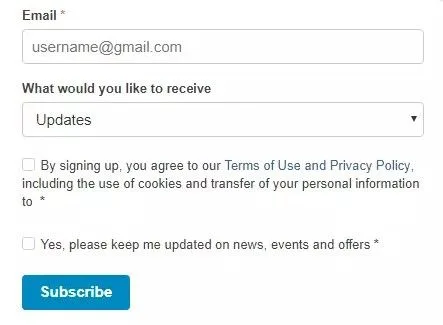
How to avoid being marked as spam? Make sure your addressees have opted in for your emails first. Always confirm addresses with a double opt-in and use email validation tools to weed out typos and spam traps. Some marketers unwittingly buy ready-made lists of email addresses and then send their messages to people who never heard of their companies. The same also applies to those who use emails from business cards or social media for their marketing campaigns. Do not do this: you will ruin your campaign in no time!
Your IP Is or Was Used for Spam
Even if you have never sent spam messages yourself, your emails can be marked as “Junk” if your sending IP address has been used for unsolicited promotional emails in the past. When you use an email marketing service, your messages are forwarded through its servers. If even a single other user sends spam, your deliverability will be affected, too. Therefore, it is vital to apply to a reputable email service provider and never use any suspicious offers in this area.
A more robust solution is to use one or more dedicated IPs for your mailings. However, exercise the same caution: check the sender scores of your newly purchased IPs to see whether they’ve been used for spam earlier.
Poor Sender Reputation
Mailbox providers count every bounce, complaint, and delete-unopened event. If my emails are going to spam, reputation is usually the common denominator. To keep emails from going to spam, focus on:
- Authenticating your sending domains (SPF, DKIM, DMARC).
- Keeping complaint rates below 0.05% (ideally).
- Sending to highly engaged segments first, then gradually rolling out to the rest.
- Removing addresses after one hard bounce or three consecutive soft bounces.
Some senders ask whether switching ESPs may be a shortcut. It hardly is; reputation follows your domain wherever you go. Far smarter is restoring trust slowly.
Your Subscribers Have Forgotten You
How to avoid being marked as spam? Remind your subscribers about your company on a regular basis. When people forget about your brand, they tend to mark your messages as undesirable, even if they had been your loyal customers only a short time ago. Make sure that branding in your emails matches the one on your website. Use your trademarks in every message, even if they seem redundant.
You Do Not Write Your Company’s Name in the “From” Line
When considering how to keep away from junk, mind the following: people do not hurry to open each and every email they receive. Most often they simply check the “From” line and then decide whether the message deserves their attention. If you do not want to bury your budget in the Spam folder, take some time to write your brand name in the “From” line. Provide a clear and comprehensible subject line too, so that the recipients can see what the message is about.
Consider pairing brand with person, e.g., “Mia at UniOne,” which earns both corporate authority and a personal touch. Avoid generic “no-reply” addresses; if recipients cannot ask a simple question, they may retaliate via the spam button.
You Send Your Emails to Inactive Users
If a person does not use his mailbox for a long period, the account becomes inactive. When you launch an email campaign with a vast amount of inactive users in your recipient list, your email is most likely to be considered spam. How to prevent such emails from going to junk? Simply clean your email list of any subscribers who have not engaged with your campaigns for a while.
Build automated sunset workflows that:
- Detect non-openers after a chosen period.
- Send a gentle “Still interested?” check-in.
- Pause or suppress if silence continues.
This data-driven hygiene routine, combined with the email validation API, helps stop emails going to spam at the source.
You Are Trying to Cheat on Your Subscribers
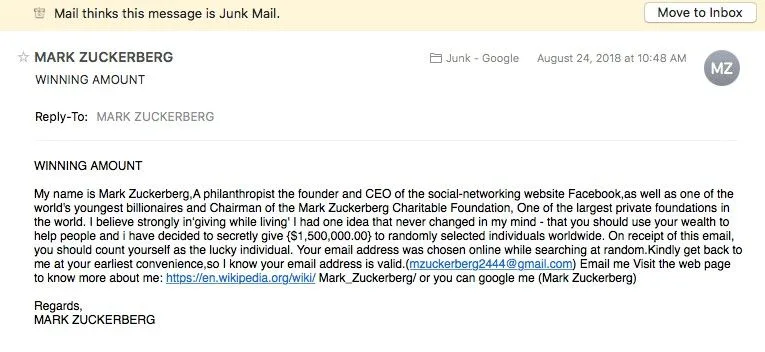
Some marketers try to attract customers’ attention with the help of misleading subject lines. For instance, they use emotionally colored words, such as “urgent”, “shock”, “free”, “best offer”, “last chance”, or deceptive phrases, like “You have lost your coat in our office” and “Thanks for your order”. No one likes to be fooled; neither do your subscribers.
Misleading subject lines might spike opens once, but the subsequent wave of complaints kills long-term deliverability. Google’s strict sender guidelines mandate that driving your spam rate above just 0.3 percent triggers automated domain blocking. Play the long game: craft subject lines that promise exactly what the body delivers.
Lack of Email Authentication
DMARC, SPF, and DKIM records prove that a message is legitimate. Without them, providers can’t confirm you are who you claim to be, and your emails go to spam. We cover the exact setup steps in the technical section below.
You Do Not Add Your Contact Data to the Email
How to avoid your email going to spam? Make your audience trust you. People prefer companies that never omit their postal address, phone number, and email address in their promotional materials. Therefore, it is better to add this data to your email regardless of its subject and purpose. What if you work from home? In this case, you can rent a PO-box for business purposes and specify its number in your emails.
Transparent brands build trust. Besides standard footer address blocks, include a link to your privacy policy, a one-click unsubscribe, and an optional “manage preferences” portal. GDPR (for EU residents) and California’s CPRA require it anyway; failing to comply risks fines in addition to junk placement.
You Do Not Add an “Unsubscribe” Button to Your Emails
No matter how valuable you think your messages are, you should always allow your subscribers to cancel their subscription if they want to. Failing this, you run the risk of getting spam complaints or even being slapped with a fine of thousands of dollars. Add an unsubscribe link or an equivalent feature at the bottom of all your messages. This way, you will show your subscribers that you respect their opinion and do not insist on your ideas.
If users cannot find a direct opt-out, they will abandon the inbox and hammer the “This is spam” button instead. A clear List-Unsubscribe header often shows up as Gmail’s native one-click unsubscribe link, which ironically reduces complaint probability even if someone leaves.
You Are Not Learning From Your Mistakes
Some email marketing specialists ask “How to avoid sending emails to the Spam folder?”, but do not implement any real measures to correct their mistakes. No good will ever come of this!
If you see that there are many inactive users in your recipient list – delete them. If you realize that your recipients do not like misleading subject lines – avoid those. And so on: do not be afraid of changing your emailing campaign to comply with existing marketing rules and techniques.
Good senders treat every campaign like a mini science experiment. They set hypotheses, test variations, gather metrics, and iterate. When metrics deteriorate, they do not blame algorithms; they tweak frequency, copy, segment rules, or templates until numbers rebound. Continuous improvement is ultimately the only sustainable answer to how to prevent emails going to spam long term.
How to Check if Your Emails Are Going to Spam
Self-diagnosis is the first step to stop emails going to spam. Use both in-platform analytics and external testing suites so you can respond before engagement tanks.
Read a deep dive on email marketing KPIs to understand which numbers truly reveal deliverability trouble.
Monitor Email Engagement Rates
Look at opens, clicks, and “read” time every day. A sudden 20% drop often precedes a larger blockade, so reacting quickly is essential for anyone learning how to prevent emails from going to spam. Advanced teams also track:
- Emails being deleted unopened;
- Time to open (helps detect inbox lag);
- “Forward” or “Share” actions, which can dramatically boost positive reputation weight.
If you see decline across multiple metrics simultaneously, investigate authentication, content, and list changes that occurred just before the drop.
Use Email Deliverability Testing Tools
UniOne’s free SMTP Debug, GlockApps, InboxReady, and Mail-Tester simulate popular spam filters. Send test messages before launching a campaign to see whether my emails are going to spam in different providers.
Remember to test a variety of mailbox types (consumer Gmail, corporate Microsoft 365, iCloud, Yahoo) because each has its own filtering nuances.
Check Spam Complaint Rates
Industry benchmarks put an acceptable spam complaint rate below 0.1%. Anything higher, and “my emails going to spam” situation becomes inevitable. Most ESP dashboards surface complaints within minutes; set up webhook notifications so operations staff can react the same day.
Monitor Email Blocklists
Set up automated lookups at Spamhaus, SORBS, and Barracuda. If listed, pause large sends immediately, look into the cause and submit delisting requests. Blocklisting can be in effect for hours or weeks depending on the severity, so reacting quickly reduces brand damage.
Technical Factors That Affect Email Deliverability
Technical hygiene is not glamorous, it is the foundation upon which all creative and strategic work depends. The following table summarizes core authentication layers and their impact:
| Authentication Method | Primary Purpose | Easy DIY? | Deliverability Impact |
|---|---|---|---|
| SPF | Authorizes sending IPs for a domain | Yes | ★★★☆☆ |
| DKIM | Cryptographically signs headers & body | Medium | ★★★★☆ |
| DMARC | Tells ISPs how to handle failures | Medium | ★★★★★ |
| BIMI | Displays verified brand logo in inbox | Hard | ★★☆☆☆ |
| TLS Reporting (TLS-RPT) | Monitors encryption failures | Easy | ★★☆☆☆ |
Email Authentication (SPF, DKIM, DMARC)
Follow this step-by-step email authentication guide. With valid records, mailbox providers know the message is trustworthy, allowing you to stop emails going to spam. A firm DMARC “reject” policy plus aligned subdomains also protects against phishing, which can tank domain reputation overnight.
Sending Domain and IP Reputation
Dedicate separate sub-domains per use case – transactional vs. marketing – so one stream’s issues don’t drag the other into the junk pile. Monitor each reputation channel individually using Google Postmaster Tools and Microsoft SNDS. If a promotional surge dings your marketing sub-domain, your critical OTP or password-reset emails remain safe.
Dedicated vs Shared IP Address
A dedicated IP gives you full control, but only after a meticulous warm-up. On a shared pool, your ESP (e.g., UniOne) manages reputation for you. Small senders (<50k/month) usually fare better on shared pools because volume is too low to maintain a standalone reputation.
Proper Server Configuration and Headers
Reverse DNS, matching HELO names, accurate “Message-ID,” and List-Unsubscribe headers all feed spam filter scoring models. Treat them like domain hygiene: set and forget, but audit quarterly. Even a stray typo in rDNS can nuke even the most persuasive copy.
Legal Compliance: Anti-Spam Laws
CAN-SPAM (USA), CASL (Canada), GDPR (EU), LGPD (Brazil) and Privacy and Electronic Communications Regulations (UK) all have strict standards. Across jurisdictions, the key pillars include:
- Prior consent (opt-in) before sending commercial content.
- Honest subject lines, no false “Re:” or “Fwd:” tricks.
- A working physical mailing address in every message.
- Prompt processing of unsubscribes (within 10 business days in the U.S.).
Violations costs are soaring: fines under CASL reach 1 million per individual and 10 million per organization. Aside from penalties, legal breaches cripple reputation, ensuring my emails are going to spam long after the fine is paid.
How to Prevent Mail From Going to Spam: Best Practices
So you are launching your mailing campaign. Here are the factors you should take into account to help your messages avoid the Junk folder:
1. Sender’s Name
Specify your brand name in the sender’s name field. Make sure the recipients will recognize your company. Try not to use abbreviations, figures, and other intricate symbols that may encourage the addressee to mark your email as spam.
Messages from unknown senders with common, unrecognizable names are more likely to go to Junk. Besides, there are certain penalties for false data in the “From” field in email advertising.
Experiment with friendly-from formatting: “Company Name,” “Name from Company,” and “Team Company.” Use A/B analytics to see which yields the highest open-to-click ratio, a strong proxy for relevancy.
2. DNS Blacklist
How to avoid spam filters when sending emails? First of all, verify that your IP address has not been blacklisted. Blacklists include IP addresses and domains that have been identified as spam sources. If a sender is blacklisted, their IP is banned and their mail is not delivered to recipients.
To check whether your IP address has been blacklisted or not, use websites aimed at testing mail server’s addresses and domains.
3. Spam Tests
Have you ever wondered if your messages look like spam? To check the “spamminess” of your emails, use special services that imitate spam filter algorithms and check email according to certain criteria. Services of this kind allow email senders to prevent their mail from going to junk.
Run tests against seed lists that include role-based addresses (info@, admin@) and plus-addressing variants, e.g., [email protected], because Gmail treats these as distinct footprints.
4. User’s Permission
You are allowed to send emails only after getting the users’ permissions – it is a strict requirement laid out in anti-spam laws. Therefore, you need to ensure that all of your subscribers have given their permission to receive messages from your company.
5. Double Checked Registration
How to avoid sending emails to spam? Pay special attention to your recipient list. When forming it, you run the risk of adding random users. Later, they may mark your emails as spam and, therefore, ruin your whole campaign.
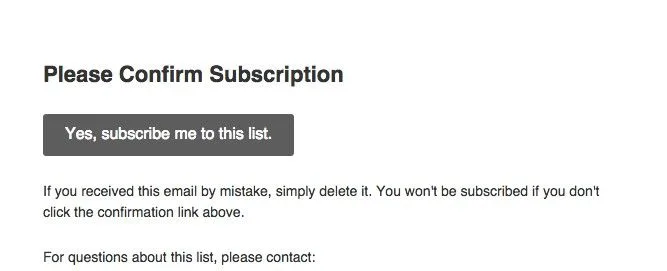
To prevent such recipients from getting into your email list, double-check their subscription intent. The double opt-in procedure includes two steps: first, customers have to fill in your signup form; second, they receive your confirmation message with a link which they should follow to verify their address.
6. Whitelisting
Ask your subscribers to whitelist your email address – it will help you to keep emails from going to spam. When the sender’s email is included in the recipients’ contact list, their ESP concludes that emails from this address are trusted. Therefore, they are protected from going to the Junk folder.
Provide OS-level instructions for mobile clients (iOS, Android). Many subscribers never open desktop mail anymore.
7. Regular List Cleaning
Purge hard bounces immediately and unengaged contacts every 30–60 days. If my emails go to spam, stale addresses are often to blame. Integrate automated suppression so sales reps cannot manually re-add toxic addresses.
8. Avoid Spam Trigger Words
Words like “FREE!!!” or “Act Now” can tip heuristic filters. Rewrite in plain language to stop emails going to spam without sacrificing urgency. Pair urgency with specificity: “Sale ends Friday” converts better than “Limited time offer!!!”.
9. Frequency
The ideal frequency of sending messages will prevent your mail from going to spam. It depends on multiple factors:
- your industry;
- your subscribers’ age, interests, occupation, and other characteristics;
- their involvement.
Analyze the statistics of your campaigns. Detect the optimal frequency which allows you to keep the audience engaged. Besides, you should have a high open-rate – this factor influences the success of your campaign, too.
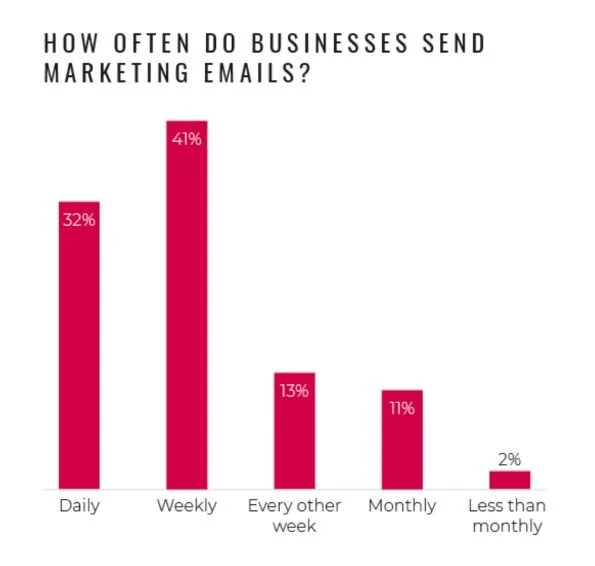
If you contact your customers on rare occasions, they can forget you. This does not mean, however, that you should send your promotional materials as frequently as possible. Focus on the value of your messages: make them worthwhile for your audience, but not aggressive. This is the best way to avoid email going to spam.
Forbes confirms that excessive email frequency creates immediate subscriber fatigue, making it critical to systematically test your send cadence. Conduct similar tests; frequency sweet spots differ widely between apparel flash sales and enterprise SaaS.
10. Text: Accuracy, Grammar, and Spelling
Proofread your emails before sending them. Make sure the subject and title match their content. Get rid of errors of all sorts – grammatical, lexical, punctuation. It will keep you from unforgivable mistakes.
Today, many companies send high-quality, valuable, and relevant content to their subscribers, so your customers are less likely to excuse your mistakes, even minor ones. Thus, it is up to you to make every message clear to subscribers, grammatically correct, and accurate. It will prevent your email from going to junk.
One more factor to be considered is that anti-spam algorithms monitor and detect unreadable content. If they see that the letter has many typos, they ruthlessly mark them as spam.
11. Links
As a rule, spammers use many links in their messages to make readers open at least one of them. Do not follow their example, or you will have to spend hours of guesswork on how to prevent emails from going to spam.
Instead, you may use a Call-To-Action button redirecting customers to your landing page. It will allow you to earn your subscribers’ confidence and avoid filters.
Use branded tracking domains. Raw bit.ly links scream spam to both algorithms and humans. Better: configure links.yourbrand.com/… so filters see consistent alignment.
12. Images and Media Content
Large images increase email loading time and impair deliverability. Besides, no one can guarantee that a subscriber’s email client will display such messages correctly. Thus, if you need an image to illustrate your text, take some time to cut out unnecessary elements, reduce its size, and preview it ahead of time.
Video and audio files should be placed on external web resources (instead of being sent as attachments), as they will reduce deliverability, too. If you want your subscribers to watch these materials, simply add a link to the page with them in the message.
Always include descriptive alt text. Not only does it help accessibility, but filters reward accessible HTML for good citizenship.
13. Personalization and Segmentation
Segment by behavior, demographics, and purchase history. Personalized content improves engagement, which tells filters to stop emails going to spam. Gartner confirms that deploying active, behavior-based personalization makes buyers 2.3 times more likely to complete a purchase.
14. Spam Testing Tools
Run a final preflight check with dedicated tools. If the score is too high, tweak and retest until clean. Document results so future writers know which phrases, layouts, or code snippets triggered issues.
What to Do If Your Emails Are Going to Spam
Finding yourself in the Junk folder is frustrating but not hopeless. Use this phased approach:
- Pause bulk sends. Continuing to blast only deepens negative reputation.
- Audit authentication and infrastructure. Fix SPF misalignments or DKIM key length errors.
- Clean the list. Run Email Validation API checks, then segment the “last 30-day openers.”
- Send a re-engagement series to that hot segment. Offer a preference center or loyalty reward; anything that encourages clicks and replies.
- Ramp volume slowly. Add colder segments in 10% increments, monitoring open and complaint deltas daily.
Stick with the process for two to three weeks and you should see gradual restoration. If not, consult with your ESP deliverability team; deep inbox placement tools can reveal hidden blocklist issues.
Conclusion
So, to recap: Choose a good transactional email service provider (like UniOne), keep your authentication tight, respect consent, test constantly, and provide value with every send. Do these things and you’ll never ask yourself “why is my email going to spam?” again.
Remember: how to prevent emails going to spam isn’t a one-time project – it’s an ongoing process that combines technical accuracy, thoughtful content, and user-centric strategy. Keep learning, keep iterating, and deliverability will follow.
Related Services
- UniOne’s transactional email service provider – lightning-fast, reputation-friendly delivery that scales from a few hundred notifications a day to millions of marketing messages an hour. Every plan includes real-time analytics, 24/7 live-chat support, GDPR compliance, and a visual template builder so your team can iterate without code.
- Email Validation API – real-time address checks that remove typos, catch disposable domains, and flag spam traps before they poison your list. By integrating the API at sign-up, senders see bounce rates fall by up to 98% and engagement climb within the first week.
- Email Testing – a browser-based suite that lets you preview, debug, and score messages against major spam filters. Use SMTP Proxy for live traffic diagnostics, Blackhole mode for safe load testing, and one-click reports to share results with developers or compliance teams.
FAQ
Why do my valid emails go to the Junk folder?
Legitimate senders can get filtered out if their reputation drops, their email authentication setup is broken, or their engagement drops off. React swiftly by reviewing complaint logs and seed-test results to identify the precise trigger.
How long does it take to improve sender reputation?
With daily list hygiene and gradual volume ramp-up, most senders see improvements within 2–4 weeks. Severely damaged domains may need 6–8 weeks plus a new sub-domain strategy.
What’s the best time to send emails?
Industry averages suggest weekday mornings, but be sure to test your particular audience. Higher engagement helps how to avoid email going to spam by signaling relevance.
Is it better to use a shared or dedicated IP?
Start on a managed shared pool; switch to dedicated once volume and expertise justify the extra responsibility. Whichever route you choose, monitor metrics constantly.