
 11 september 2026, 09:08
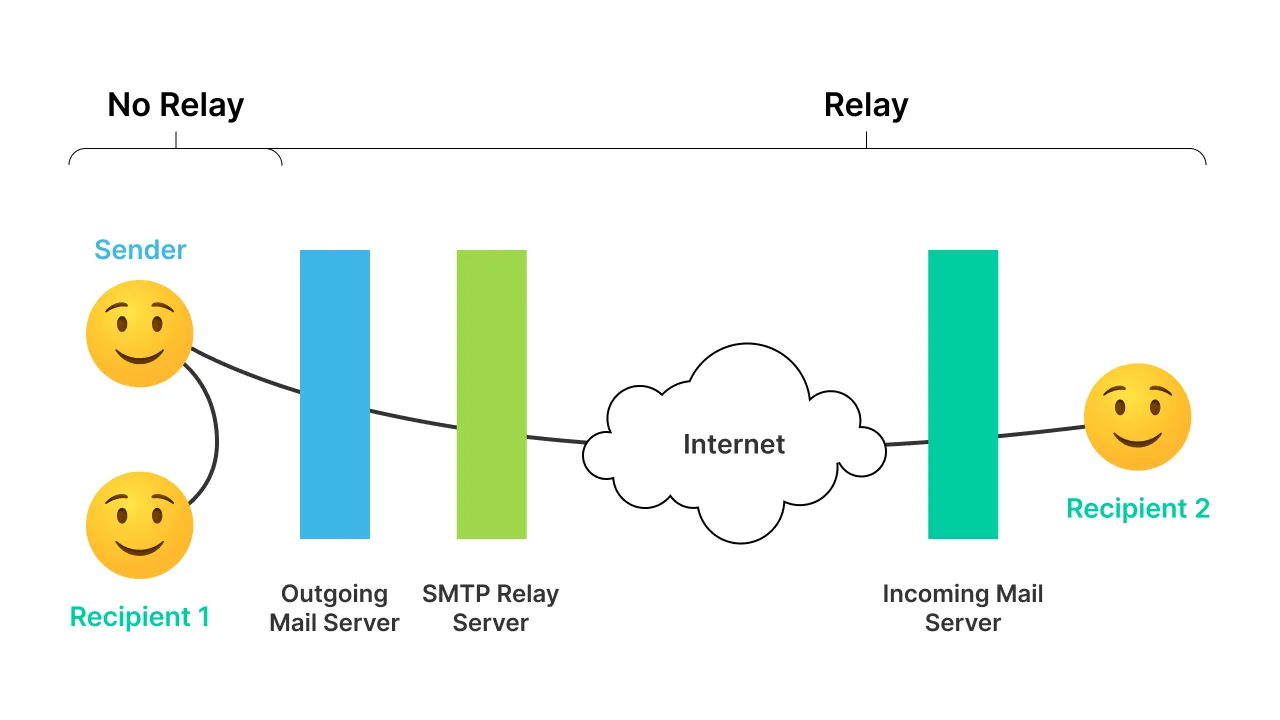
An SMTP smart host is an intermediary server that sits between a sender’s mail server and the recipient’s mail server, handling outgoing mail on the sender’s behalf. Personal and corporate mail systems use one to improve deliverability, simplify setup, or offload sending infrastructure entirely.

Typically, an email travels straight from the sender’s server to the recipient’s server. But when deliverability problems interfere with daily operations — or a sender just wants a simpler way to handle outgoing mail — routing through a smart host is a safer alternative to an unreliable direct-send path. Businesses redirect mail through a smart host whenever internal or external factors are blocking their normal delivery stream.
The sending server also doesn’t need to be fully configured for outbound delivery if it only ever talks to a smart host. This is why some companies run a single smart host — in-house or via a third party — as the central relay point for a number of lightweight “dumb hosts” across departments, cutting maintenance costs.
Smart Host vs. SMTP Relay: What’s the Difference?
The terms get used almost interchangeably, and the overlap is real: a smart host is a type of SMTP relay. The distinction that matters in practice is authentication and scope.
- SMTP relay is the general term for any server that forwards outbound mail from one system to another. It may or may not require authentication, depending on how it’s configured.
- Smart host specifically refers to a relay that requires authenticated senders and is typically used as the designated outbound path for a mail system, rather than one relay among several unauthenticated options.
If you’re evaluating a relay service more broadly — pricing, throughput, how the sending flow works end-to-end — see our guide to what an SMTP relay service is. This article focuses specifically on the authenticated, single-point-of-routing use case.
History of Smart Hosts
In 1982, as the number of connected computers grew, the Simple Mail Transfer Protocol (SMTP) was introduced to standardize how email is sent and received. Over four decades later, SMTP is still the foundation of how email moves across the internet.
One of the earliest challenges was simply finding the right destination server — DNS and MX records for email routing didn’t exist yet. Since no computer could easily locate every other computer on the network, open mail relays emerged: centralized servers that any internet user could point their email client to, with messages routed onward — often via other open relays — to their final destination.
These open relays were better at finding an efficient routing path than any individual machine could manage alone, which is how they earned the name “smart hosts.” They let individual systems skip maintaining their own directories and network maps.
Smart hosts started as a public service, but as spam took over the open internet, open relays quickly became part of the problem. Mail servers began blocking them outright, and the passage of the US CAN-SPAM Act in 2003 accelerated efforts to clean up email delivery industry-wide.
That shift changed what “smart host” means today: a non-open, authenticated mail relay, with safeguards in place specifically to stop spammers and scammers from abusing it.
What Exactly Does a Smart Host Do?
A modern smart host is a core piece of any setup that sends meaningful volumes of email. It typically provides:
- Mandatory authentication: unlike an open mail relay, it only lets verified senders relay mail through it.
- Higher sending limits: hourly or daily message caps are significantly higher than a typical ISP connection allows.
- Sender reputation management: it helps you maintain a positive sending reputation and avoid blocklisting without IP warming on your own infrastructure.
- Filtering and scanning: it checks attachments and message content for viruses, malicious scripts, phishing attempts, and other threats before relaying.
How Can a Smart Host Server Help You?
Beyond a higher deliverability rate, using an SMTP smart host service comes with a few concrete advantages:
Ease of Setup and Integration
The smart host manages every connection to recipient mail servers for you. Your application only needs to connect to the smart host itself, using standard SMTP. In practice, that’s a one-time configuration step: point your sending software or mail server at the smart host’s hostname, and supply your login, password, and port number.
Email Authentication
A smart host has built-in sender authentication, so only authorized senders can relay through it — improving both security and inbox placement. If you run multiple mail streams (say, a marketing platform and a transactional sender), you can consolidate them behind one smart host for unified authentication and allow-listing.
Reporting
Many smart host providers include analytics on your sending activity — deliverability, bounce, and engagement data in a dashboard, so you can monitor performance without building your own tracking.
How to Set Up a Smart Host (General Steps)
The exact steps vary by mail server or application, but the pattern is consistent across most setups:
- Get your smart host credentials. Sign up with a provider and generate an SMTP username/password or API key.
- Point your outbound mail config at the smart host. In an MTA like Postfix or Exchange, this means setting the relay host address; in an application, it means updating the SMTP host, port, username, and password in your mail-sending configuration.
- Choose a secure port and enable STARTTLS/TLS. Most providers support port 587 (submission with STARTTLS) or 465 (implicit TLS).
- Authenticate your sending domain. Add the SPF and DKIM records your provider gives you, and set up DMARC, so mail relayed through the smart host is verified as coming from your domain.
- Send a test message and check the logs. Confirm the message relays successfully and review any delivery or bounce reporting your provider offers before sending production volume.
Example: Using UniOne as Your Smart Host
UniOne’s smart host needs only four connection parameters, and they’re the same for any MTA or application:
| Parameter | Value |
|---|---|
| Host | smtp.eu1.unione.io or smtp.us1.unione.ioUse the one matching the region your account was registered in |
| Port | 587 or 465TLS 1.2+ only; unencrypted connections aren’t accepted |
| Username | Your user ID or project ID |
| Password | Your account API key or project API key |
In Postfix, for example, add these lines to /etc/postfix/main.cf:
relayhost = [smtp.eu1.unione.io]:587
smtp_sasl_auth_enable = yes
smtp_sasl_password_maps = hash:/etc/postfix/sasl_passwd
smtp_sasl_security_options = noanonymous
smtp_tls_security_level = encrypt
Then put your credentials in /etc/postfix/sasl_passwd:
[smtp.eu1.unione.io]:587 YOUR_USER_ID:YOUR_API_KEY
Run postmap /etc/postfix/sasl_passwd and reload Postfix. Every outbound message will now relay through UniOne. Before switching production traffic, you can check the session with the free SMTP Debug Tool or preview messages with Email Testing.
Ready to try it? Create a free UniOne account, and your SMTP credentials are available as soon as your domain is verified.
Why You Might Need an SMTP Smart Host Service Provider
A few common scenarios where a smart host earns its place:
Sending High Volumes of Email With Good Deliverability
Even with good intentions, it’s hard to avoid spam blocking without a strong sender reputation for both your domain and your server’s IP. A smart host routes your campaigns through infrastructure with an established, positive IP reputation, so volume alone doesn’t sink your deliverability.
On-Premise Spam Filter Leak
If an on-premise spam filter develops a leak that lets outgoing spam through unnoticed, spam volume can quickly overwhelm legitimate mail and tank your deliverability. Routing through a smart host lets you bypass the damaged system entirely while the underlying issue gets fixed.
Wrapping Up
Email management has to keep evolving to protect users from spam, fraud, and identity theft. Whether you’re sending transactional, promotional, or personal email, a bad IP reputation or a malfunctioning mail system can quietly break your deliverability. A smart host relay service gives you a way to route around that problem instead of fighting it from scratch.
If you’re ready to route outbound mail through a smart host, UniOne’s SMTP service connects in minutes with the settings shown above, and the Email API is there when you need higher volumes or programmatic sending. Sign up for free to get your credentials, or compare plans on the pricing page.
FAQ
Is a smart host the same as an SMTP relay? Not exactly — a smart host is a specific, authenticated type of SMTP relay used as a system’s designated outbound path, rather than any general relay server. See SMTP relay explained for the broader concept.
Do I need a smart host if I only send a few emails a day? Probably not. Smart hosts earn their keep at volume, or when you’re actively fighting deliverability problems (blocklisting, a damaged on-premise filter, poor IP reputation) that a direct-send setup can’t solve on its own.
What ports does a smart host use? Most modern smart hosts support port 587 with STARTTLS or port 465 with implicit TLS; port 25 is increasingly blocked by ISPs for outbound submission.