
 26 october 2026, 12:35
Key takeaways
• What to send: A small store emails customers about orders, payments, shipping, refunds, accounts, and form requests. Whoever packs the orders gets a separate alert.
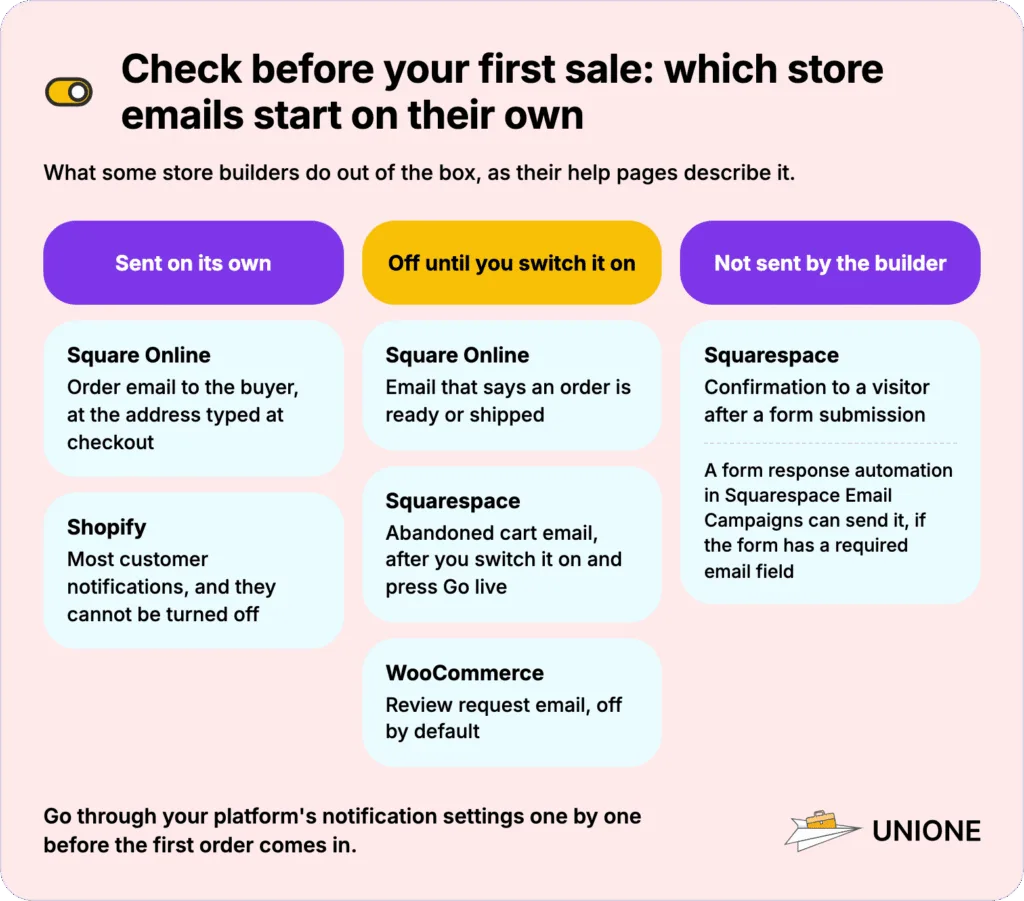
• Check your builder’s defaults: Some emails go out on their own, and others stay off until you switch them on. Your builder may not send any reply to a form at all.
• Late orders: When an order cannot ship on time, the customer needs an email with a new date and a choice to cancel.
• Delivery: Shopify lets you send order emails from your own domain with SPF, DKIM, and DMARC; Wix and Squarespace send from their own addresses, and on WooCommerce you set up the sending yourself. Replies should go to a person.
What Are Transactional Emails for an Online Store?
An order confirmation, a shipping notice, or a refund receipt is a transactional email. It goes to one customer because of something they bought or asked about.
Customers expect these emails, and when one is missing, they write to your support team or dispute the charge with their bank.
Newsletters and discount campaigns are marketing, even when they go to the same customers. Abandoned cart reminders count as marketing too, even though a shopper’s action triggers them.
Which Transactional Emails Does a Small Online Store Need?
The first rows follow a single order, starting with the confirmation; account and form emails come after them. The last row, the abandoned cart email, is the one marketing message on the list. Most rows describe emails that Shopify, Wix, Squarespace, WooCommerce, and Square Online send or let you switch on. All of them are documented in the platforms’ own help pages; the delay notice comes from US shipping rules.
Start from the order emails your builder already has, and keep your own transactional email templates for the ones it lacks.
| Trigger · recipient | What to include | When to send | |
| Order confirmation | Checkout completed · customer | Order number, items with quantity and price, total, shipping address, delivery method and ship date, payment method | Immediately |
| Payment received or failed (delayed payments) | A bank or other delayed payment clears or fails · customer | Amount, payment method, link to pay another way | When the payment result arrives |
| New order alert | Order placed · owner or staff | Customer, items, delivery method, order link | Immediately |
| Digital download | Digital item paid · customer | Download link, link lifetime, what to do if it expires | With the confirmation |
| Shipping confirmation | Order fulfilled · customer | Carrier, tracking link, expected delivery date | When the parcel leaves |
| Ready for pickup | Order packed for pickup · customer | Address, opening hours, what to bring | When the order is ready |
| Shipping delay notice | Promised date cannot be met · customer | New date, keep or cancel option | Before the promised date |
| Order canceled | Order canceled by store or customer · customer | Canceled items, refund or not | Immediately |
| Refund confirmation | Refund issued · customer | Amount, card or account, expected timing | When the refund is issued |
| Customer account emails | Sign-up, sign-in, reset, or change · account holder | Link or code, lifetime, what to do if not them | Immediately |
| Form submission confirmation | Form sent · visitor (copy to owner) | Copy of the request, reply time, contact | Immediately |
| Abandoned cart (marketing) | Checkout left unpaid · shopper who gave an email | Cart items, return link, unsubscribe link | After a delay you choose |
Before your first sale, open your platform’s notification settings and go through these emails one by one, noting which are on, which are off, and which your platform lacks.
Which Emails Should a Customer Get After Placing an Order?
After checkout, the customer gets an order confirmation, which doubles as the receipt if the platform sends no separate one. With a bank payment or another slow method, a second email later tells the customer whether the payment cleared. Buyers of a digital file also get a download link, and your staff receives a new order alert as soon as the order is placed.
Order Confirmation Email
You send an order confirmation the moment checkout succeeds. It is the email customers search for when they want to check what they bought.
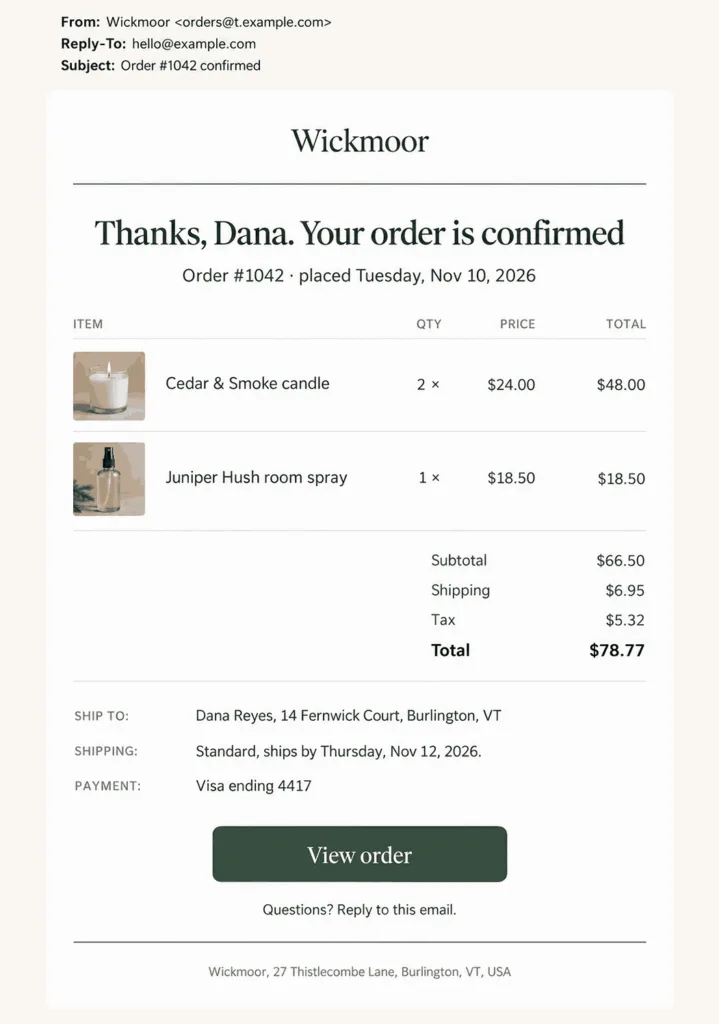
Along with the order number and total, include the details that save a support message later:
• Quantity and price next to each item
• The shipping address exactly as the customer typed it, which gives them a chance to catch a typo before the parcel leaves
• The delivery method the customer chose and the date you expect to ship
• The payment method, shown as the last four digits of the card
Keep discount banners and “you may also like” blocks out of a receipt. A customer looking for an order number shouldn’t have to scroll past an offer, and Google’s sender guidelines also advise against mixing content types in one message.
Payment Receipt and Failed Payment Email
Your platform sends a failed payment email when a bank payment, a direct debit, or another method that takes days to clear does not go through. A card declined at checkout usually stops on the payment page, where the shopper sees the error and tries another card. A bank payment, by contrast, looks fine at checkout, and the shopper believes the order went through until this email arrives.
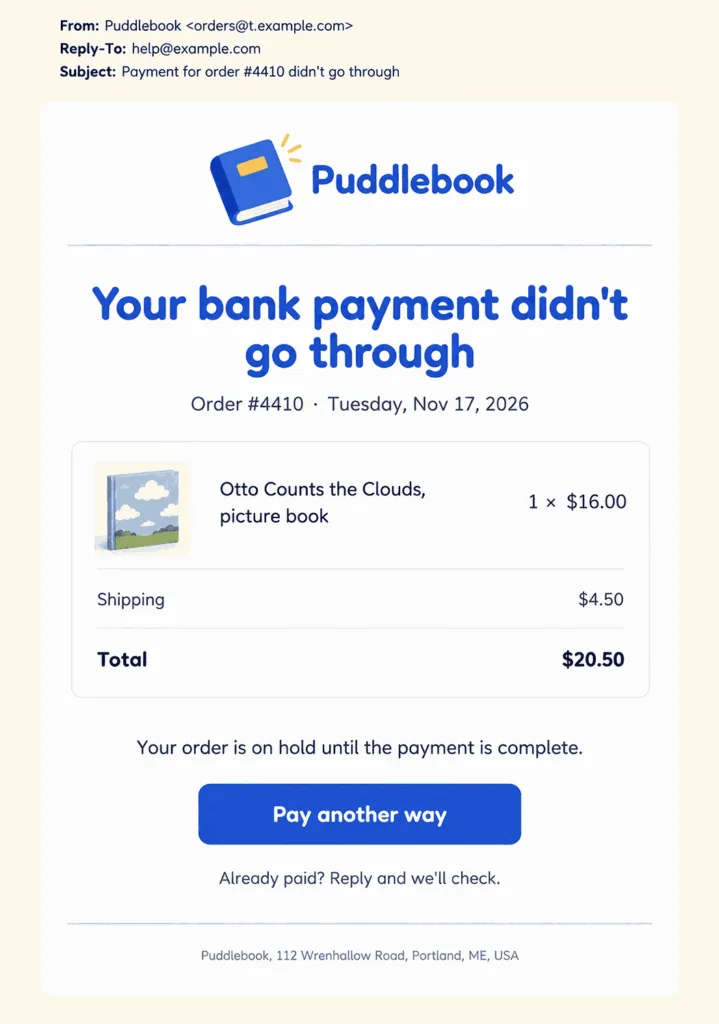
Alt: Example declined bank payment email from a small online store with the order on hold, the order total, and one Pay another way button
Shopify sends “Pending payment error” when such a payment cannot be processed, with a link to pay again. In WooCommerce, an order paid by direct debit stays On hold while the payment is confirmed and moves to Failed if it is rejected. The customer then gets a “Failed order” email asking them to try another payment method, and the owner can send the order details with a payment link by hand. Whichever platform sends it, the email should say what happens to the order next and give one clear way to pay.
On Squarespace, a US bank (ACH) payment stays “in progress” for four to five business days. Squarespace first sends an “Order confirmed – payment in progress” email, then “Payment successful” or “Payment declined” once the bank payment goes through or fails. Squarespace offers ACH only in the US and only for orders of $250 or more, so a store with small orders may never send these emails.
New Order Alert for Your Staff
The person who packs orders needs a separate email for each new order, sent to an inbox someone checks every day. A shared mailbox that also collects supplier invoices and newsletters is where new orders get buried for a day or two.
In WooCommerce, the “New order” email goes to the recipients you choose. If you leave the Add Reply-to email option off, WooCommerce uses the customer’s address as the Reply-to in its New order, Cancelled, and Failed emails. Hitting Reply then goes straight to the buyer.
Digital Download Email
For a digital product, the download email is how the customer receives what they paid for. The link has to work on the first click. State how long the link stays valid, because customers often download the file later on another device.
Squarespace sends a new link automatically when a customer clicks an expired one. If your builder doesn’t, tell customers in the email how to ask for a fresh link. A reply address or a short form is enough.
Which Shipping and Pickup Emails Do Customers Expect?
Shipping Confirmation Email
The shipping confirmation goes out when the parcel leaves, and the tracking link should be the most visible thing in it.
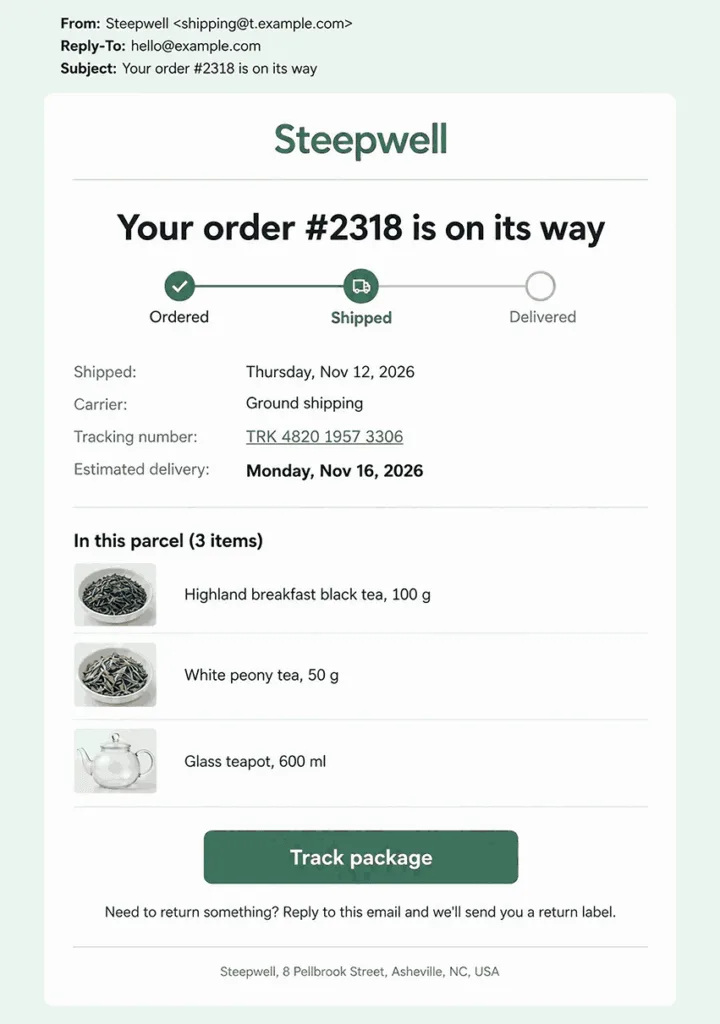
A shipping email helps only when one system sends it. If a store builder and a shipping app both email the customer about the same order, two messages arrive with different tracking numbers. Choose which of the two sends it and disable the shipping email in the other.
For instance, Shopify sends a “Shipping confirmation” when an order is fulfilled and a “Shipping update” when the tracking changes. Its “Out for delivery” and “Delivered” emails follow tracking events from the carrier. Most Shopify customer notifications are sent automatically and can’t be turned off. The exceptions are these shipping emails and the order canceled and refund emails.
On Square Online, buyers automatically get an email about their order at the address they typed at checkout. The seller has to enable the email that says an order is ready or shipped.
Ready for Pickup Email
With local pickup, the customer’s next step is coming in to collect the order. Instead of a tracking link, the pickup email gives directions, opening hours, and what to bring.
Send it only after the order is packed and set aside. A customer who comes in because the email arrived too early ends up waiting at the counter while you put the order together. If you ask for an ID or the order number at pickup, put that in the first line, where the customer will see it before setting out.
Shipping Delay Notice
The delay email should reach the customer before the promised ship date passes, while they still have time to decide whether to wait.
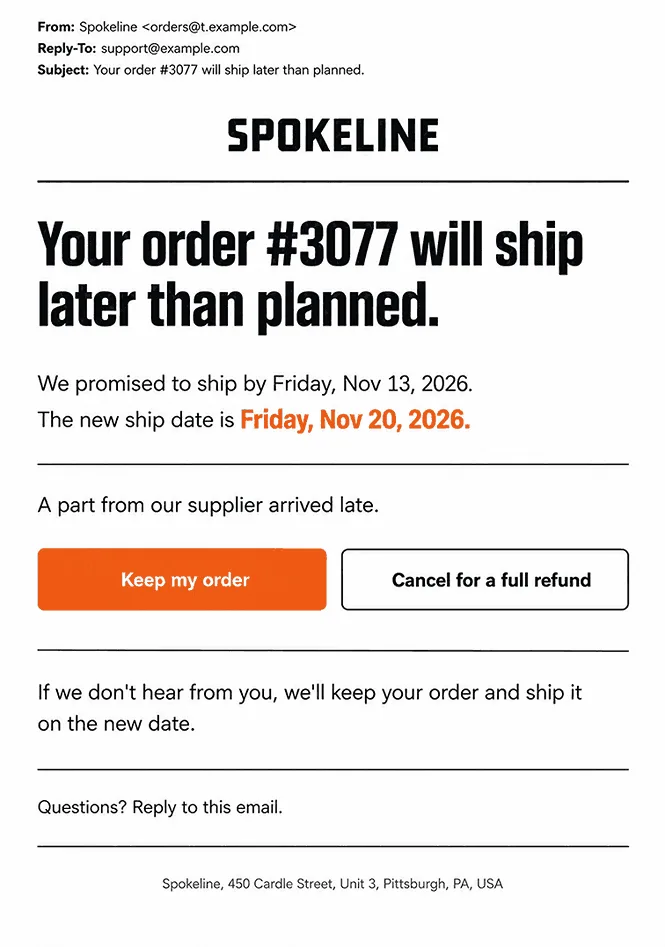
In the US, a seller has to ship by the promised date, or within 30 days if no date was given. A seller who cannot must tell the buyer before that deadline and offer a choice: wait or cancel for a prompt refund. Email is an accepted way to do it.
A changed status on your site is easy to miss, because few customers open an order page without an email linking to it. If you do not know the new date yet, say what you are waiting for and when you will write again.
Which Emails Cover Cancellations and Refunds?
Cancellation and refund emails need exact amounts. Once an order is canceled or refunded, customers check their bank statement against the figures in your email.
Order Canceled Email
A cancellation email works best when it arrives before the customer notices the order is gone, whether the store or the customer canceled it. If an item went out of stock, you should say so plainly and offer a similar item or a restock date if you have one. When the order was already paid, put the refund amount in the same email.
Customers who get a bare “Your order was canceled” may suspect a payment problem or fraud and call their bank. In a partial cancellation, list the items that are still coming: the customer still expects a parcel with them.
Refund Confirmation Email
Money returned to a card does not show up the same day. Until it appears, the refund email is the customer’s proof that you sent the money back.
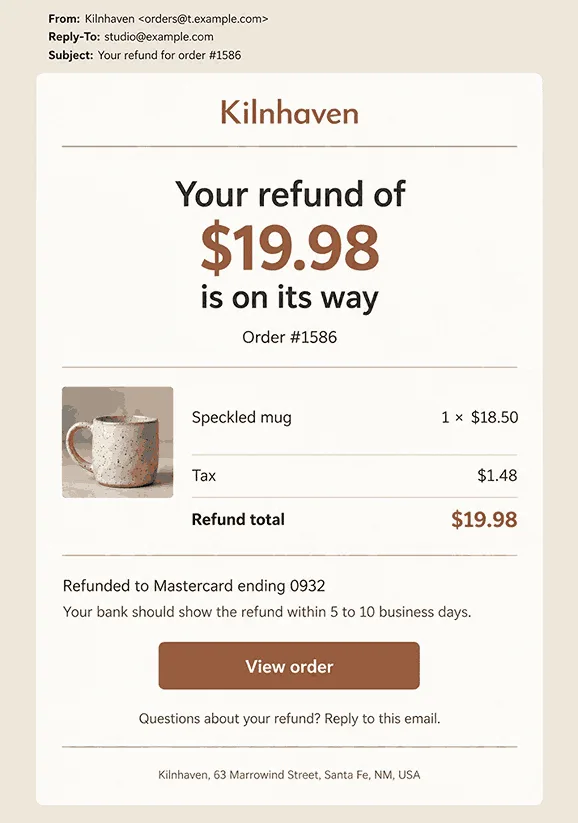
State a realistic range for when the money should appear, even though the bank sets the exact day.
The customer may also get a separate email from the payment provider. Wix points this out next to its own “Refund confirmation” email, which lets you add a personal note. Use that note to say which items the refund covers. Otherwise the two emails can look like two different refunds.
Which Account and Form Emails Does a Store Need?
Customer Account Emails
Stores with customer accounts send a short set of security emails: a welcome or verification link, a password reset, and a change notice. Squarespace keeps reset links valid for 24 hours. It also sends separate “Password updated” and “Email change” notices, which warn account owners about changes they did not make.
Keep promotions out of all of them, including a sign-up discount in the verification email.
Form Submission Confirmation
A visitor who sends a quote or booking request through your site should get an email right away. Without it they cannot tell whether the form worked, and some will send it again or ask another shop.
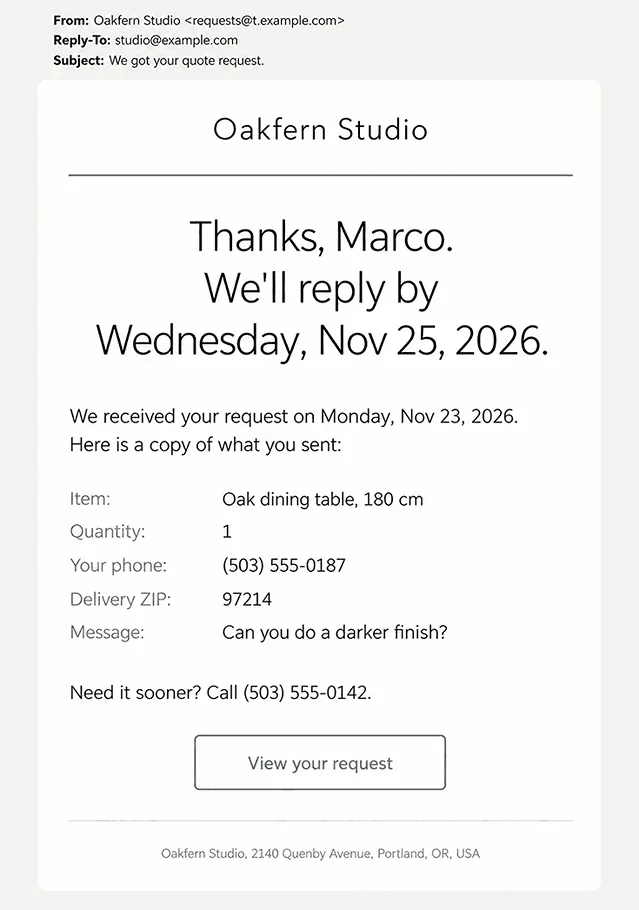
Catalog sites and service shops often get more quote requests than orders. In the confirmation, repeat what the visitor wrote in the form. If they mistyped their phone number or address, they can correct it before you try to reach them.
Squarespace does not send visitors a confirmation after a form submission. If you use Squarespace Email Campaigns, a form response automation can email the visitor, as long as the form has a required email field. Wix automations can do the same if the form asks for the visitor’s email address. If your builder has no form reply at all, look for a form integration or an automation in its app market. Whatever sends the reply, fill in the form once with your own address and check that the email arrives and repeats your request correctly.
Is an Abandoned Cart Email Transactional or Marketing?
An abandoned cart email is marketing: it asks a shopper to come back and buy, so it needs an unsubscribe link. It goes to someone who entered an email address at checkout and left without paying.
Builders time it differently. Shopify counts a checkout as abandoned when it stays incomplete for more than ten minutes after the shopper enters an email address. A separate “Send after” setting decides how long after that the email goes out. Squarespace sends its recovery email 24 hours later, only once you enable it and press Go live, and the email carries an Unsubscribe link you cannot remove.
Send your first abandoned cart emails without a discount, so shoppers do not learn that leaving a cart earns a coupon. Discount reminders and follow-up series belong with your newsletters as part of ecommerce email marketing.
How Do You Keep Store Emails Out of Spam?
Spam filters check the sending domain and the mix of content before a customer sees the email. You decide what goes into each email, and some platforms also let you send from your own domain.
Send From Your Own Domain
Order emails sent from your shop’s own domain let you set up SPF, DKIM, and DMARC under your own name. Not every builder allows it. Shopify lets you authenticate your domain as the sender; without that, it rewrites the sender to an address on shopifyemail.com. Wix Stores sends from [email protected] and lets you change only the sender name, and Squarespace recommends keeping its default From address. On such a platform, a clear sender name and a working contact inside the email matter more than the address.
Google asks every sender to authenticate email with SPF or DKIM and to hold the spam rate under 0.3%, ideally under 0.1%. Anyone sending Gmail users more than 5,000 messages a day needs all three: SPF, DKIM, and DMARC.
WooCommerce sends email through your own WordPress site. Its email troubleshooting guide advises signing up with a dedicated SMTP provider, connected through an SMTP plugin, because that is more reliable than your server’s own mail function. UniOne is one such service: it connects to WooCommerce over SMTP, sends order emails from your domain, and shows which ones bounced. When emails land in spam, check the sender domain before rewriting the text.
Separate Order Emails From Newsletters
Order emails and newsletters are easier to tell apart when each has its own sender address. Google’s guidelines also ask for one consistent From address per category of message. An address such as orders@ on your domain tells the customer what an email is about before they open it. A customer who filters out your newsletters still sees the receipt.
No unsubscribe link is needed in order, shipping, and account emails, while bulk senders must offer one-click unsubscribe in marketing and subscribed messages.
Let Replies Reach a Person
Customers reply to order emails with questions about sizes and delivery addresses. Point the Reply-To address at a support inbox someone monitors. A no-reply sender works only if the email names a working contact, such as a support address or a phone number next to the order details.
In busy weeks, check that inbox more often, because a wrong delivery address can be fixed only before the parcel ships.
Which Website Builders Do Small Stores and Catalog Sites Use?
The emails in this guide all start with an event on the store’s site, such as an order, a payment, or a form someone filled in. Where that event is recorded depends on how the site is built: on a store platform, a website builder, a WordPress plugin, or a spreadsheet catalog.
| Platform | Built around | What the site takes in |
| Shopify | A full online store with its own checkout | Orders, payments, fulfillment, refunds, customer accounts |
| Wix | A website builder with store, bookings, and forms | Orders, payments from the Core plan, bookings, form submissions |
| SpreadSimple | A Google Sheet that holds products and prices | Orders through an order form; Stripe and PayPal from the Business plan; cash on delivery on every plan; lead forms |
| Squarespace | A website builder with an online store and form blocks | Orders for physical, digital, and service products; payments, including US bank (ACH) payments; form submissions; customer accounts |
| WooCommerce | An open-source store plugin on your own WordPress site | Orders; payments through the gateways you add, including delayed methods such as direct debit; refunds; customer accounts |
| Square Online | An online store connected to Square Point of Sale | Orders for shipping, in-store pickup, and local delivery |
Shopify
Shopify runs the whole order cycle in one admin, from checkout to fulfillment and refunds, on a store you build from a theme in a visual editor. Customer accounts let shoppers sign in with a one-time 6-digit code instead of a password, so there is no password to reset. If you take payments through a provider other than Shopify Payments, a third-party transaction fee may apply.
Wix
Wix puts a store, online bookings, and forms on one site, which you build in a drag-and-drop editor. A small business that sells products and also takes appointments can run both from one website. Building the site costs nothing, but to charge shoppers online you need a paid plan, starting with Core.
SpreadSimple
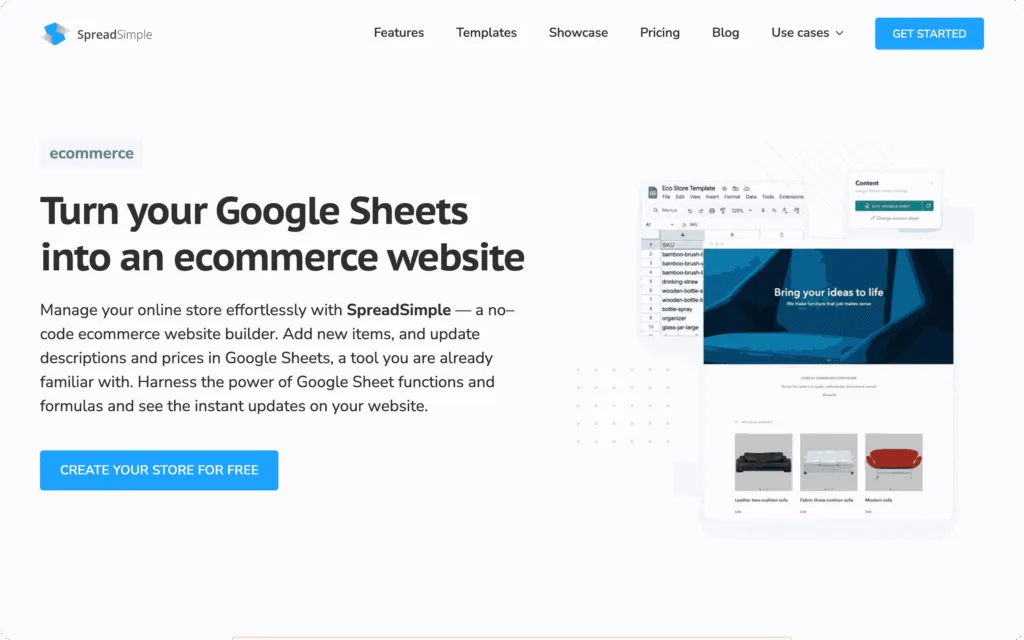
SpreadSimple turns a Google Sheet into a website. Products and prices live in the sheet, and edits reach the site automatically, so changing a price means editing a cell. Orders come through an order form with fields you set, and lead forms collect requests. Cash on delivery works on every plan, live Stripe and PayPal payments start with the Business plan, and the Free plan limits the sheet to 50 rows.
Squarespace
Squarespace starts the store from a template and lets you add form blocks to any page. The site sells physical goods, digital downloads, services, and subscriptions, and keeps customer accounts. New form submissions go by default to the account email of whoever added the form. Every site begins with a 14-day free trial. Any paid plan can sell, but ecommerce features differ between plans, so check which one covers what your store needs.
WooCommerce
WooCommerce is an open-source plugin that adds a store to a WordPress site you host yourself. Orders, refunds, and customer accounts are built in, and payments arrive through whichever gateway you install, direct debit included. WooCommerce is free to download and use, while hosting and any paid extensions are separate costs you choose. Setup and updates stay with you, which suits an owner who already runs WordPress.
Square Online
Square Online works as the web storefront of Square Point of Sale, so sales at your counter and on the site stay in sync. Customers order for shipping, in-store pickup, or local delivery, and inventory is tracked across locations and sales channels to avoid overselling. The Square Free plan has no monthly fee, only a processing fee on each sale. Square Online makes the most sense for a shop that already takes payments in person with Square.
Conclusion
Order confirmation, shipping, and refund emails are the ones to finish before launch. A test order that you ship and then refund shows which of them actually reach the inbox. On WooCommerce, place that order after the SMTP plugin is set up, so the emails you check leave the same way real ones will. If you accept bank payments or other slow methods, preview the failed payment email in your notification settings: Squarespace can send a test email, and Shopify shows a preview of “Pending payment error”. An abandoned cart email can be added after launch. The shipping email has to work from the first order, because it carries the tracking link.
FAQ
Should a Small Store Send a Review Request After Delivery?
Yes, but count it as marketing: it asks the customer for something instead of reporting on the order. Give the parcel time to arrive before you ask. WooCommerce’s review request email, for example, is off by default and, unless you change the delay, goes out 7 days after an order is completed.
Can I Edit the Order Emails My Store Builder Sends?
Most builders let you change the wording and the logo, but not every email. Squarespace does not let you edit the email that tells a customer a refund on a bank (ACH) payment has started. When an email cannot be changed, put the missing details on the order page it links to.
Should Order Updates Go by Email or Text Message?
Email carries the full order and the tracking link, so it stays the main channel. Text messages suit short status changes, such as an order being ready for pickup, and some builders can send them next to the email.