
 25 october 2026, 11:09
Key takeaways
• Account emails: Email verification, sign-in codes and magic links, security change notices, leaked key alerts, and team invitations control who can access an account.
• Warnings before a deadline: Token expiry, domain and certificate renewal, and deprecation emails go out in several steps that come closer together as the date nears.
• Failure alerts: Build, error, webhook, and incident emails say what broke and link to the log, issue, endpoint settings, or status page.
• Billing and delivery: Usage alerts start at a threshold below the limit, and all service mail comes from one authenticated subdomain.
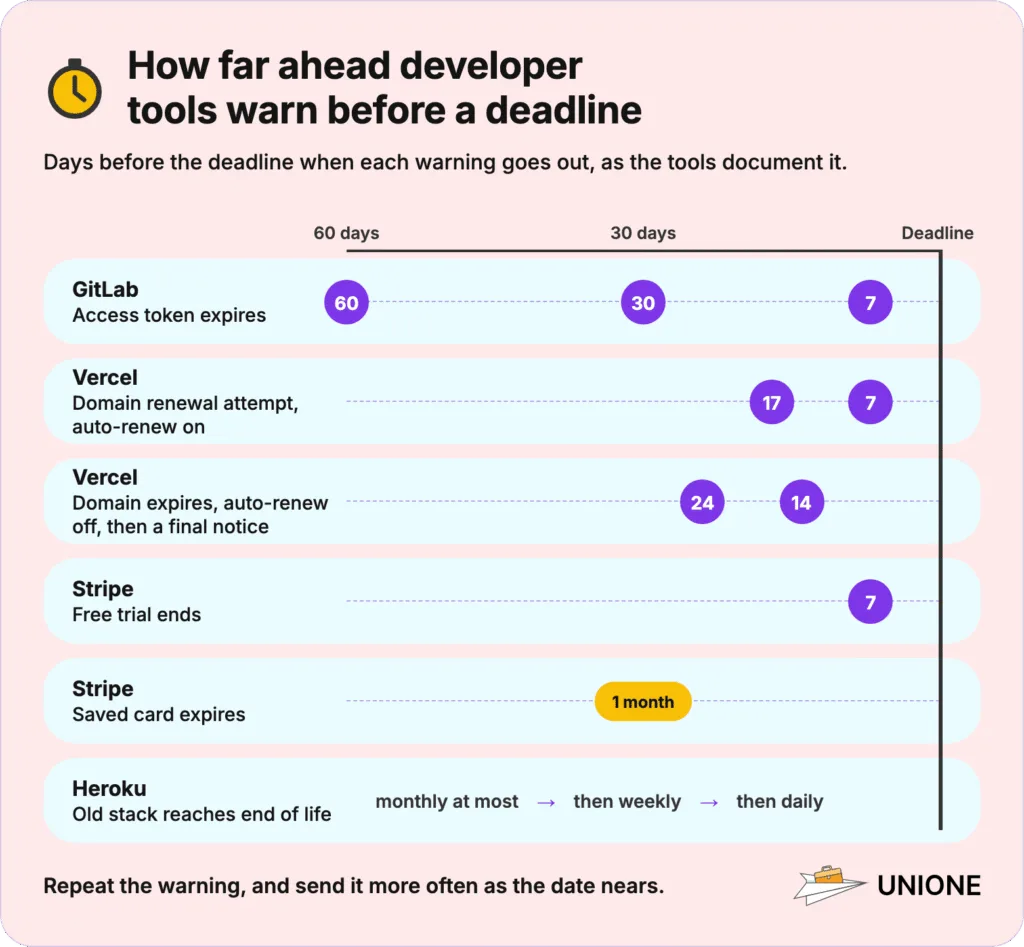
Since version 17.7, GitLab emails the owner of a personal access token 60, 30, and 7 days before it expires. If the owner misses those emails, the scripts and CI jobs that use the token start failing on the expiry date.
Most service mail in a developer product does one of two things: it gives a developer time to act before something breaks, or it reports a failure and points to the fix.
What Are Transactional Emails in a Developer Tool?
A transactional email in a developer tool is one your product sends because a developer did something or their account changed. Sign-in codes, failed build notices, and usage warnings are typical examples. Each one concerns your user’s own account or bill. Your users expect these emails and often have to act on them within minutes or days. A sign-in code that arrives late leaves a developer stuck on your login screen.
Product newsletters and webinar invitations count as marketing even if every recipient already uses your product. An alert or a receipt that also promotes a new feature risks being treated as marketing. Announce new features in separate emails.
Which Transactional Emails Does a Developer Tool Need?
Fourteen emails cover a typical developer product, from the first verification code to the deprecation notice for an old runtime. We built the list from what GitHub, GitLab, Vercel, Sentry, Stripe, Heroku, WorkOS, and Atlassian Statuspage document in their notification settings and help pages.
| Trigger · recipient | What to include | When to send | |
| Email verification | Sign-up or address change · new address | Link or code, who asked, what to do if not them | Immediately |
| Sign-in code or magic link | Login from a new device or passwordless login · account owner | Code or button, lifetime, device and location | Immediately |
| Security change notice | Password, SSH key, or 2FA change · account owner | What changed, when, device, link to secure the account | Immediately, always on |
| Leaked secret alert | Key found in public code · key owner | Which key, where found, revoked or not, how to replace | As soon as it is found |
| Team invitation or role change | Invite sent or role changed · invited or affected member | Inviter, organization, role, accept link, expiry | Immediately |
| Token expiry | Expiry date approaching · token owner or project maintainers | Token name, scope, expiry date, last use, regenerate link | In steps before expiry; on create, revoke, or rotate |
| Domain and certificate notice | Renewal or expiry approaching, or renewal failed · team owners | Domain, date, auto-renew status, action needed | Before renewal or expiry; on failure |
| Deprecation notice | Version or runtime retirement scheduled · accounts still using it | What is retired, date, what breaks, upgrade path | Repeating, more often near the date |
| Build or deployment failure | Build or deploy fails · person who started it | Project, branch and commit, failed stage, log lines, log link | On failure, and again when fixed |
| Error and anomaly alert | New, escalating, or returning error · project subscribers | What broke, where, event count, issue link | On trigger, with a repeat interval |
| Webhook failure notice | All retries for an event failed · team that owns the endpoint | Endpoint, event type, last error, failed payload, settings link | After the last retry fails |
| Incident and status update | Incident opened, updated, or resolved · status page subscribers | Status, affected components, next update time, status page link | At every status change |
| Usage and spend alert | Usage reaches a threshold · owner and billing | Threshold, usage against limit, what happens at 100%, settings link | At each threshold |
| Billing email | Charge, failed payment, trial end, card expiry · payer | Amount, reason, date, payment update link | On the event, or before it for reminders |
How Do You Find Every Email Your Product Already Sends?
Search your repositories for the send function and template IDs, and check the results against the table above before you build anything new. Older code often sends email that no one has documented. For a simple pattern, such as the name of your send function or your From address, grep or ripgrep in one repository is enough. When the codebase is large or several services send email, CodeAlive, Sourcegraph, and GitHub code search can look through many repositories at once.
| Tool | What it searches | Limitation | Pricing |
| CodeAlive | Whole codebases over MCP, with semantic search and a call graph | Free plan: 1 user, 25 MB of code; deep analysis from the Pro plan | Free plan; $15 or $50 monthly usage balance; self-hosted from $750 a month |
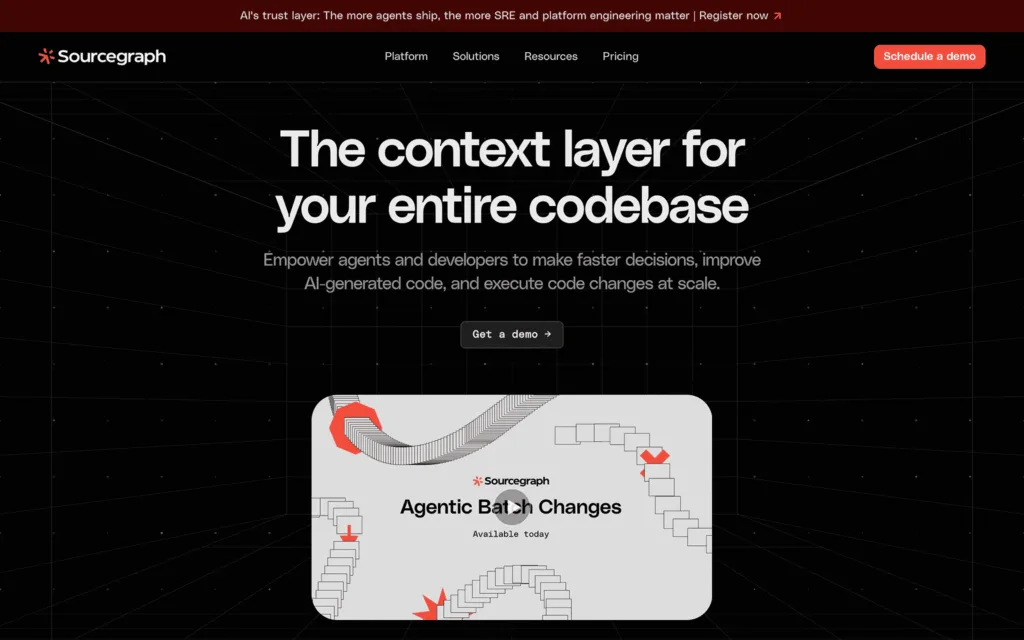
| Sourcegraph | All repositories of an organization, exact and regex search | Code Monitoring emails need mail set up on the instance | Enterprise from $16K, minimum annual contract |
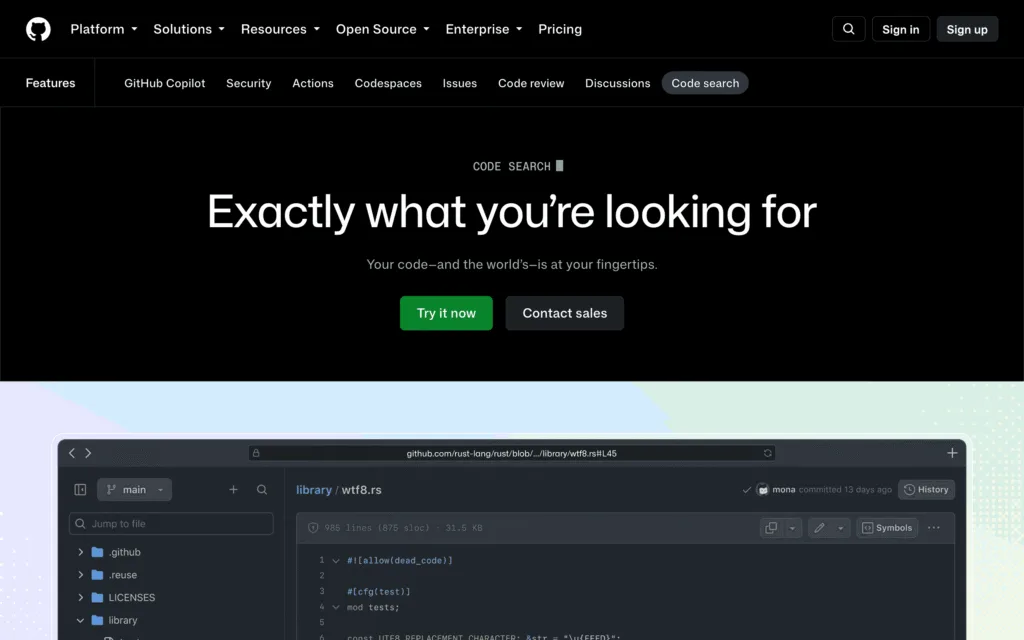
| GitHub code search | Repositories on GitHub, with regex, boolean operators, and symbol search | Default branch only; each search shows at most 100 results | Included with a GitHub account |
CodeAlive
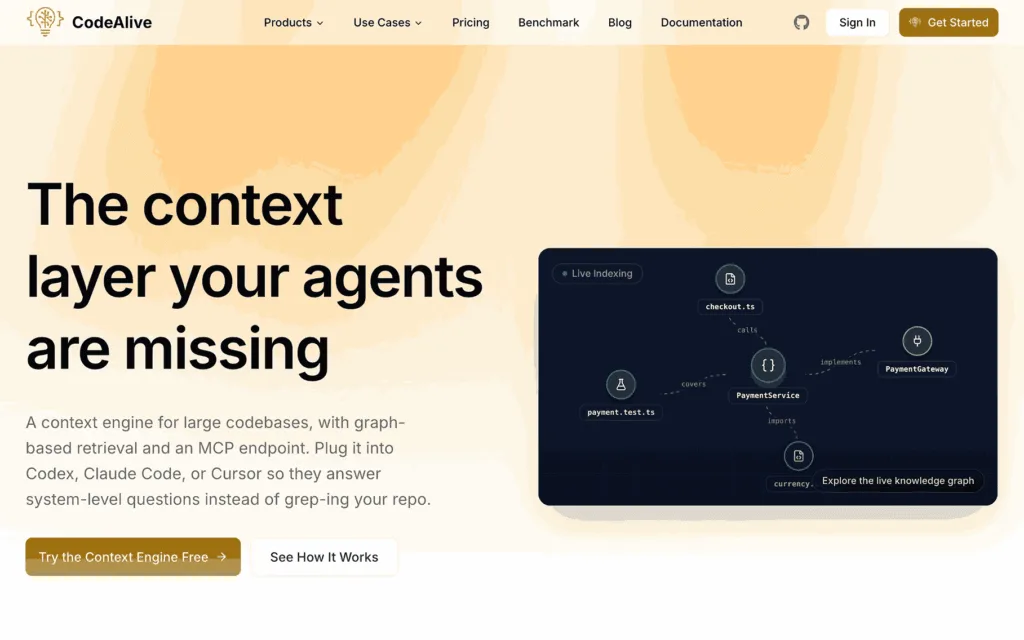
CodeAlive indexes code from GitHub, GitLab, and other Git hosts and makes it searchable for a coding agent over MCP. Its docs suggest asking it to find all places where a deprecated method is still called. Ask the same about your send function, and your agent can list the places in your code that call it.
Sourcegraph
Sourcegraph searches every repository an organization indexes, with exact phrase and regex queries. Code Monitoring reruns a saved search over every new commit and can email the monitor’s owner, so a send call added later gets noticed.
GitHub Code Search
GitHub code search is available to any team on GitHub, with regular expressions, boolean operators, and jumps to a symbol’s definition. A search for your template IDs lists the files that send mail, as long as the code is on the default branch.
Which Emails Protect a Developer’s Account?
The emails in this group protect access to an account. Anyone who takes one over can read its secrets and deploy code in the owner’s name. Security notices go to the account owner even for changes they made themselves, since only they can confirm the change was theirs.
Email Verification
Right after sign-up, send the new address a link or code that proves it belongs to your user. Send the same email whenever someone changes the address on an account. It’s a good idea to add a short line for people who never signed up, since a mistyped address sends the email to a stranger.
When the address changes, tell the old address too. Otherwise an attacker who has taken over a session could quietly move the account to their own mailbox. The real owner then learns about it only when they can no longer sign in.
Sign-In Code and Magic Link Email
You send a sign-in code when a developer logs in from a device you haven’t seen or chooses to log in without a password. The code should be the first thing they see, so leave onboarding tips and promotions out of your OTP emails.
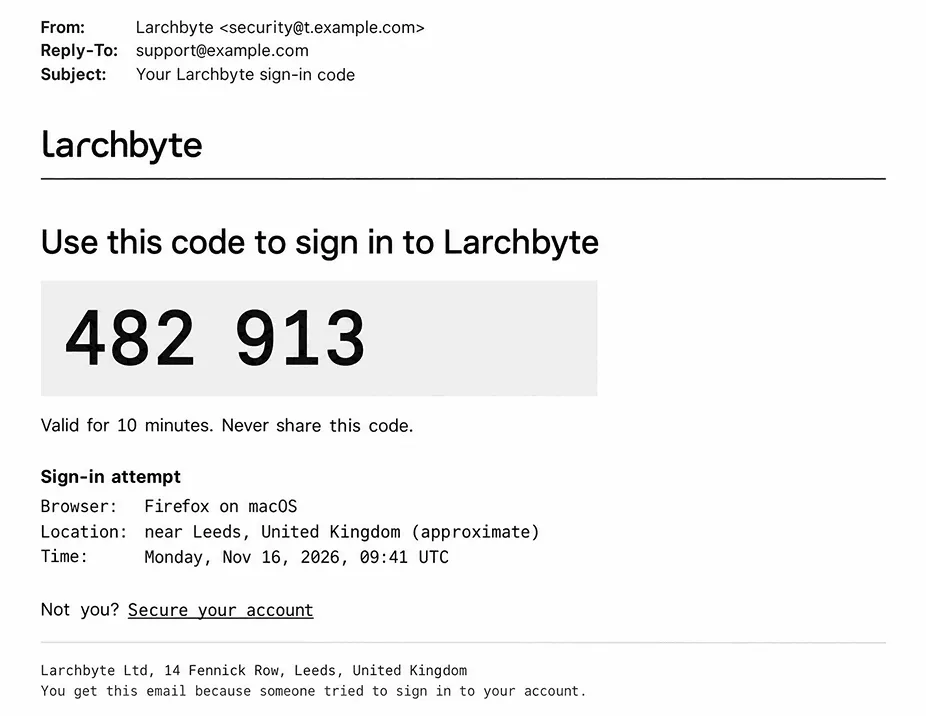
Each code email should include:
• The code in large type
• How long it stays valid
• The device and approximate location of the attempt
• What to do if it wasn’t them
If a code signs the user in on its own, keep it valid for a few minutes and accept it only once. Auth0 email codes expire after three minutes by default and WorkOS codes after 10, in line with OWASP’s advice to give one-time codes a short lifetime.
GitHub asks for a device verification code only after a correct password, when an account without two-factor authentication signs in from a new device. The code goes to every primary and backup address on the account. A magic link login email follows the same rules as a code email, with one button in place of the code. Corporate email security tools open links to check them, and Supabase warns that such a scan can use up a one-time sign-in link before the user clicks it. Let the link open a page with a button, and mark the token as used only when the user presses it.
Security Change Notice
Any change that could lock the owner out deserves an email right away, whether it’s a new password, a new SSH key, or two-factor authentication turned off. Add a link that lets the owner lock the account down if the change wasn’t theirs.
At GitLab, a changed password, a password changed by an administrator, a new or expired SSH key, and two-factor authentication turned off all trigger security emails that users can’t disable.
Leaked Secret Alert
When a key turns up in a public repository, its owner needs to know what was found and whether you have already revoked it. Put the steps for issuing a new key right in your email, since the developer’s next job is replacing the old one everywhere it was used.
Write your email as if someone else already has the key. GitHub’s secret scanning documentation advises treating any exposed secret as public and compromised, and through its partner program a provider can revoke the secret and notify the affected users.
Team Invitation and Role Change Email
An invitation should tell the invited developer who asked them, which team it is, and how long the link will work.
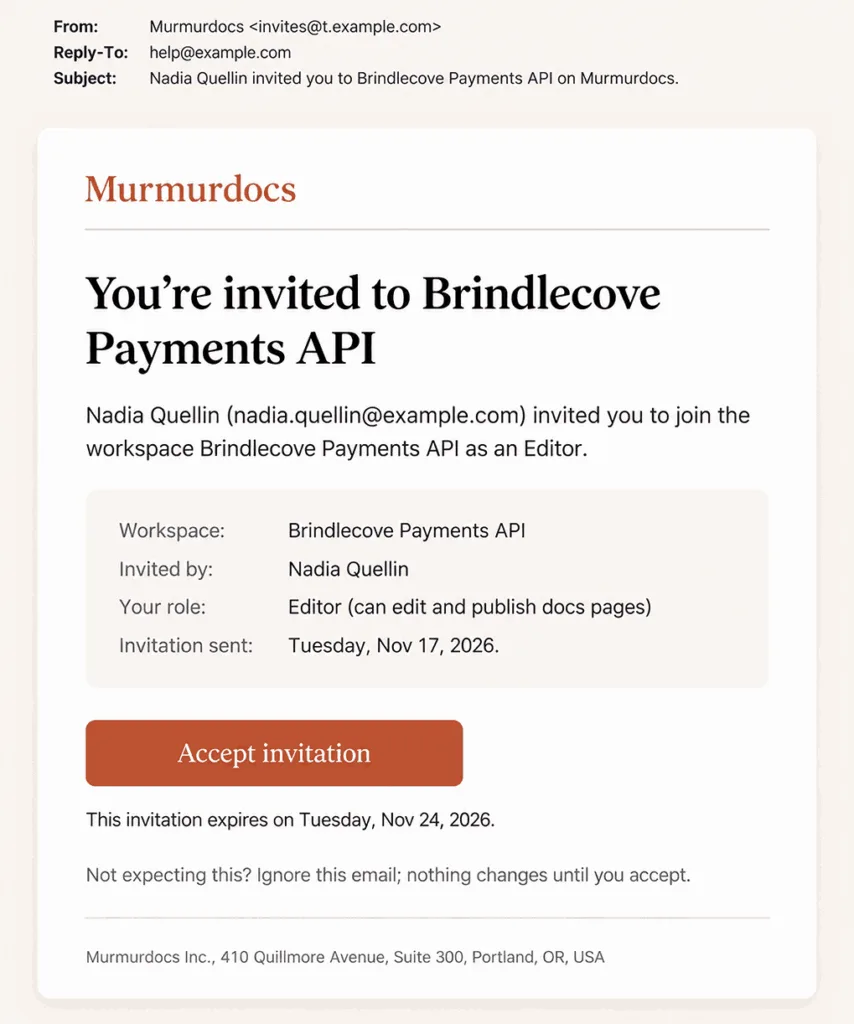
Add the role they’ll get and a single Accept button. On GitHub, an organization invitation expires automatically if nobody accepts it within seven days.
A role change needs its own short email with the new role, who changed it, and a contact. If you revoke someone’s deploy rights, tell them before their next deploy fails.
Which Emails Warn Before Something Expires or Breaks?
Credentials, domains, and old runtimes stop working on a fixed date, and every integration that depends on them fails at the same moment. Each email in this group names that date and the one action that prevents the failure.
Token Expiry Email
Warn the owner of an API key or access token more than once, starting weeks before it expires.
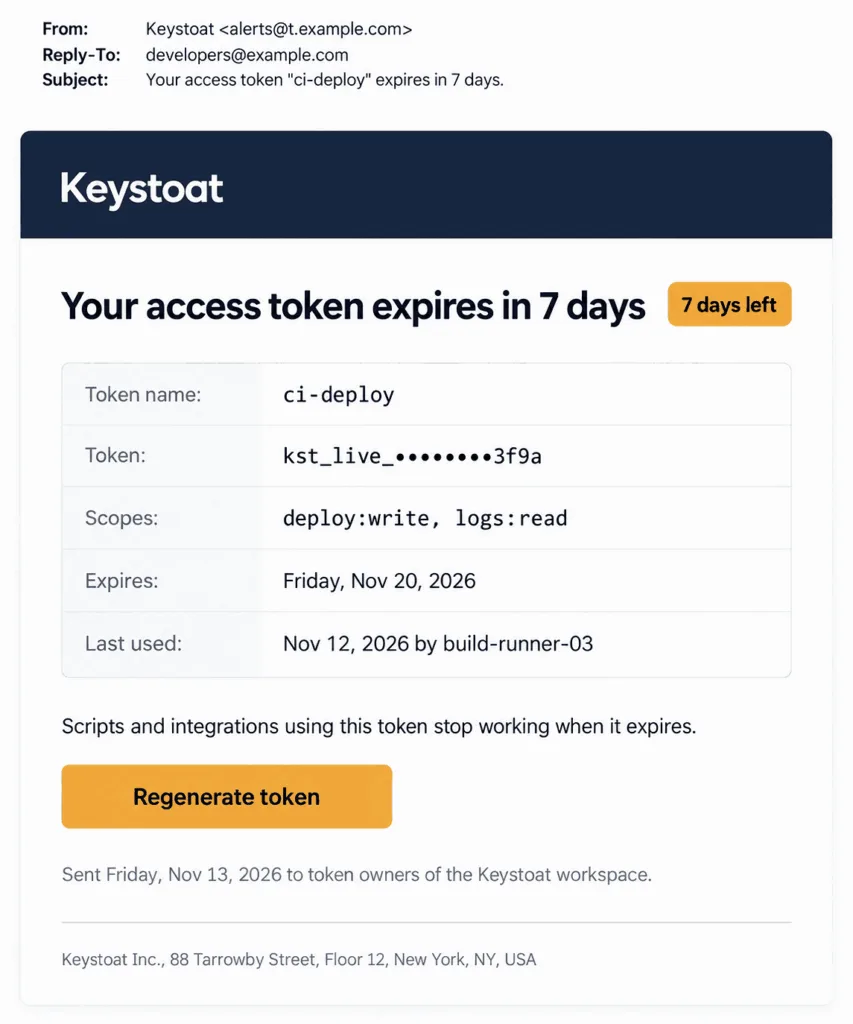
Your warning should carry:
• The token name
• What the token can access
• The expiry date and the days left
• When and where it was last used
• A link to regenerate it
Project tokens need a warning that doesn’t depend on one person. GitLab checks tokens daily and sends project token warnings to the project’s Owners and Maintainers and group token warnings to the group’s Owners, so the warning still arrives after the token’s creator leaves. When a token is created, revoked, or rotated, send its owner a short email too.
Domain and Certificate Notice
Email the team that owns a custom hostname or a TLS certificate before renewal, and again if renewal fails. A lapse takes your user’s site offline or behind a browser warning. If auto-renew is off, you should say so in the first line, because then the date in the email is the day the site stops working.
Vercel’s schedule depends on auto-renew. For a domain registered through Vercel with auto-renew on, team owners get emails 17 and 7 days before Vercel tries to renew it. With auto-renew off, they get emails 24 and 14 days before the domain expires and a final one when it does. A failed SSL certificate renewal gets an email of its own.
Deprecation and End-of-Life Notice
A deprecation email goes out when you schedule the retirement of an old runtime, API version, or stack, and only the accounts still using it should get one. Name the first thing that stops working after the date, and link to your migration guide or changelog.
Stop sending it to an account once that account has moved off the old version. Heroku sends its Heroku-22 warnings only about apps that still build on that stack, to their owners, admins, and collaborators. They come at most once per 30 days at first, then weekly, then daily.
Which Emails Report Builds, Errors, and Incidents?
Failure emails have different readers. A broken build matters to the developer who pushed the commit, and an error alert to the people watching a project. A webhook failure concerns the team behind the receiving endpoint, and an incident update reaches customers outside your team.
Build and Deployment Failure Email
Whoever pushed the commit or started the run should get this email while the change is still fresh in their mind.
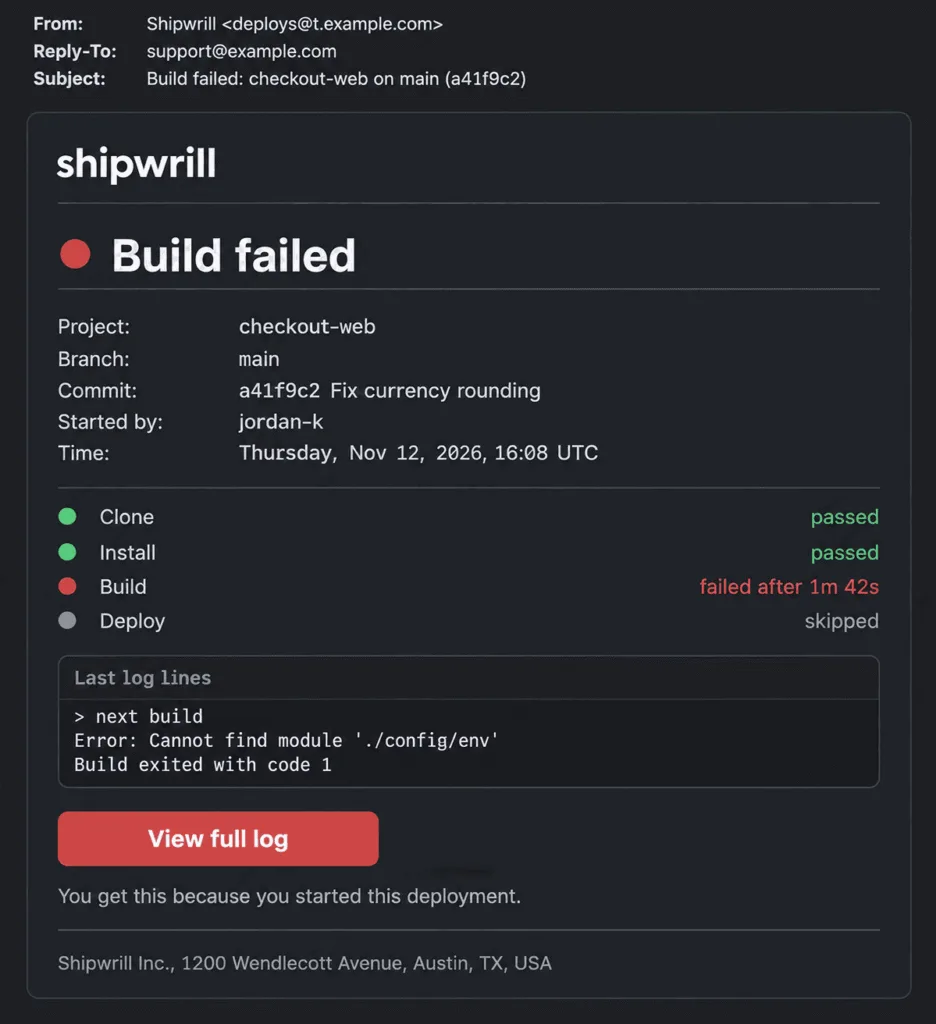
Give them enough to start without opening your dashboard:
• The project
• The branch and commit
• The stage that failed
• The last lines of the log
• A link to the full log
• Who started the run
For scheduled GitHub Actions workflows, the failure email goes to whoever created the workflow, or to whoever last changed its cron syntax. Send one notification email per failed run. When several builds share one email, the developer has to guess which one failed.
After the next successful build, a short “fixed” email tells the developer they can stop looking. Netlify has a separate “Previously failed deploy succeeded” event for this case.
Error and Anomaly Alert
Alert the people subscribed to a project when a crash appears for the first time and when a bug returns after it was marked resolved. A sudden rise in failed requests belongs in the same alert flow. Put the event count and the time the error was first seen next to its name, so the reader can tell a spike from a single crash.
Let your users decide in each alert rule how often a repeat goes out. Sentry alert rules can fire when a new issue is created, when an issue escalates, or when a resolved issue regresses. Each rule sets how often its actions can run again for the same issue. The default is every trigger, and the other options range from once per 5 minutes to once per 30 days. Ship every rule in your product with a repeat interval already set. A rule with no interval lets one noisy error fill your developers’ inboxes within an hour.
Webhook Failure Notice
A webhook failure notice tells the team behind a receiving endpoint that your product gave up on an event after its last retry. Without it, failed events pile up unseen until a customer asks why their data never arrived.
WorkOS sends this email once all retry attempts for a specific event are exhausted, and the link in it opens the Dashboard settings page for that webhook. Include the last error the endpoint returned, since a timeout and a 401 response point to different fixes.
Incident and Status Page Update
Customers who follow your service expect to hear from you each time an incident changes status, from the first report to the fix.
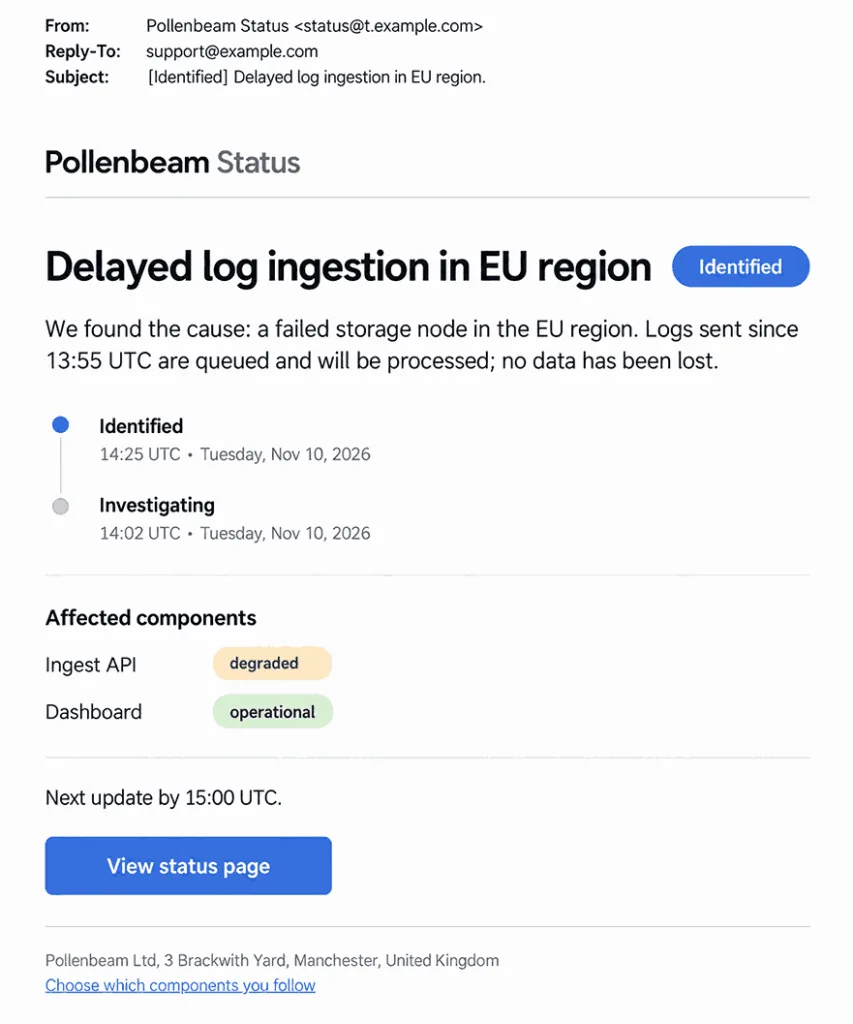
An update email needs:
• The current status
• The affected components
• When the next update is due
• A link to the status page
• A way to choose which components to follow
Confirm subscribers before your first incident: outage news should reach only people who asked for it. In Atlassian Statuspage, people who subscribe from the page get a confirmation email and receive no updates until they click the link. With component subscriptions on, every email carries a Manage Subscriptions link.
Which Billing and Usage Emails Should Developers Get?
With pay-as-you-go pricing the bill grows with every request, so developers need a usage warning before the invoice and the usual payment emails after it.
Usage and Spend Alert
Before a busy month turns into a surprise invoice, your user’s account owner and billing contact should get a warning with real numbers in it.
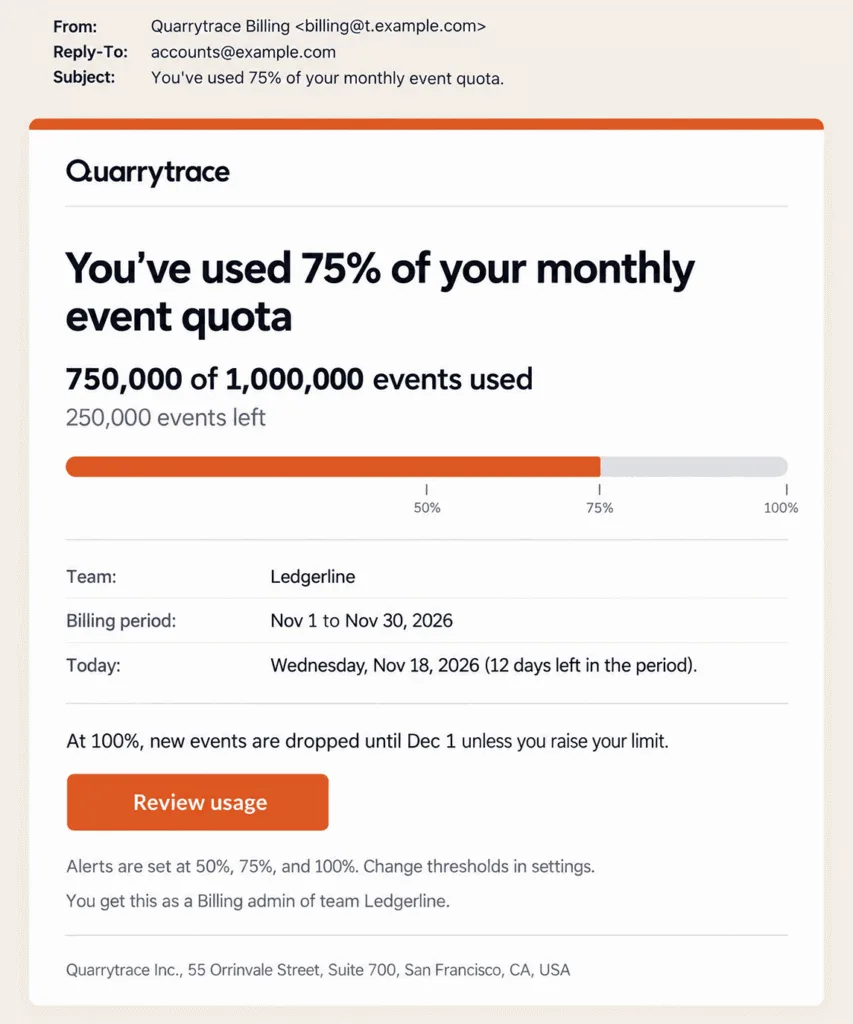
Put the numbers first:
• The threshold reached
• Usage so far against the limit
• What happens at 100%
• A link to raise the limit or change thresholds
Set your first threshold well before the limit. Vercel sends web and email notifications at 50%, 75%, and 100% of a spend amount and adds an SMS at the last of them. It also fires webhooks at each threshold, so a team can pause jobs automatically. Sentry’s default is a single early email to owners and billing members at 80% of reserved volume.
Billing Email
Billing emails go to whoever pays, and in a developer team that’s often a finance contact who rarely opens your dashboard. Give the failed payment email one link that opens the payment method form directly. Then they don’t have to hunt for billing settings in a product they barely use.
Time your reminders against the billing cycle. Stripe Billing can email a customer after each failed payment, a week before a free trial ends, and a month before a saved card expires.
How Do You Get Security Emails and Alerts Into the Inbox?
Authenticate the domain your service mail comes from and keep spam complaints low, since Gmail sets both conditions for every sender.
Send Service Mail From One Subdomain
Sign-in codes and alerts should come from one of your email subdomains kept for service mail. Send each type of email from one fixed address that developers can filter on and learn to trust. Gmail’s sender guidelines also ask for a consistent From address within each kind of message.
Every sender to Gmail needs SPF or DKIM and a spam rate under 0.3% in Postmaster Tools, and Google recommends staying under 0.1%. Senders of 5,000 or more messages a day to personal Gmail accounts need SPF, DKIM, and DMARC together. When an email API such as UniOne delivers your codes and alerts, set up all three records for the sending subdomain. Check the bounce reports as well: they show which sign-in codes never reached a developer.
Service emails such as sign-in codes, team invitations, and invoices need no unsubscribe link, since Google requires one-click unsubscribe only in marketing and subscribed messages. Emails people sign up for, such as status page updates or error alerts they chose to follow, are different. Treat them as subscribed messages and give each one a one-click unsubscribe link, which bulk senders must support.
Keep Security Emails On When Users Mute Alerts
Your developers should be able to mute build and usage alerts, but not the emails that tell them someone changed their password or added a key. Vercel doesn’t let users turn off every channel for critical notifications. A user can switch off one of the two channels, email or web, and the other one stays on. Email address changes, invitations, unpaid invoices, role changes, and account deletion can’t be configured at all. For everything else, let your developers pick the channel, such as email, web, or push.
Send Alerts to the Role That Can Act
Alert fatigue starts when every team member gets every email. Route each type to the role that handles it, and skip the email when the user has already read the same notification in your dashboard. A repeat interval and a “fixed” email cut duplicate alerts, and fewer duplicates mean fewer spam complaints in Postmaster Tools.
Conclusion
Build these first: email verification, sign-in codes, security notices, leaked key alerts, token warnings, and build failure emails. Without them nobody can sign up, sign in, or ship, and a leaked key stays usable. Usage alerts and the failed payment email belong in the same first release, because a late usage alert costs your user money and a missed payment notice can end in a blocked account. Incident updates can wait until you run a status page, and deprecation notices until you have an old version to retire.
FAQ
Should Developer Alerts Go by Email, Slack, or Webhook?
Anything a developer must not miss belongs in email, and you can offer Slack or a webhook on top for speed. Sentry can send alerts to Slack and PagerDuty as well as email, and Atlassian Statuspage subscribers can choose SMS or Slack.
Are Status Page Emails Transactional or Marketing?
Incident and maintenance updates are service mail the subscriber asked for, about a product they use. Since the subscriber opted in, each update should also let them stop or change the subscription from the email itself.
How Long Should a Sign-In Code or Magic Link Stay Valid?
A few minutes for a code that signs a developer in by itself. Platform defaults can be longer: Supabase gives both its email links and codes one hour unless you change the Email OTP expiration setting, so shorten it if you send sign-in codes. GitHub’s one-hour device verification code is a second check after the password, not a login by itself, so its longer window isn’t a model for passwordless sign-in. State the lifetime in the email, so nobody tries an expired code.