
 23 october 2026, 13:14
Key takeaways
– Access emails: Send login codes and security notices the moment they’re triggered, and keep them on for everyone. Accountant invitations name the company and the access level.
– Invoice emails: The client gets the invoice, reminders, and receipt. Tell the owner at once about a bounce or a failed payment, and say what the client was told.
– Books and taxes: Email the user who connected the bank once the feed breaks. Send tax reminders in steps and stop them after the payment is recorded.
– Delivery: Send from one authenticated domain and watch Google Postmaster Tools for a rising spam rate.
FreshBooks sorts the emails it sends into three lists: to clients, to owners, and to team members, where the accountant’s invitation sits. If your app writes only to the person who signed up, it leaves out the client who pays the invoice and the accountant who closes the books.
What Are Transactional Emails in an Accounting or Tax App?
Your app sends a transactional email when something happens to one business’s money, account, or tax return. For instance, an invoice goes out, a payment fails, someone changes the login email, or a return comes back rejected. The recipient isn’t always your user. A client who has never opened your app still gets the invoice and the receipt, because both concern their own bill.
A login code that arrives late can lock the owner out of their books at month-end, and a lost invoice pushes back the day the business gets paid.
Tax-season tips, product news, and upgrade offers belong to financial services marketing and go out as their own messages, never inside an invoice or a receipt. An invoice that also advertises an upgrade can count as a marketing email.
Which Transactional Emails Does an Accounting or Tax App Need?
A typical bookkeeping or tax filing product needs thirteen transactional emails, split across account access, invoices and payments, the books, and taxes. The list draws on the help pages of FreshBooks, QuickBooks, Wave, Xero, and TurboTax.
| Trigger · recipient | What to include | When to send | |
| Login code or email verification | Sign-in from a new device, new address · owner | Code, how long it works, a line for anyone who didn’t ask | Immediately |
| Security change notice | Password, login email, or 2-step change · owner, old and new address | What changed, when, a link to lock the account | Immediately, for every user |
| Accountant or team invitation | Owner invites someone or changes a role · invited person | Inviter, company, access level, accept link, expiry | Immediately |
| Invoice | Owner sends an invoice · client | Business name, invoice number, amount, due date, pay button | When the owner sends it |
| Payment reminder | Due date near or passed · client | Invoice number, amount, days overdue, pay button | Before and after the due date |
| Payment receipt | Client pays · client and owner | Amount, date, payment method, invoice number | Immediately |
| Failed payment notice | Payment declined · client and owner | Invoice number, amount, retry link, what the client was told | Immediately |
| Invoice delivery failure | Invoice email bounces · owner | Client address, reason, invoice number, resend link | Immediately |
| Bank connection needs attention | Bank link expires or breaks · user who connected it | Bank and account, reason, steps, reconnect link | When the link breaks |
| Document or information request | Accountant asks about a transaction · client | Transaction, question, link to answer and upload | When the accountant asks |
| Report or export ready | Report sent or export finished · recipient | Report name, sender, download link, link expiry | When the file is ready |
| Tax deadline reminder | Payment or form due date approaching · owner | What is due, amount or form, date, where to pay or file | In steps before the date |
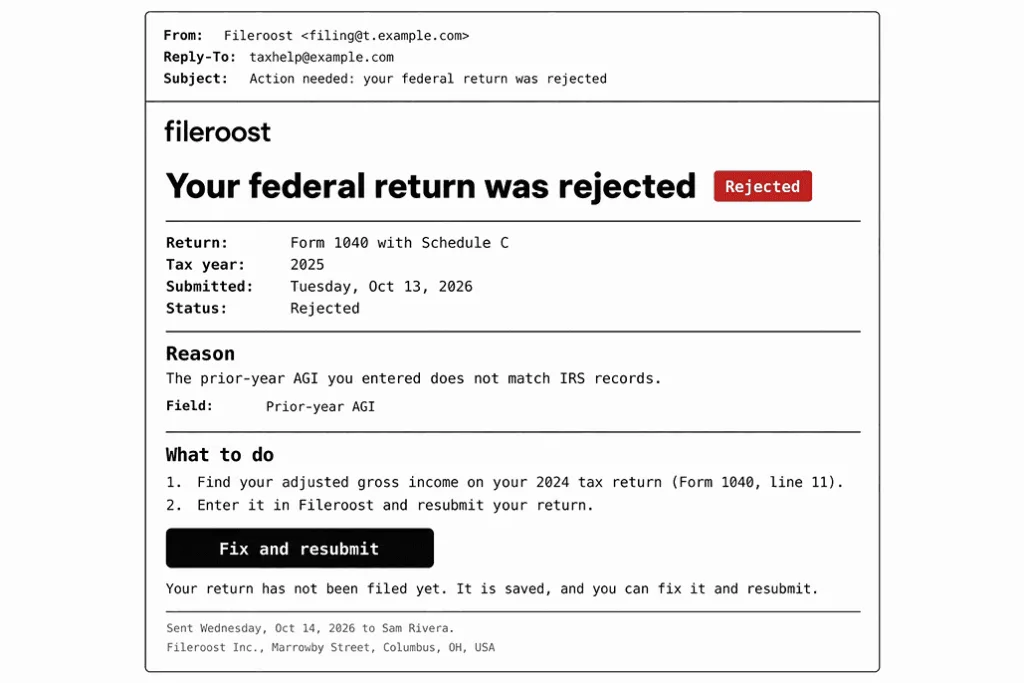
| Filing status update | Return transmitted, accepted, or rejected · filer | Status, form, date, reason and fix if rejected | At every status change |
Which Emails Protect Access to a Business’ Books?
Deliver a login code or a security change notice within seconds, and an accountant’s invitation as soon as the owner sends it. Anyone who signs in to your app sees bank transactions and unpaid invoices, along with every client’s contact details. In most accounting apps, the owner can also hand that access to an outside accountant.
Login Code and Email Verification
You send a one-time code when an owner signs in from a new device or confirms a new email address. Put the code at the top of your email, with its lifetime right next to it. Keep your one-time password emails free of onboarding tips and offers: the owner opened the email only to get past the login screen.
Add a line for people who never asked for the code. FreshBooks puts the code itself in the subject line and says in the body that it will expire in 10 minutes. The same email asks the user not to share it and tells anyone who didn’t request it to contact support.
Security Change Notice
A security change notice is the email you send the owner whenever someone changes the password or the login email, or turns off two-step verification. The person who made the change can read the business’s books, and the owner needs to know if that wasn’t them. When the login email changes, send your notice to the old address as well as the new one. Otherwise the only warning goes to the intruder.
Give the owner one link to secure the account in case they didn’t make the change. When the owner resets the password from there, the password reset email should carry a link that expires soon after it’s sent.
Accountant and Team Invitation
An invitation tells an accountant or a new team member who invited them, to which company’s books, and with what access. An accountant may get invitations from many clients, so put the company name in your subject line. That way they know which books they’re about to open.
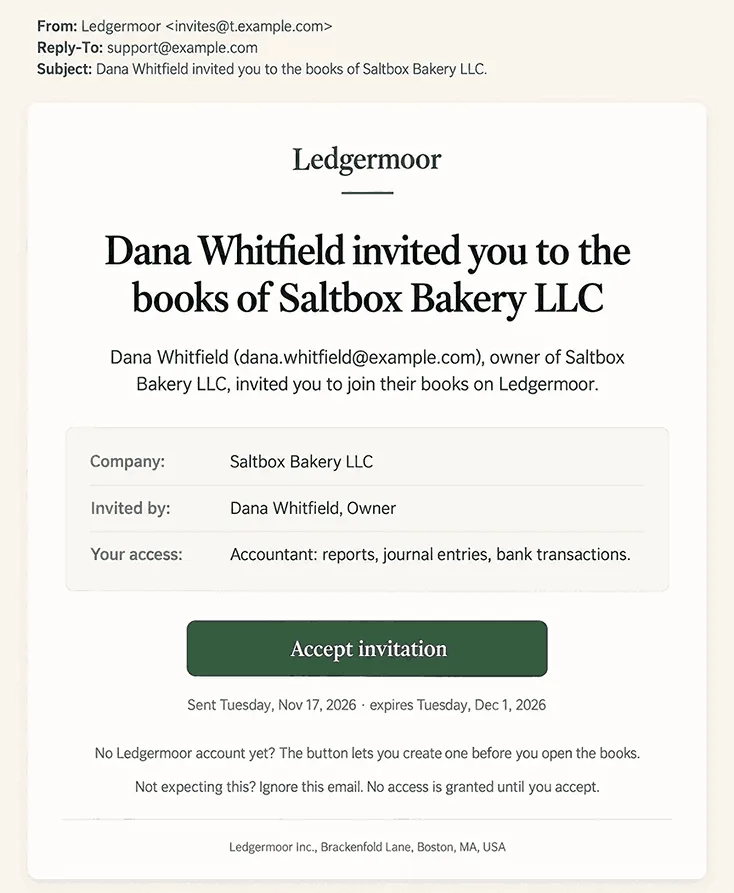
Your invitation also has to work for accountants who have no account yet. In QuickBooks, the owner invites a firm from Manage users, and an accountant without an Online Accountant account gets a sign-up link in the same email. When a role changes later, send that person a short email that lists the new permissions.
Which Emails Follow an Invoice From Sending to Payment?
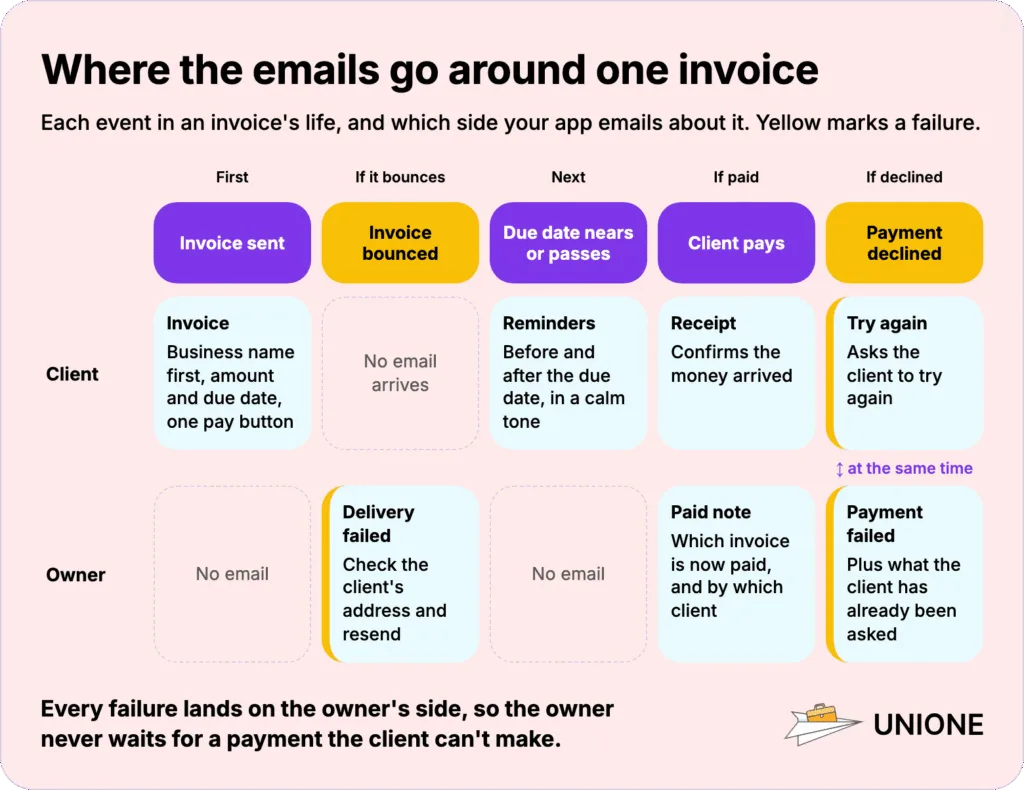
The client gets the invoice, any payment reminders, the receipt, and a retry request if a payment fails. The owner gets a payment notice when the client pays, plus a warning when a payment is declined or the invoice bounces. Route the client’s replies to the person who created the invoice.
Invoice Email
An invoice email is often the client’s first contact with your app, and they may never have heard of it. So put the business’s name first in the subject.
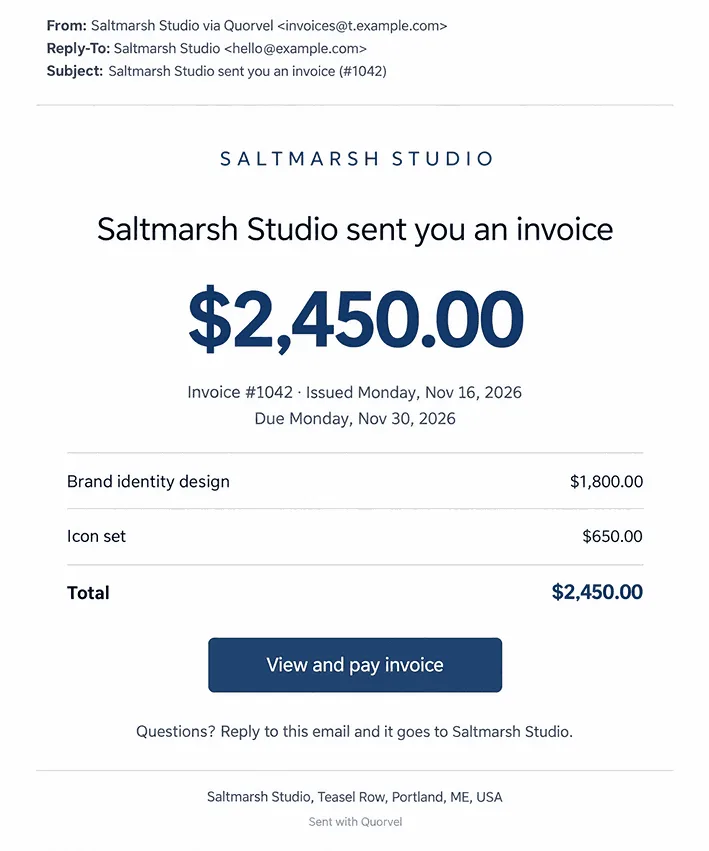
FreshBooks keeps its invoice email to three parts:
– A subject in the pattern “[Company Name] sent you an invoice ([number])”
– The amount and the due date above everything else
– One “View and Pay Invoice” button
Payment Reminder
You send a payment reminder when an invoice is about to come due or has already passed its due date. Time the first one a few days before the date and the next one after it passes, and say in the overdue one how many days late the invoice is. Keep the tone calm: the client may simply have missed your first email.
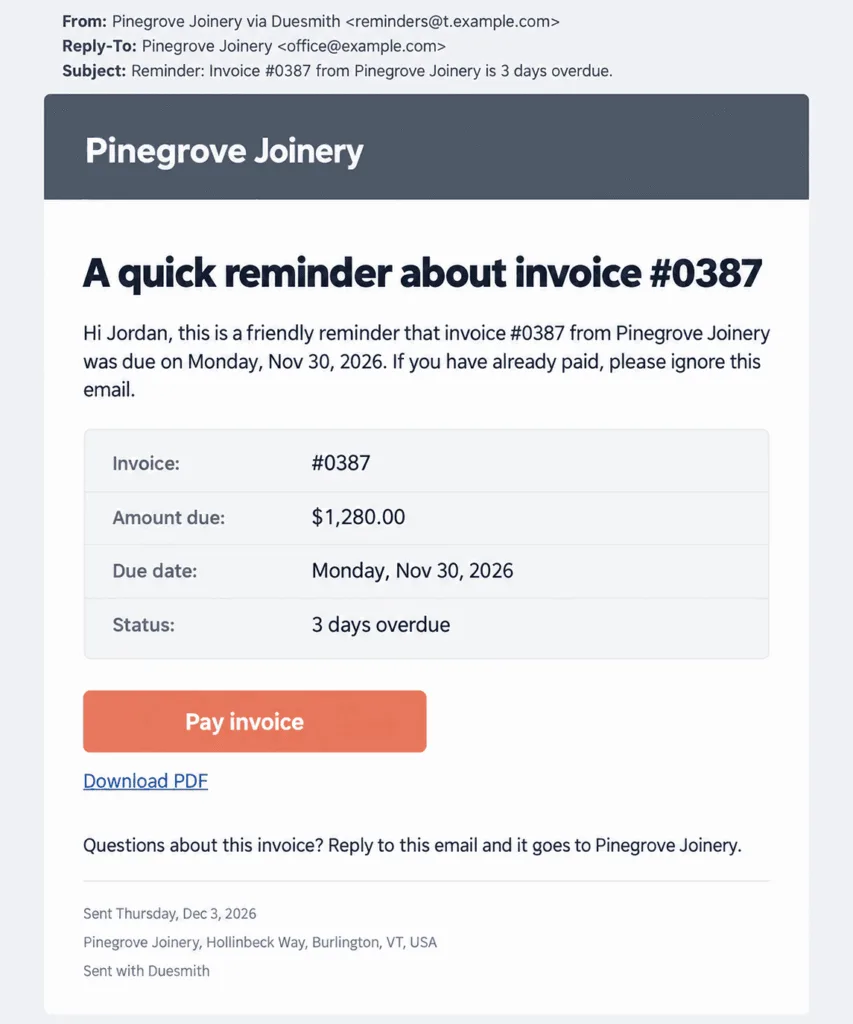
QuickBooks lets a business schedule up to three reminders, each up to 90 days before or after the due date. It also recommends keeping the word “reminder” in the subject. You can add two rules of your own:
– Small balances: A minimum amount below which no reminder goes out
– Invoices delivered outside the app: Reminders only for invoices marked as sent. Wave, for example, asks users to mark such invoices as sent before it lets them send a reminder
Payment Receipt
A payment receipt is the email you send the client once they pay, as proof of payment. At the same time, send the owner a separate notice with the client’s name next to the invoice number. An owner with many open invoices matches payments by name and number.
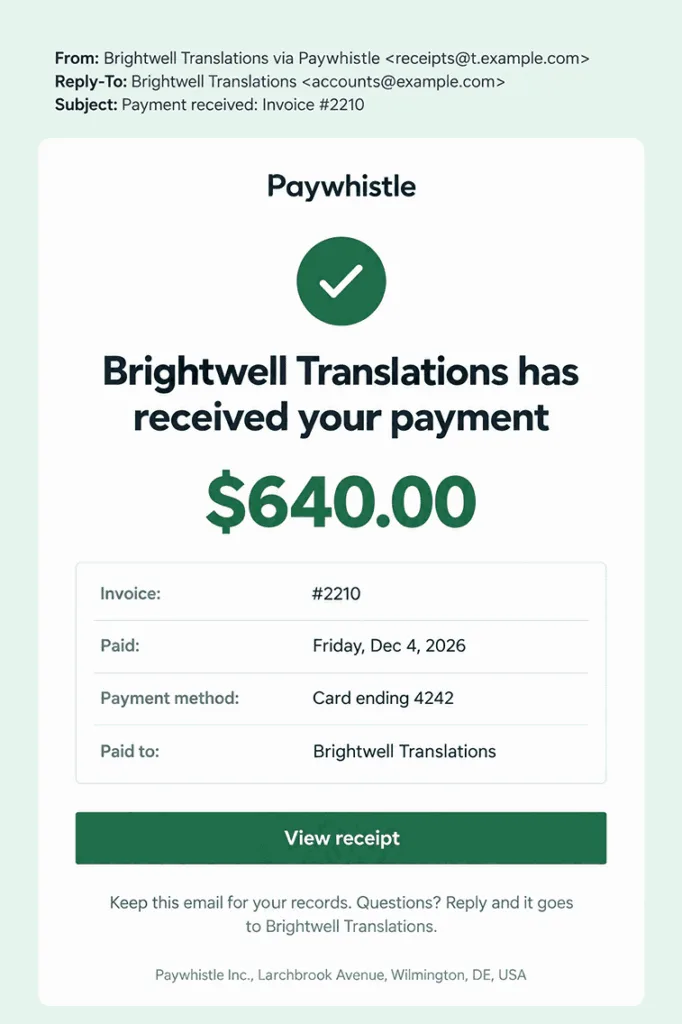
Send the receipt without waiting for the owner to confirm the payment by hand. In Wave, a receipt goes out by itself whenever a customer with an email address on the invoice pays through it. Users can customize the message, but they can’t turn the setting off.
Failed Payment Notice
When a card payment or an automatic charge is declined, you send two emails at once. One asks the client to try again, and the other tells the owner the payment didn’t go through. It’s a good idea to tell the owner what the client has already been asked, so the owner doesn’t chase the client with a second request of their own.
In FreshBooks, the client’s email after a failed automatic payment asks them to “re-enter your payment details and try again”. The owner’s email after a declined online payment says a request to try again has already gone to the client.
Invoice Delivery Failure
An invoice delivery failure notice tells the owner that an invoice email bounced and the client never got it. Never show a bounced invoice as sent in your app, or the owner will wait for a payment the client can’t make. FreshBooks titles this email “Invoice/Estimate delivery was unsuccessful” and asks the owner to check the client’s address before resending.
A bounced recurring invoice needs one more step. If the owner corrects the address only on the current invoice, the next one in the series goes to the dead address again. Let the owner update the whole series from your email.
What Should Your App Email When the Books Fall Behind?
Alert the user who linked the bank as soon as the feed stops importing, and pass each accountant’s question to the client when it’s asked. Both emails should name what’s missing and link to the screen where the user fixes it. A third email tells the owner or the accountant that a report or an export from the up-to-date books is ready to download.
Bank Connection Needs Attention
Bank connections expire on the bank’s schedule, and until someone reconnects it, new transactions stop arriving in the books. Send your email to whoever connected the account, who may not be the one who notices the gap.
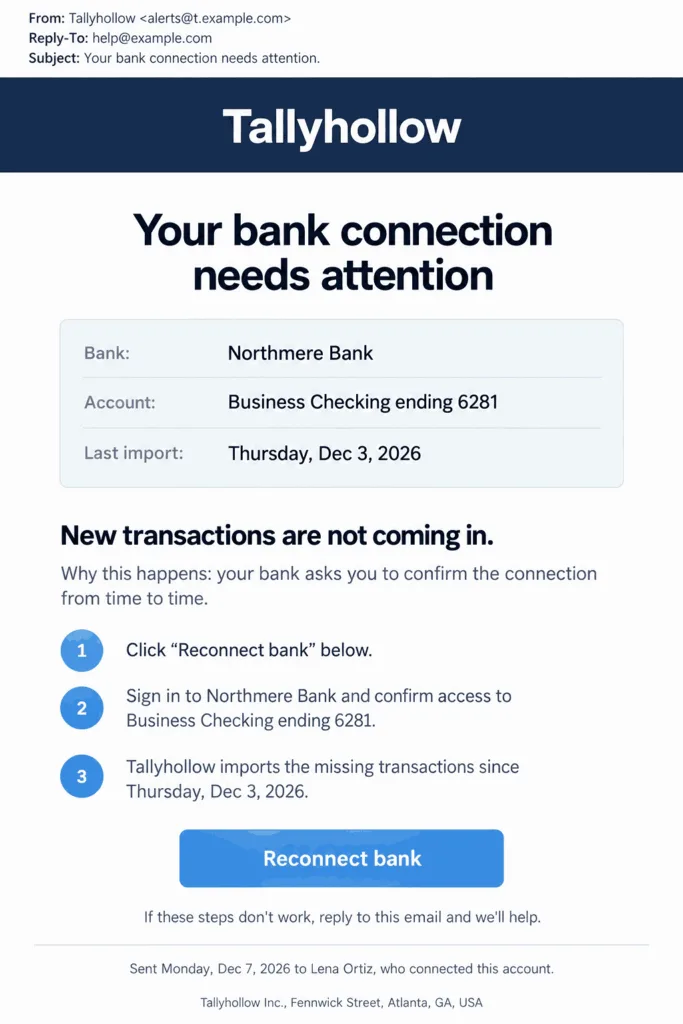
QuickBooks warns that, depending on the bank, users “might need to reconnect every 90 business days or every 18 months”. When another user selects Send a request, the reconnection link goes by email to the person who set up the connection.
Name the problem in your subject, such as “Your bank connection needs attention”. Give the reason in a single line, for example that the bank requires you to re-confirm the connection. End with an invitation to reply if the steps don’t work.
Document or Information Request
A document request is the email the client gets when their accountant can’t classify a transaction and needs a receipt or an explanation. Link your request email to a page in the app where the client answers and uploads files. For instance, in QuickBooks Online Accountant the accountant selects “Ask client” during a books review. The client gets an email notification and answers the request in the app.
If you ask the client to reply with documents attached, tax papers end up in an email thread that anyone with access to the mailbox can read.
Report or Data Export Ready
Financial reports are safer sent as a download link that expires than as a file attached to the email. When a FreshBooks user sends a report, the email reads “[Company Name] sent you a [Report Name]” and offers a “Download Report” button. The link stays valid for up to 30 days. State the expiry in your email. Give the recipient a way to ask for a fresh link too, since an accountant may open it after the link has expired.
Which Tax Emails Do Self-Employed Users Expect?
Plan for a deadline reminder before each tax payment or form is due, and an update each time a filed return changes status. The IRS sets those dates and decides on each return, so your app controls neither. Each email should say what is due or what changed, and what the user does next.
Tax Deadline Reminder
A single reminder on the due date leaves the owner no time to find the money or check the figure with their accountant. Send your deadline emails in steps, and name what is due and the date in each one. Estimated taxes are due four times a year, and the IRS may charge a penalty for an underpaid period even when the owner ends up with a refund at filing.
Link to the payment page, or to the screen in your app where the owner records the payment, and suggest they check the payment options on the IRS payments page. Once the payment or the filing is recorded in your app, stop the remaining reminders for that date.
Filing Status Update
An e-filed return starts as Pending and then becomes Accepted or Rejected, usually within 24 to 48 hours, according to TurboTax. Email your user at each change so they don’t have to log in to check.
TurboTax’s wording on its e-file status page is a good base for your own messages:
– Pending: The return was sent but hasn’t been accepted or rejected yet
– Accepted: The IRS received and accepted the return
– Rejected: The IRS is sending the return back for a correction, so your email should give the reason, point to the field to fix, and add a button to resubmit
Flag that email as “rejected” right in the subject. It’s the one status that needs the user’s action.
How Do Invoices Sent in a Business’ Name Reach the Client’s Inbox?
An invoice is more likely to reach the client’s inbox when it leaves from your app’s authenticated domain and is easy to tell from the phishing emails that copy real invoices. A bounced invoice comes back with a reason. An invoice filtered to spam doesn’t, and the owner finds out when the client asks where the invoice is.
Send From One Authenticated Domain, With the Business’ Name as the Sender
Invoices, receipts, reminders, and security emails should all leave from your app’s domain. Google’s sender guidelines recommend that messages of one category share a From address. For example, use billing@ for invoices, receipts, and reminders, and security@ for login codes and security notices. Send security emails under your app’s name, because the owner is signing in to your app.
Put the business’s name in the From field of billing emails, and point Reply-To on invoices at the owner’s address. Google asks every sender to set up SPF or DKIM, and bulk senders (from 5,000 messages a day) need SPF, DKIM, and DMARC together. Yahoo asks for the same authentication and wants every sender’s spam rate below 0.3%.
UniOne and other email APIs report bounce events by webhook or in delivery reports, so your app knows which client addresses an invoice couldn’t reach. Spam placement doesn’t bounce. Watch your domain’s spam rate in Google Postmaster Tools. When a client misses an invoice, Wave’s help center asks users to have the client check the spam folder and add @waveapps.com to the address book.
Do Invoices and Receipts Need an Unsubscribe Link?
Most US rules for commercial email exempt invoices, receipts, login codes, and filing updates that carry only transactional content, so these emails can go out without an opt-out link. A tax tips newsletter that promotes your app does need one, and bulk senders to Gmail and Yahoo have to let readers leave it with a single click. Transactional emails still can’t carry false or misleading routing information.
Make Real Emails Easy to Tell From Phishing
Fake invoices and fake tax notices copy the look of real ones. Your real emails should never ask for a password or bank details, and they should link only to your app’s own domain. Attackers use email spoofing to make their mail look as if it came from your domain. List every security event on an account activity page in your app, so users can check an email there before acting on it.
Put the amount and the invoice number in your email, with a link to the invoice. Keep bank account numbers, Social Security numbers, passwords, and tax documents behind the login.
How Does Your Product’s Model Change Which Emails It Needs?
When your app holds a business’s books through the year, most of its emails concern invoices, payments, and bank connections. When it’s built around one yearly return, deadlines and filing status come first. In a product where the bookkeeping happens in a chat thread, questions about unclear transactions reach the user in WhatsApp or iMessage. In QuickBooks and Xero, the accountant sends the client a document request email instead. Three products for freelancers and LLC owners show these three models.
QuickBooks Solopreneur
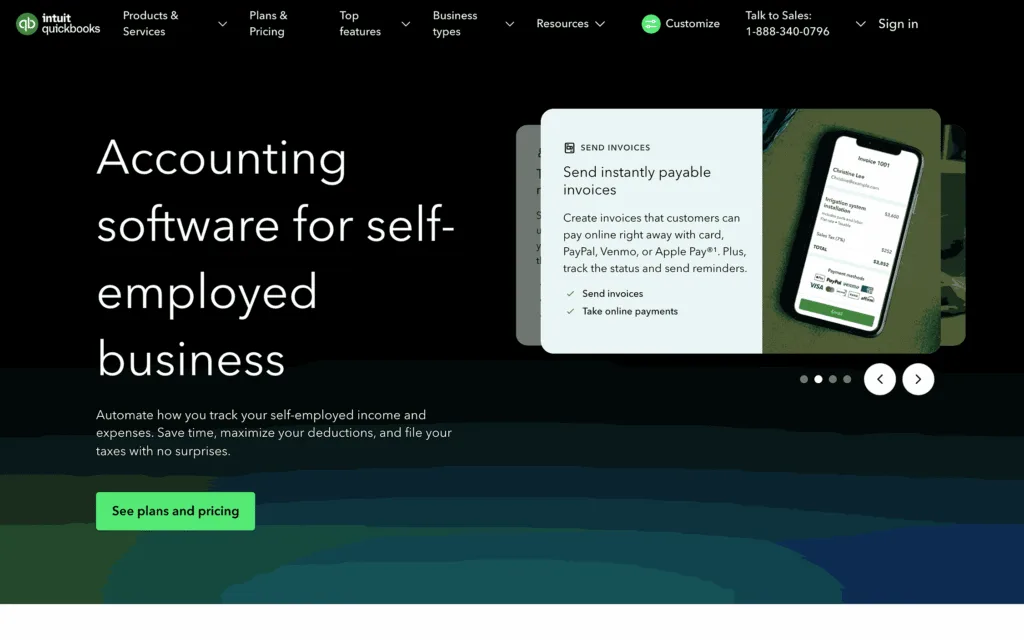
Bookkeeping from Intuit for people who run a one-person business. Owners sync bank and card transactions, capture receipts, and track miles with their phone’s GPS. The expenses are categorized as Schedule C deductions. Invoices that customers can pay online by card, PayPal, or Venmo sit in the same books. There’s a free plan and paid monthly plans. Every plan has one user, and the Free and Lite plans give no access to an accountant.
TurboTax Premium
Intuit’s do-it-yourself tax product for self-employed people and investors, including independent contractors, gig workers, and freelancers. Users photograph their 1099-NEC or 1099-K forms and sync accounts to find self-employment deductions, then sign in after filing to check the e-file status and track the refund. Users pay per return when they file, and state returns cost extra. Expert advice and expert filing are sold as separate products. Account sync for deductions covers a single Schedule C only.
Jupid
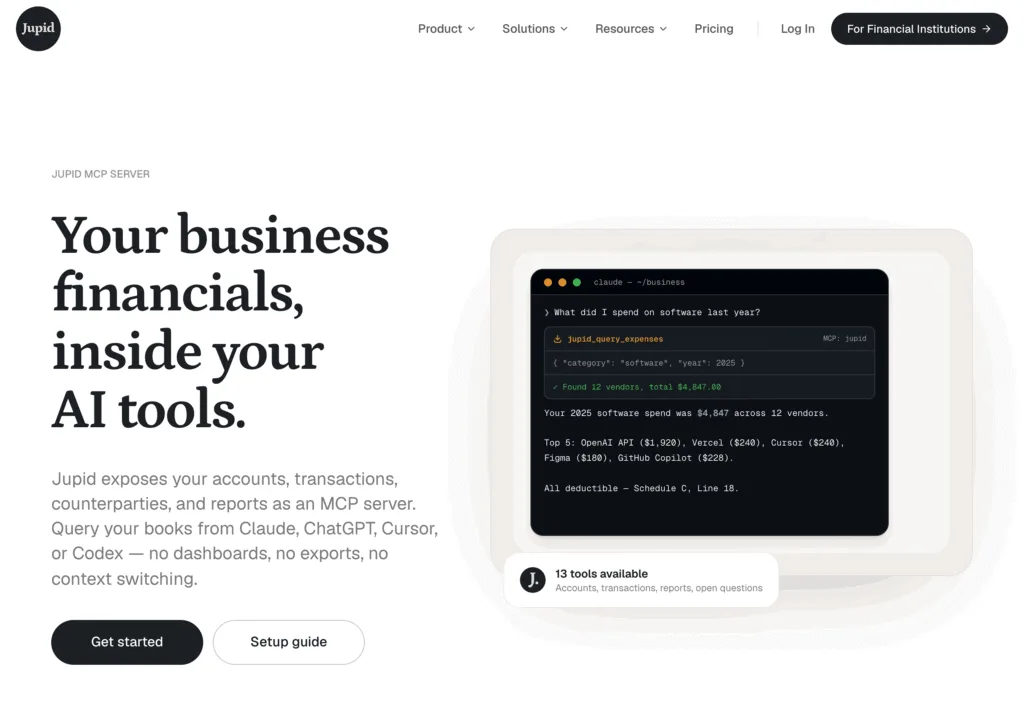
AI accounting for freelancers and LLCs in the US. Transactions from linked bank accounts map to Schedule C lines, and Jupid asks about unclear ones in WhatsApp or iMessage. The Schedule C goes to the user’s accountant or is filed after a CPA reviews it. An MCP server lets AI tools read the books. Subscriptions are monthly or yearly. Partnership, S corporation, and multi-state returns still need a CPA, so Jupid prepares the data and routes it to one for review.
Conclusion
Start a bookkeeping product with eight of the thirteen emails: the invoice, its reminders, the receipt, the failed payment and bounce notices, the bank connection request, the login code, and the security change notice. If your product gives the owner a place to bring in an accountant, unlike the Free and Lite plans that don’t, add the accountant invitation to that starting set. The accountant is the one who closes the books. A filing product starts instead with the access emails, deadline reminders, and the filing status email. You can add the rest once those work.
FAQ
Does an Accepted Tax Return Mean the Refund Is Approved?
No. Once the IRS accepts a return, it still has to approve the refund before sending it. TurboTax reminds filers that the e-file status and the refund status aren’t the same thing, so your status email should say which of the two it reports.
How Long Should an Accountant Invitation Stay Valid?
Long enough for a busy accountant to get to it, with the date stated in the email. Xero invitations expire after 14 days and can be resent, and adding an accountant as a user costs nothing there. If an invitation expires unused, tell the owner and give them a button to resend it.
Should an Invoice Email Carry the PDF or a Link?
Make the link to the online invoice the main way to pay, with the amount in the body, and attach a PDF for clients who keep copies for their records. Keep attachments small, since email size limits differ across mailbox providers. A large PDF can push an invoice over those size limits.