

 21 may 2026, 16:21
When setting up an app or mail system to send (or relay) emails, people often ask, Which SMTP port should I use?” You may find information sources directing you to use SMTP port 25, 465, 587, or 2525. But which of those should be your default SMTP port?
Here are quick takeaways on which SMTP port is best suited for your use case.
- Use port 587 for SMTP submission. It’s the modern default and supports TLS through STARTTLS, defined in RFC 6409.
- Use port 2525 when port 587 is blocked. It’s not officially recognized, but most providers and cloud hosts support it.
- Don’t use port 25 for submission. It’s reserved for server-to-server relay, and most residential ISPs and cloud providers like AWS and Google Cloud block it by default to cut down on spam.
- Use port 465 when your provider or a legacy application requires implicit TLS. Some older articles may call it deprecated, but RFC 8314 reinstated it in 2018 for SMTP submission with implicit TLS.
- For most apps, email clients, and WordPress sites, port 587 is the right one to use.
You may already have your answer, yet the rest of this article explains why each port works the way it does, how encryption is handled on each one, and how to fix the most common SMTP port problems.
What Is SMTP?
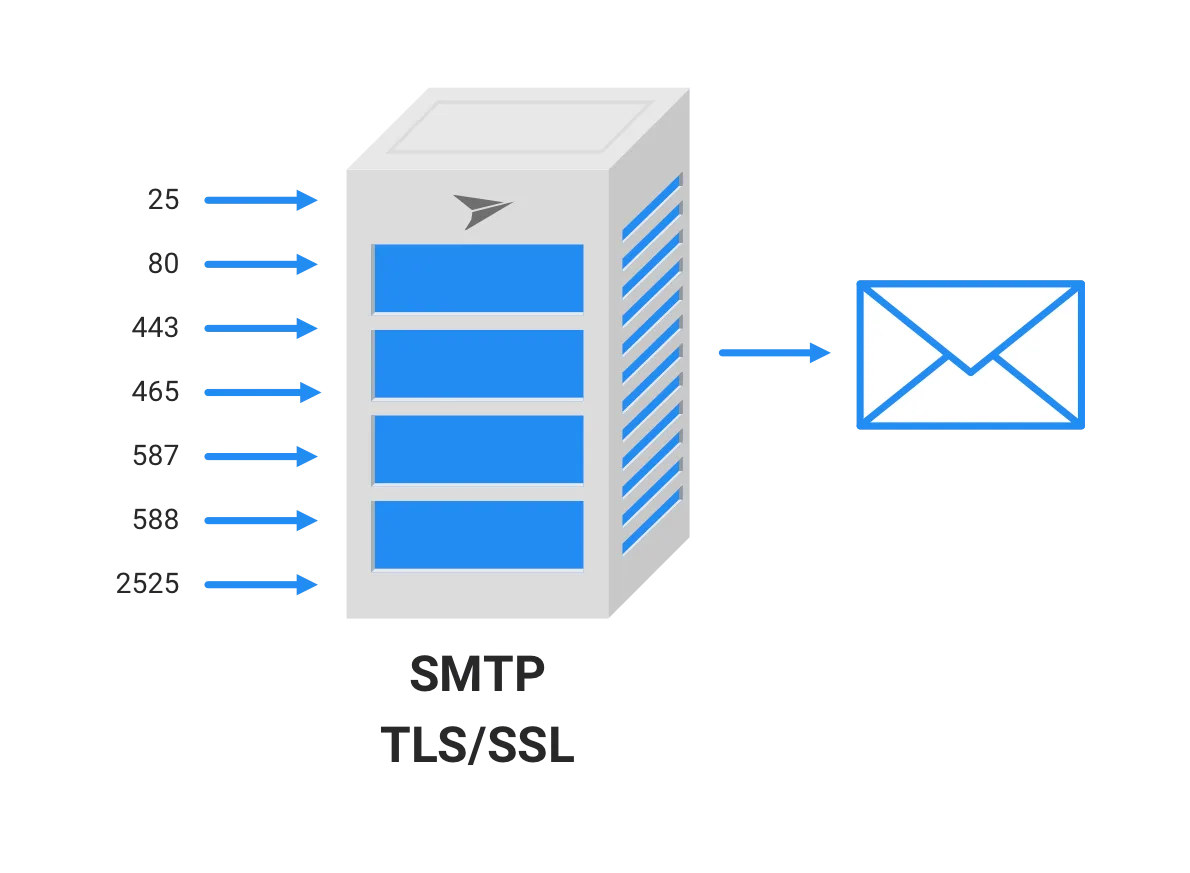
Before diving into details of what SMTP ports are, let’s start with answering the question “what is SMTP?”.
SMTP stands for Simple Mail Transfer Protocol (SMTP), a standard protocol for email transmission on the internet. Internet mail servers use this set of rules to send and receive emails. For example, when sending an email, your email client needs an outgoing mail server to upload the email to. The outgoing mail server will then route your email to the recipient’s incoming mail server.
What Are SMTP Ports?
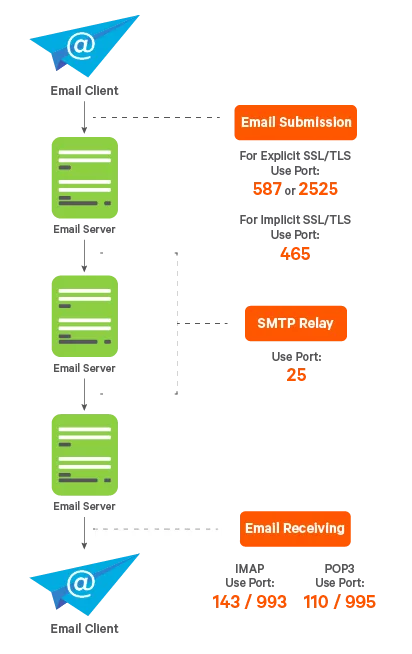
SMTP ports are the network ports used to send email between devices, apps, and mail servers through the SMTP (Simple Mail Transfer Protocol). Different SMTP ports are used for different types of connections and security methods:
- Port 25 — the original SMTP port for server-to-server email transfer. Often blocked by ISPs for outgoing mail from apps because of spam abuse.
- Port 465 — SMTP over SSL/TLS. Used for secure email sending with encryption from the start.
- Port 587 — the modern standard for secure email submission from apps and email clients using STARTTLS.
- Port 2525 — an alternative SMTP port supported by some providers when 587 or 25 are blocked.
For most applications today, port 587 with TLS is the recommended choice.
What Is the Difference Between SMTPS and SMTP?
In addition to plain SMTP, SMTPS (secure SMTP) uses additional SSL or TLS cryptographic protocol for increased security.
The SMTP protocol does not offer encryption by default, so it can be used to send emails without any protection at all. As a result, emails sent via plain SMTP are vulnerable to man-in-the-middle attacks and bad actors eavesdropping while mail is in transit.
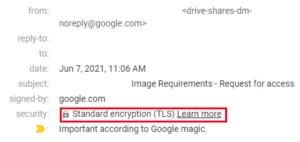
SMTPS uses asymmetric cryptography to encrypt email communications using TLS or SSL. The most important takeaway is that SMTP is vulnerable to attacks, whereas SMTPS uses TLS to secure email connections.
How Can You Find Out What Your SMTP Port Number Is?
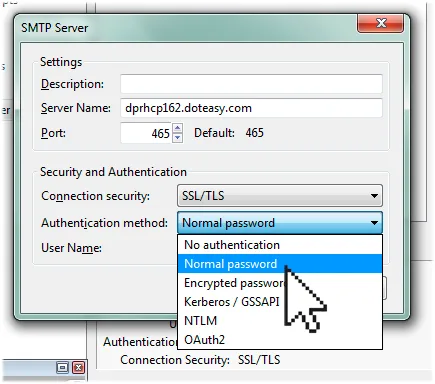
Different types of incoming and outgoing traffic have been assigned their own port numbers. The port assigned to SMTP (Simple Mail Transfer Protocol), used for packaging and transferring electronic mail, is an example of this. In most cases, the default SMTP port is 25.
Why Does Your SMTP Port Number Matter?
Aside from connectivity issues, you’ll notice that using the wrong port has an impact on delivery. Effective email communication between the sender and receiver occurs when using the correct port to ensure delivery.
Most email providers configure ports automatically for their users to avoid connection problems. Also, it’s important to note that different ports have different functions. To connect to an SMTP server, you must input the correct domain name (or IP address) and port number.
Different Ports for Different Purposes
SMTP transmission has two major stages:
- Submission: It’s the process of sending an email message to a server that handles outgoing mail. For example, when sending an email in Apple Mail client, it is transferred to the outgoing mail server.
- Relay: Message relaying is the process of sending a message between two servers. So, after “submitting” an email to the outgoing mail server, the outgoing mail server “relays” it to the recipient.
Which Port Does SMTP Use?
Modern networking technology doesn’t use one single SMTP port. Instead, there are four standard SMTP ports: 25, 587, 465, and 2525.
SMTP ports comparison
Before going through each port description in the coming sections, here’s how the four common SMTP ports compare. Use the table below when configuring an outgoing mail server, debugging a delivery issue, or entering SMTP settings in a CMS or email client.
| Port | Primary use case | Encryption | Recommended? | Common blockers |
|---|---|---|---|---|
| 25 | Server-to-server SMTP relay | None by default; opportunistic STARTTLS | Avoid for submission | Residential ISPs, AWS, Google Cloud, Azure, DigitalOcean |
| 465 | SMTP submission with implicit TLS | Implicit TLS (encrypted from the first byte) | Only when your provider or legacy app requires it | Rare |
| 587 | Authenticated SMTP submission from apps and clients | STARTTLS | Yes, this is the default for submission | Some corporate firewalls and restrictive networks |
| 2525 | Alternative submission port when 587 is blocked | STARTTLS | Yes, as a fallback | Rare |
Two rules cover almost every scenario:
- If your app, plugin, or email client is sending mail to a mail server, that’s called a submission. Start with port 587. Try port 2525 if 587 is blocked. Use port 465 only when implicit TLS is required.
- If two mail servers are passing a message between each other, that’s a relay. Relay runs over port 25 by default, and isn’t something you configure on your own application.
What Is Port 25 Used For?
Port 25 is the oldest SMTP port, being in use since 1982. It is primarily used for SMTP relay and is not suitable for SMTP submission.
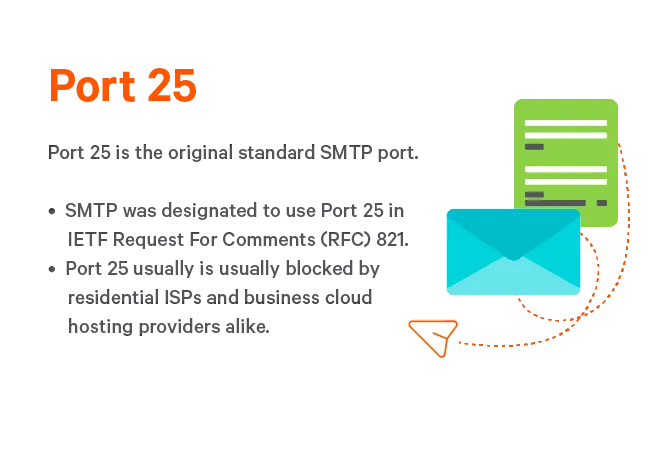
If you’re using SMTP for a WordPress site or email client setup, avoid using port 25 because most residential ISPs and cloud hosting providers block it. This is done to cut down on the number of unsolicited emails that are sent from their networks. There should be no traffic passing through this port on your server unless you’re managing a mail server.
What Is Port 465 Used For?
SMTPS was the first protocol to use port 465 (eSMTP over SSL). Port 465 was originally registered for SMTPS in the 1990s, then deprecated by IANA, but later reinstated for SMTP submission with implicit TLS by RFC 8314. It’s fully supported by most major providers today, though port 587 with STARTTLS remains the recommended default.
Although many ISPs and cloud hosting providers still accept SMTP submissions on port 465, we don’t recommend its usage unless it’s necessary for your application because such usage is not RFC compliant – that is, it does not follow a code that complies with the agreements for the protocols in the TCP/IP stack, as defined by the Internet Engineering Task Force (IETF).
What Is Port 587 Used For?
Modern web servers use port 587 for SMTP message submission. While you can use other ports for submission, always use port 587 as the default and only use another port if circumstances demand it (e. g. if your host blocks port 587 for some reason). Port 587 also supports TLS encryption for added security when sending emails in accordance with the IETF’s guidelines.
What Is Port 2525 Used For?
When under any circumstance other ports are blocked, web servers provide an alternate port 2525 that mirrors port 587 because it’s a non-traditional high port number, and consumer ISPs and Cloud Hosting providers such as Google Compute Engine permit such connection. Port 2525 also offers TLS encryption. However, IETF and the Internet Assigned Numbers Authority (IANA) do not approve this port.
STARTTLS vs implicit TLS
When you configure SMTP, you’ll see two ways to enable encryption. The two ways are explicit TLS (usually called STARTTLS) and implicit TLS.
Implicit TLS means encryption is in effect the moment the TCP connection is opened. The client and server complete a TLS handshake first, and every byte that follows (SMTP commands, authentication credentials, message content) is encrypted. Port 465 is the standard port for SMTP submission using implicit TLS, as defined in RFC 8314.
Explicit TLS, or STARTTLS works in two steps. The client connects to the server in plaintext. The server responds with the list of extensions it supports, including STARTTLS. The client issues a STARTTLS command, the two sides negotiate TLS, and from that point on, everything is encrypted. STARTTLS for SMTP is defined in RFC 3207.
The downside of STARTTLS is the brief plaintext window before the upgrade. A network attacker can strip the STARTTLS advertisement from the server’s response and trick the client into never upgrading, which is known as a STRIPTLS or downgrade attack. The defense is to configure your client to require TLS, not just attempt it. Modern clients will refuse to send mail if the upgrade fails, rather than fall back to plaintext silently. RFC 8314 also recommends preferring implicit TLS where possible, partly for this reason.
In day-to-day use, both methods protect your mail in transit once the session is established. For most submission scenarios, use this rule of thumb:
- If your provider supports both ports, use port 587 with STARTTLS. It’s the standard for authenticated submission.
- If your provider or client only supports implicit TLS, use port 465.
- Configure your client to require TLS. Settings labeled “Required”, “Strict”, or “Always use TLS” will stop your client from sending mail in plaintext if the secure session fails.
SMTP authentication and why it matters
Encryption protects the contents of your email while it travels across the network. Authentication answers an entirely different question – how does the mail server know that you’re allowed to use it?
An SMTP server that accepts mail from anyone without checking is called an open relay. Open relays are abused by spammers within minutes of being discovered, and a single open relay is enough to get your IP and domain blacklisted across most of the internet. That’s why every reputable email provider requires authentication before accepting mail from your application or email client.
SMTP authentication is defined in RFC 4954. When your application connects to an SMTP submission port, the server asks the client to log in before it accepts any mail. The four mechanisms you’re most likely to see are:
- PLAIN: username and password sent in a single base64-encoded string. Safe only over an encrypted connection.
- LOGIN: username and password sent in separate base64-encoded steps.
- CRAM-MD5: the server sends a challenge, the client hashes it with the password, and returns the hash. Avoids sending the password directly, but it is considered weak by modern standards.
- XOAUTH2: the client sends an OAuth 2.0 token instead of a password. This is what Google Workspace and Microsoft 365 use for modern programmatic access.
The mechanism you can use depends on the provider. UniOne and most transactional email services support PLAIN over TLS, which is the simplest and most broadly compatible option for application code.
Authentication is the reason port 587 exists as a separate port from 25. RFC 6409 defines port 587 as the submission port and expects the server to authenticate users before accepting mail. That single rule is what makes 587 the correct choice for almost every app, plugin, or client sending mail. The server expects credentials, and your mail won’t be treated as anonymous relay traffic. Port 465 also requires authentication when used for submission, but the requirement is enforced by convention rather than by RFC 6409 directly.
When you configure your application to send mail through UniOne, use the following settings (which may slightly differ in naming across various apps):
- SMTP host: smtp.us1.unione.io
- Port: 587
- Encryption: STARTTLS (labeled “TLS” or “STARTTLS” in the UI)
- Authentication: required
- Username: your UniOne user ID
- Password: your UniOne SMTP password or API key
That combination (port 587, STARTTLS, authenticated) is the safe default for almost every production setup. If your platform forces you to choose between “SSL” and “TLS” without specifying the port, pick SSL for port 465 and TLS for port 587. Full configuration details, including code samples, are in the UniOne SMTP API documentation.
What about POP and IMAP?
POP3 (Post Office Protocol) and IMAP (Internet Message Access Protocol) are two protocols that allow email clients like Outlook, Thunderbird, and others to retrieve mail from a mail server.
TCP ports 110 and 995 are commonly used for POP, and TCP ports 143 and 993 are typically used for IMAP, for insecure and secure sessions, respectively. Email clients like Microsoft Outlook, Netscape, Eudora, and others use the IMAP protocol to connect to port 143 of a remote email server.
They were each good at different things, such as reporting the status of an email back to the server (whether it had been read, flagged, or marked as junk) or storing a copy of the message on a local machine for easy offline access. POP3, as of the most recent version, can be used with or without an SMTP server.
Troubleshooting common SMTP port problems
If your mail isn’t going out, the cause is almost always one of four things:
- The port is blocked
- Authentication is failing
- The TLS layer is misconfigured
- The server is rejecting your message for policy reasons.
Each one looks different in the logs, and each one has a command-line test that will tell you which category you’re in. Telnet, Netcat, and OpenSSL are available by default on most macOS and Linux systems, and on Windows through WSL or Git Bash.
Test 1: Is the port reachable?
The first thing to test is whether your machine can open a TCP connection to the SMTP server on the port you care about. If this fails, no SMTP setting in your application will help.
Use Telnet:
telnet smtp.us1.unione.io 587Or use Netcat with verbose output:
nc -v smtp.us1.unione.io 587A successful connection response looks like this:
220 smtp.us1.unione.io ESMTP readyThat 220 is the SMTP greeting code. If you see it, the port is open and the server is responding. Type QUIT and press Enter to close the connection.
If you see “Connection refused”, “Connection timed out”, or the command hangs, the port is blocked somewhere between you and the server. The blocker is usually:
- Your residential ISP, which often blocks outbound port 25 and sometimes 587.
- Your cloud host. AWS blocks outbound port 25 by default on all EC2 instances and Lambda functions, and Google Cloud blocks outbound traffic on port 25 by default.
- A corporate firewall or VPN.
- A local antivirus or security suite intercepting all outbound traffic.
Try the ports in this order: 587 first, then 2525, then 465. If all of them are blocked, the network is the problem, not the mail server.
Test 2: Does STARTTLS work on port 587?
If the port is reachable but your mail client reports a TLS error, make sure that the server is offering STARTTLS and that the TLS handshake succeeds. OpenSSL has a built-in SMTP mode for this:
openssl s_client -connect smtp.us1.unione.io:587 -starttls smtpA working session prints the server’s certificate chain, the negotiated TLS version (TLS 1.2 or 1.3 in any modern setup), and ends with a 250 response listing the SMTP extensions the server supports. If you see verify return code: 0 (ok), the certificate is valid.
Common things this test surfaces are:
- Expired or self-signed certificate. The output shows a non-zero verify return code, and your mail client will refuse to connect unless you turn off certificate verification, which you shouldn’t do in production.
- Hostname mismatch. The certificate is for smtp.example.com but you connected to mail.example.com. Use the exact hostname your provider documents.
- Server doesn’t advertise STARTTLS. The extensions list returned after the handshake won’t include STARTTLS. This usually means you’re on the wrong port. Try 465 with implicit TLS instead.
Test 3: Does implicit TLS work on port 465?
For port 465, the connection is encrypted from the very first byte, so the OpenSSL command is slightly different. There’s no -starttls smtp flag because there’s no plaintext step to upgrade from:
openssl s_client -connect smtp.us1.unione.io:465You should see the certificate chain and the SMTP banner directly. If the connection succeeds on 465 but fails on 587 with STARTTLS errors, your client is probably set to use the wrong encryption type for the port. Switch the client setting from “STARTTLS” to “SSL/TLS” or vice versa and try again.
Test 4: Authentication errors
If the connection and TLS layers are healthy but the server responds with 535 Authentication failed, the problem is your credentials or your authentication method. The most common causes:
- You’re using your account login password instead of an SMTP-specific password or API key. UniOne and most providers issue a separate SMTP credential.
- You’ve copied an extra space or newline into the username or password.
- Your account is rate-limited or temporarily suspended for sending volume above your plan.
You can authenticate inside an OpenSSL session to see exactly what the server returns. After the TLS handshake completes, run:
EHLO yourdomain.com
AUTH LOGIN
The server prompts for a base64-encoded username and then a base64-encoded password. On macOS or Linux, generate those in a separate terminal window with:
echo -n 'your-username' | base64
echo -n 'your-password' | base64
A 235 Authentication succeeded response means the credentials work. A 535 means they don’t. This rules out client-side bugs and tells you whether to investigate the credential itself or your library’s auth code.
If all four tests pass and your application still can’t send, the issue has moved past the port and into the mail content layer, usually DNS records (SPF, DKIM, DMARC), reputation issues, or policy rejections from the receiving server. Those are things changing an SMTP port cannot fix.
Which SMTP Port Should You Use?
As we mentioned previously, it is vital to select the correct SMTP port. If you’re configuring your WordPress website or email client to send emails via SMTP (submission), port 587 is almost always the best choice because it’s the default SMTP port for submission, and it supports secure TLS connection.
If for some reason port 587 is blocked, port 2525 is a common alternative. Although this SMTP port number is not officially recognized, it is widely used and supported by the majority of web providers.
While many providers still support port 465 for SMTP, it is no longer an accepted standard. Instead, use ports 587 and 2525.
Finally, while port 25 is commonly used for SMTP relay, you should avoid using it when configuring an email client or a WordPress website because most ISPs and cloud hosting providers block it.
Using SMTP with UniOne
UniOne’s SMTP services are highly scalable and come with no added hardware or software costs. Our features adapt quickly to your business needs and allow you to scale up as needed. Our transactional email delivery comes with template libraries and code samples and is easy to integrate with many developer frameworks.
Check out our SMTP API documentation for more information on our SMTP relay service.
Summary
SMTP is a protocol for sending and receiving emails over the Internet. You can configure your web application to send transactional emails via SMTP to improve the deliverability of those emails. Additionally, SMTP is used by email clients like Apple Mail and Outlook to submit outgoing emails to the mail server.
You must enter a specific SMTP port to connect your web site or email client to the SMTP server. The four most common SMTP ports are 25, 587, 465, and 2525. Although port 25 is frequently used for SMTP relay, it should not be used for SMTP submission because it is insecure and most providers block it.
If you want to use SMTP on your WordPress site or in your email client, you should start with port 587, the standard port for SMTP submission. You might also try port 2525 if port 587 isn’t working. Even though it is not an officially recognized SMTP port, it is widely used and supports TLS for secure communication.
FAQ
Is port 587 secure?
Yes, when used with STARTTLS and authentication. Port 587 is defined in RFC 6409 as the submission port and expects every connection to authenticate before mail is accepted. Once the STARTTLS upgrade completes, all credentials and message content are encrypted in transit. An important thing to check is that your client or app is configured to require TLS, not just attempt it.
What is the difference between port 25 and port 587?
Port 25 is for server-to-server relay between mail transfer agents. Port 587 is for clients submitting mail to a server. RFC 6409 split these two functions specifically so that submission could require authentication while relay stayed unauthenticated. In practice, port 25 is rarely the right choice for your app or email client, and most ISPs and cloud providers block it for outbound traffic.
What is the difference between port 465 and port 587?
Both are for SMTP submission, but use different encryption methods. Port 465 uses implicit TLS, where the connection is encrypted from the first byte. Port 587 uses STARTTLS, where the connection starts in plaintext and upgrades to TLS before any credentials or message content are sent. RFC 8314 supports both, with a slight preference for implicit TLS where available.
Is port 465 deprecated?
No. Port 465 was deprecated for a period in the late 1990s, but RFC 8314 reinstated it in 2018 for SMTP submission with implicit TLS. Most major email providers, including UniOne, support it today.
Why is port 25 blocked?
Port 25 has no built-in authentication requirement, which made it the primary tool for spammers in the early internet. To cut down on outbound spam, residential ISPs and most cloud hosts block outbound port 25 by default. AWS and Google Cloud both document this behavior. You can request unblocking on AWS, but switching to port 587 or 2525 is usually simpler.