

 23 july 2026, 10:08
You’ve built an email list, created a campaign you’re confident in, and finally hit Send. A day later, you check the results and discover that a large share of your emails never reached the inbox.
That’s a frustrating experience, but it’s also a common one.
Think of it like training for a marathon. You wouldn’t wake up one morning and run 26.2 miles without preparation. You build up your mileage over time so your body can adapt. Email domains work much the same way.
Sending too many emails too soon from a new domain will raise red flags with mailbox providers, making it harder for campaigns to reach the inbox.
This guide explains how to warm up an email domain the right way. You’ll learn how modern email deliverability works and the steps you can take to build a sender reputation that supports long-term inbox placement.
What Is Email Deliverability and Why Does It Matter?
Before we explain how to warm up an email domain, let’s briefly talk about email deliverability in general.
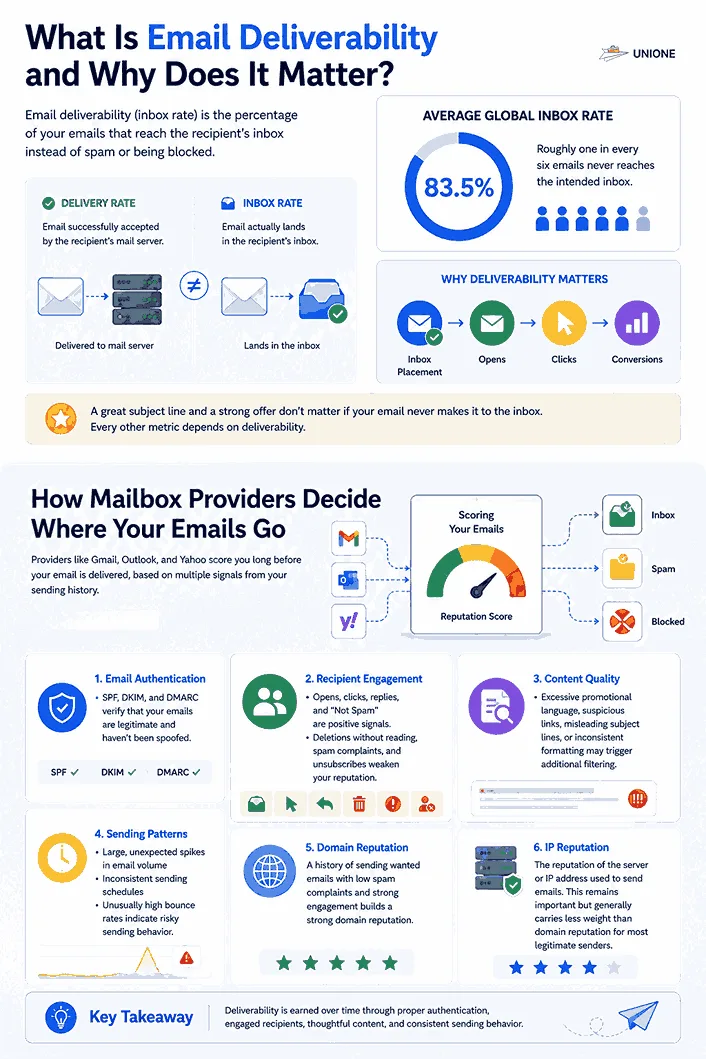
Email inbox rate is the percentage of your emails that get to your recipients’ inboxes instead of landing spam or being blocked altogether. It’s often confused with delivery rate, but they’re not the same thing. An email can be successfully delivered to a recipient’s mail server yet end up in spam.
The average global inbox rate is 83.5%, meaning roughly one in every six emails never reaches the intended inbox. That’s a significant gap for businesses that rely on email to generate leads or drive sales.
Deliverability matters because every other metric depends on it. A campaign with a great subject line and a strong offer still fails if the message never makes it to the inbox. Open rates, click rates, and conversions only happen once the email gets in front of someone.
How Mailbox Providers Decide Where Your Emails Go
Providers like Gmail, Outlook, and Yahoo don’t read your email and decide in the moment where it should land. They score you long before that, based on a number of signals collected across your sending history.
The most influential ones include:
- Email authentication: Properly configured SPF, DKIM, and DMARC records help verify that your emails are legitimate and haven’t been spoofed.
- Recipient engagement: Opens, clicks, replies, and emails marked as “Not Spam” are positive signals, while deletions without reading, spam complaints, and unsubscribes can weaken your reputation.
- Content quality: Excessive promotional language, suspicious links, misleading subject lines, or inconsistent formatting may trigger additional filtering.
- Sending patterns: Large, unexpected spikes in email volume, inconsistent sending schedules, or unusually high bounce rates often indicate risky sending behavior.
- Domain reputation: A history of sending wanted emails with low spam complaints and strong engagement.
- IP reputation: The reputation of the server or IP address used to send emails. This remains important but generally carries less weight than domain reputation for most legitimate senders.
Why Domain Reputation Has Become a Strong Filtering Signal
IP reputation used to carry most of the weight in deliverability decisions. That changed as more businesses began sending through email service providers (ESPs), where hundreds or even thousands of domains can share the same IP pool. Looking at the IP alone no longer tells mailbox providers which sender is responsible for spam complaints or poor engagement.
The sending domain gives them that missing context. Combined with authentication standards such as SPF, DKIM, and DMARC, it allows providers to evaluate each sender individually, even when multiple businesses share the same infrastructure. This became even more important after Gmail and Yahoo introduced authentication requirements for bulk senders in 2024, making verified domains a key part of their filtering decisions.
Domain reputation is also more persistent than IP reputation. While companies can migrate to a different IP, their domain remains their long-term identity. If the domain has built a poor reputation, moving to a new IP alone is unlikely to change anything. You’ll still be sending from the same domain, just through a different server.
For businesses, the takeaway is simple: your domain is your email identity. Every campaign you send contributes to that identity, which is why building a positive reputation through a gradual domain warm up is an effective way to improve inbox placement.
What Is Email Domain Warm-Up?
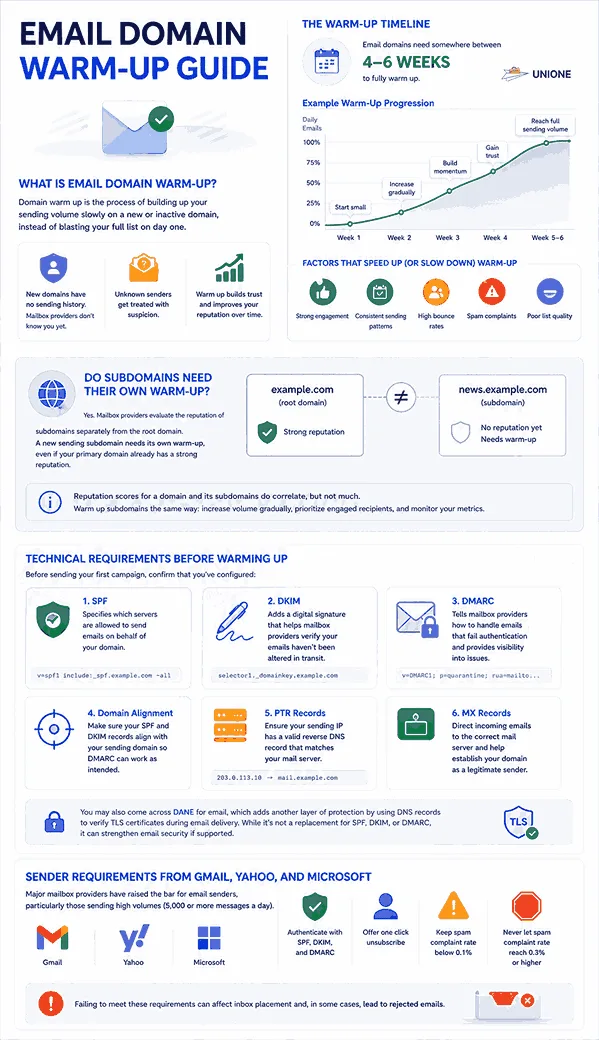
Domain warm up is the process of building up your sending volume slowly on a new or inactive domain, instead of blasting your full list on day one.
This warm-up process is important because a brand new domain has no sending history. It means you’re unknown to reputation services and mailbox providers, and unknown senders get treated with suspicion until you prove otherwise.
Sending a large volume the moment your domain goes live, you’re asking a mailbox provider to trust you with zero evidence. Most won’t.
Email domains need somewhere between four and six weeks to fully warm up, though the exact window depends on your target volume. The exact timeline depends on several factors, including how steeply you increase your sending volume, the quality of your email list, and recipient engagement.
Strong engagement and consistent sending patterns help build trust faster, while high bounce rates and spam complaints can slow the process or even damage your reputation.
Do Subdomains Need Their Own Warm-Up?
Yes. Mailbox providers evaluate the reputation of subdomains separately from the root domain. So a new sending subdomain needs its own warm-up, even if your primary domain already has a strong reputation.
For example, if your website uses example.com and you start sending marketing emails from news.example.com, don’t assume the subdomain has inherited the same level of trust. Reputation scores for a domain and its subdomains do correlate, but not much.
The warm-up process itself doesn’t change for subdomains. You increase sending volume gradually, prioritize engaged recipients, and watch the same metrics.
Technical Requirements Before Warming Up Your Email Domain
Before sending your first campaign, confirm that you’ve configured:
- SPF: Specifies which servers are allowed to send emails on behalf of your domain.
- DKIM: Adds a digital signature that helps mailbox providers verify your emails haven’t been altered in transit.
- DMARC: Tells mailbox providers how to handle emails that fail authentication and provides visibility into authentication issues. If you’re unfamiliar with these protocols, our email authentication guide explains what SPF, DKIM, and DMARC are and how they work together.
- Domain alignment: Make sure your SPF and DKIM records align with your sending domain so DMARC can work as intended.
- PTR records: Ensure your sending IP has a valid reverse DNS record that matches your mail server.
- MX records: Direct incoming emails to the correct mail server and help establish your domain as a legitimate email sender.
You may also come across DANE for email, which adds another layer of protection by using DNS records to verify TLS certificates during email delivery. While it’s not a replacement for SPF, DKIM, or DMARC, it can strengthen email security if supported.
Sender Requirements from Gmail, Yahoo, and Microsoft
Major mailbox providers have raised the bar for email senders, particularly those sending high volumes (5,000 or more messages a day).
Gmail and Yahoo require bulk senders to authenticate their emails with SPF, DKIM, and DMARC. They also expect senders to offer one click unsubscribe, keep average spam complaint rates below 0.1% and prevent it from ever reaching 0.3% or higher.
Failing to meet these requirements can affect inbox placement and, in some cases, lead to rejected emails.
A 30-Day Email Domain Warm-Up Schedule
Now that you understand the basics, let’s look at how to warm up a new email domain over the first 30 days.
Keep in mind that there’s no universal warm up schedule that works for every sender. The right pace depends on your volume, audience size, and engagement levels. As a general guideline, try gradually increasing your volume twofold over 5 days, provided your inbox, bounce and engagement rates stay within safe limits.
| Period | Daily Sending Volume | Who to Send To | What to Monitor |
|---|---|---|---|
| Days 1-5 | 20-50 emails | Your most engaged subscribers, opened or clicked recently | Open rate, replies, spam complaints |
| Days 6-10 | 50-150 emails | Expand to other active subscribers | Bounce rate, inbox placement, engagement |
| Days 11-15 | 150-300 emails | Include moderately engaged contacts | Spam complaints and unsubscribe rate |
| Days 16-20 | 300-500 emails | Continue expanding your audience | Delivery consistency and engagement trends |
| Days 21-25 | 500-1000 emails | Most active subscribers on your list | Sender reputation and complaint rate |
| Days 26-30 | Increase based on performance | Broader segments while maintaining list quality | Overall deliverability and inbox placement |
Prioritize quality over volume throughout. Don’t increase your daily sending just because you’ve reached the next stage on the calendar.
If engagement declines, hold your volume steady until your metrics recover. Building a strong sender reputation takes far longer than damaging one.
Best Practices for a Successful Domain Warm Up
The goal when warming up a new email domain isn’t simply to increase volume. You want to consistently demonstrate that people want to receive your emails.
These best practices will help you build a stronger sender reputation while reducing the risk of spam filtering.
Start With Your Highest Quality Contacts
Audience sequencing matters so much when warming up an email domain.
Sending to your entire list too soon, especially to contacts who haven’t engaged with your emails in months, weakens your early engagement signals right when your domain has the least reputation to absorb it.
If you’re moving to a new sending domain, start with subscribers who have recently opened, clicked, or replied to your emails. Then, gradually expand to less active segments as your reputation grows.
If you’re launching a brand new email program with no engagement history, begin with your highest quality audience. Think of your recent signups, existing customers, or trusted contacts who are most likely to engage with your emails.
Monitor the Right Engagement Signals
Opens and clicks are the clearest sign someone wants your mail. Replies carry even more weight, since they prove a real person read your email and cared enough to respond.
On the other hand, complaints and unsubscribes tell mailbox providers the opposite story, and complaints in particular can undo weeks of careful domain warm-up in a matter of days.
You don’t have to track all of this manually. Email sender reputation tools can automatically show how mailbox providers see your domain at any point during warm up, so you catch a problem while it’s still small.
KPI Thresholds for a Healthy vs Failing Warm-Up
As a general rule, keep bounce rates below 2% and spam complaints below 0.1%, while watching for steady open and click rates.
If opens and clicks begin to decline, or you notice rising complaints, unsubscribes, or delivery failures, pause your warm up before increasing your sending volume further.
Tracking these email marketing KPIs consistently makes it easier to spot deliverability issues before they become more serious.
Common Domain Warm-Up Mistakes
A successful warm-up is as much about avoiding mistakes as following the right schedule. Even a few missteps can slow your progress or damage your sender reputation.
- Buying email lists: A purchased list is full of people who never asked to hear from you, plus an unhealthy dose of dead addresses. Sending to these people is the surest path to low engagement and increased spam complaints.
- Sending too much too soon: A sudden spike in email volume, even with a clean list, reads as suspicious behavior and can stall your domain warm up.
- Ignoring email authentication: Without properly configured SPF, DKIM, and DMARC records, mailbox providers have a harder time verifying your identity. Besides, major mailbox providers have made authentication mandatory.
- Sending to poor quality lists: Invalid email addresses increase bounce rate. Revive them to keep your list clean and prioritize engaged recipients.
- Overlooking engagement signals: Declining opens, clicks, or replies, along with rising spam complaints and unsubscribes, are signs that it’s time to pause and identify the issue before scaling.
- Changing domains too often: Switching to a new domain every time you encounter deliverability issues is not always the right call. In many cases, it’s better to diagnose and fix the underlying problem than start over with a new domain.
IP Warm-Up Explained
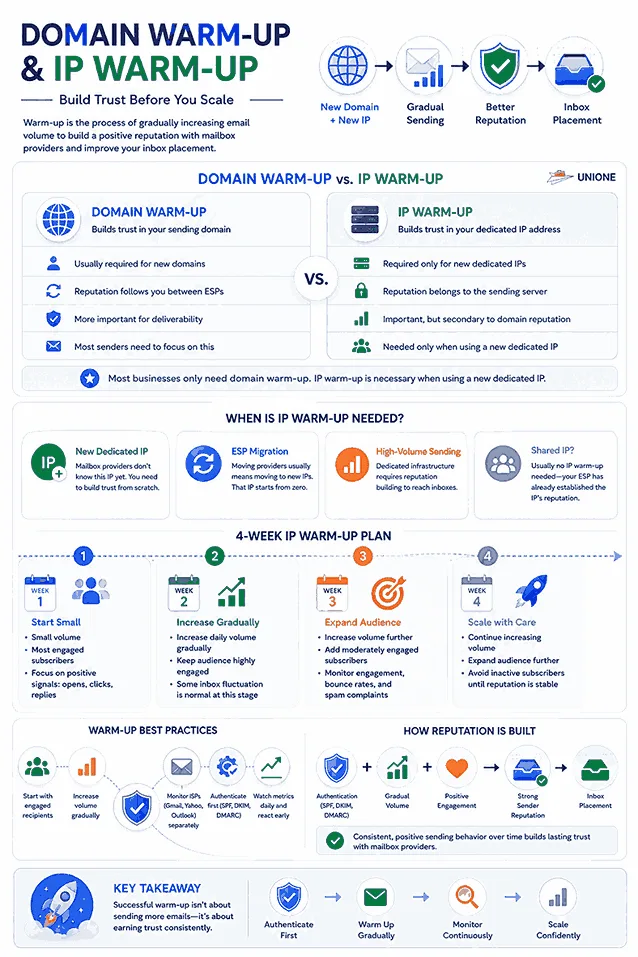
IP warm up is the process of gradually increasing email volume from a new dedicated IP address.
Similar to domain warm up, the goal is to establish a positive reputation before sending at full scale. If you send at full volume the moment a new dedicated IP goes live, you’re handing mailbox providers a pattern that looks exactly like spam.
Not every sender needs to worry about this though. If you’re using a shared IP through your ESP, that IP already has an established reputation built from thousands of other senders.
Your job in this case is keeping your own domain and sending practices clean so you don’t drag that shared reputation down.
When Is IP Warm-Up Necessary?
IP warming becomes important when you move to a new dedicated IP. In this situation, mailbox providers need time to evaluate the new IP before trusting it with email campaigns.
ESP migration is another common scenario. Changing providers usually involves moving onto new dedicated IPs, even if your domain reputation carries over. That new IP starts from zero regardless of how long you’ve been sending or how clean your history is.
Domain Warm Up vs. IP Warm Up: What’s the Difference?
The biggest difference is what you’re building a reputation for. Domain warm up establishes trust in your sending domain, while IP warm up builds trust in the server that’s sending your emails.
Domain reputation generally is more important for deliverability because it’s tied to your identity as a sender and follows you even if you change providers or migrate to a new IP.
IP reputation still matters, especially for dedicated IPs, but it works alongside your domain reputation.
Most senders only need to think about domain warm-up. If you’re on a shared IP, that’s all you need. You should care for both only when you’re setting up a new dedicated IP.
How to Warm Up a Dedicated IP Address
Warming up a dedicated IP follows the same principle as domain warm up: start with a small volume of emails and increase it gradually.
Keep these principles in mind throughout the warm up process:
- Audience mix: Start with your most engaged recipients and gradually expand to less active segments as your IP builds trust.
- ISP monitoring: Watch performance at Gmail, Yahoo, and Outlook separately. A deliverability issue with one provider doesn’t necessarily affect the others.
- Daily increases: Increase your sending volume gradually instead of making large jumps.
Before you begin warming up your domain or IP, make sure your email infrastructure is set up correctly. Strong engagement alone won’t build a good sender reputation if mailbox providers can’t verify that your emails are legitimate.
Week 1
Start with a small group of your most engaged subscribers. Focus on generating positive signals through opens, clicks, and replies rather than reaching a large audience.
Week 2
If your metrics remain healthy, increase your daily sending volume gradually while keeping your audience focused on engaged subscribers.
It’s quite common to see some emails miss the inbox during this stage. That doesn’t always mean something is wrong. As your IP builds a positive reputation, deliverability improves.
Week 3
Continue increasing your daily volume and begin expanding to moderately engaged subscribers. Keep a close eye on engagement, bounce rates, and spam complaints before scaling further.
Week 4
If performance remains strong, continue increasing your audience while maintaining a steady increase in volume. Avoid adding inactive subscribers until your IP has established a stable reputation.
Recovering a Damaged Sender Reputation
Warm Up vs. Reputation Recovery
These two processes solve different problems. Domain warm up is about building a reputation from scratch. Reputation recovery is about repairing one that’s already been damaged.
With a warm-up process just started, mailbox providers have little or no history to evaluate.
Recovery happens after your domain has developed a poor reputation, so your first task is to identify and fix the issues that caused the damage before you start rebuilding trust.
Recovering From Spam Blocks or Blacklisting
If your inbox rate drops while hard bounce rates remain stable, the usual suspect is either blacklisting with some major reputation service or getting flagged as a known spam source by a major mailbox provider.
A sudden drop in deliverability isn’t always the result of blacklisting. Authentication issues, temporary throttling, and DNS misconfiguration can produce similar symptoms. Tools like Google Postmaster and Microsoft SNDS can help you understand what’s affecting your reputation.
Start by figuring out what’s actually wrong. You identify the exact cause by monitoring blacklist and using seed addresses to evaluate inbox delivery.
Once you’ve identified the problem, fix it before you request de-listing. Remove invalid or inactive contacts, correct any authentication issues, and stop any sending practices that triggered the problem.
After that, rebuild your reputation gradually. Start with your highest quality audience, monitor your metrics closely, and increase your sending volume only if your engagement remains healthy.
If repeated recovery attempts don’t improve your reputation, it may be time to move to a new sending domain. For most businesses, though, repairing an established domain is usually the better long-term choice.
Conclusion
Knowing how to warm up an email domain or IP takes patience. Mailbox providers build trust over time, so steady sending, proper authentication, and positive engagement will always outperform a rushed rollout.
Increase your sending volume only when your metrics show it’s safe to do so. If deliverability starts to decline, stop, find the cause, and fix it before scaling again.
Email domain warm up lays the groundwork for consistent inbox placement. It also gives your sender reputation room to grow. You can easily scale future campaigns without running into avoidable deliverability problems.
Related Services
If you’re putting these warm-up strategies into practice, the right tools make the process much easier. UniOne offers several services that help you monitor deliverability, maintain list quality, and send emails at scale.
- Email Analytics helps you track key deliverability and engagement metrics.
- Email Validation API verifies email addresses before you send. This reduces bounce rates and improves list quality.
- SMTP Service provides reliable email delivery for transactional and bulk emails with a focus on performance and deliverability.
- Email API Service for Developers makes it easy to integrate email sending into your applications while giving you the flexibility to scale as your sending volume grows.
FAQs
Can I warm up more than one email domain at the same time?
Yes, but each domain builds its own reputation. You’ll need to warm up each one separately, monitor performance independently, and avoid sharing the same sending strategy across all of them from day one.
Do I need to warm up my domain again if I stop sending emails?
It depends on how long you’ve been inactive. A short pause usually isn’t a problem, but if your domain hasn’t sent emails for a few weeks, reduce your sending volume when you resume and build back up gradually. Consistency helps preserve your sender reputation, so the best tactic is to keep sending updates to your audience at least once in two weeks.
Can I warm up my domain with transactional emails?
Yes, as long as you’re sending to real recipients who expect your emails and are likely to engage with them. However, the best practice here is to use different dedicated subdomains for transactional and promotional traffic.
How do I know if my email domain has finished warming up?
There’s no fixed finish line. A domain is generally considered warmed up once you can increase your normal sending volume without seeing spikes in bounce rates, spam complaints, or inbox placement issues. Healthy engagement is the best sign that mailbox providers trust your domain.